Lease Renewals & Amendments
Renewing an expiring lease, the last day you can lawfully serve notice, what the local market is asking, and what a served notice freezes.
Leases end, and terms sometimes need to change mid-term. Seayora supports both without forcing you back to a blank application.
The last day you can act
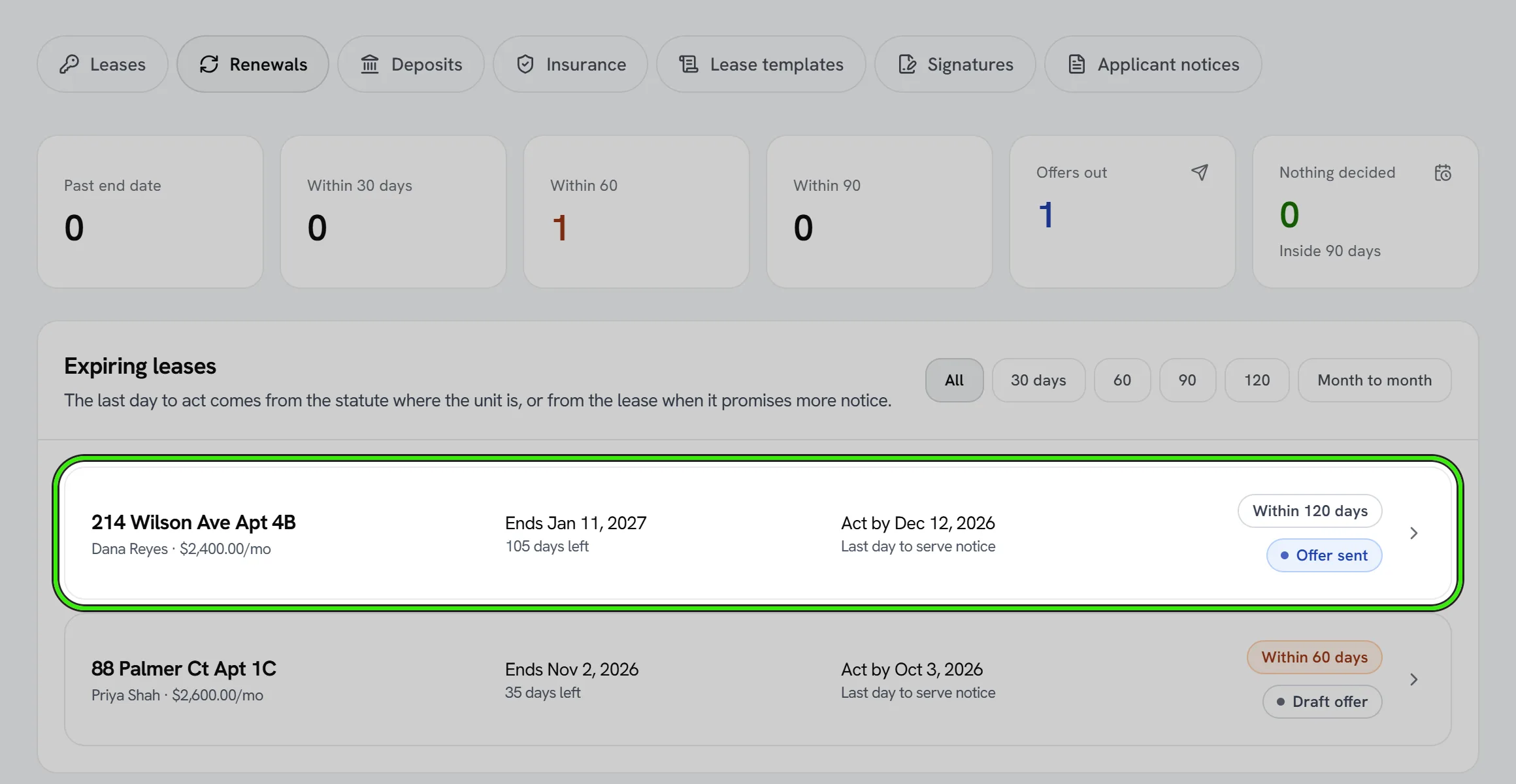
Every expiring lease carries two deadlines — the last day to serve a rent increase and the last day to serve a non-renewal — each derived from the statute where the unit is, or from the lease when the lease promises more notice than the law requires. The basis and the citation are printed beside the date. Where Seayora is working from a rule it has not verified, it says so instead of presenting it as settled.
What the market is asking
Beside each expiring lease, Seayora shows the median asking rent for homes of the same size in that neighborhood, how many live listings that is drawn from, the gap to the current rent, and the direction of travel.
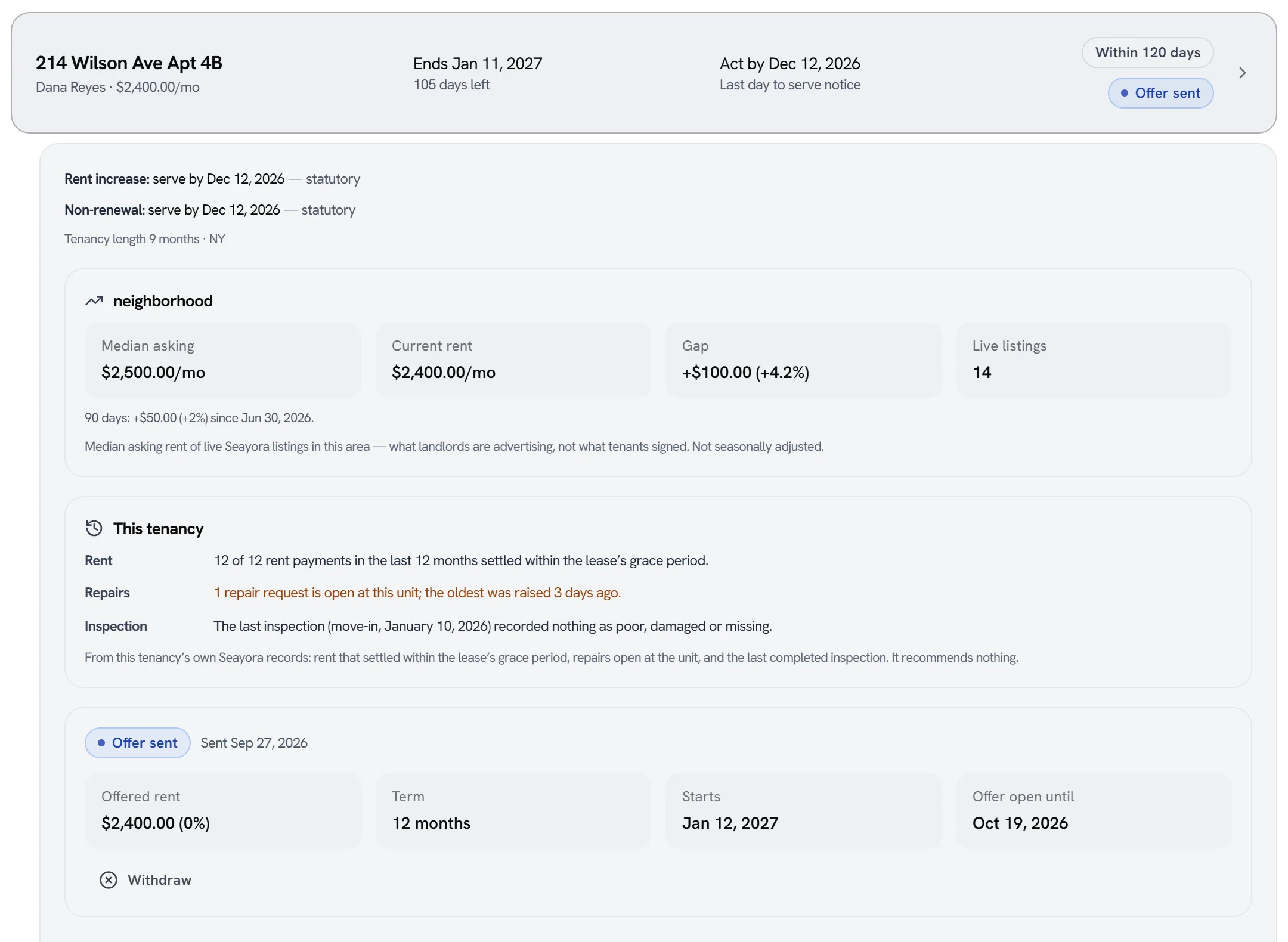
These are ASKING rents — what landlords are advertising, not what tenants signed. Pricing a renewal as though the asking median were achieved rent is an offer that gets declined and a unit that then sits empty, so the distinction travels with the number everywhere it is shown.
Where there is not enough live inventory nearby to publish a median, Seayora says that rather than showing a figure. “We cannot tell you” and “the market is flat” are different facts and only the second is a reason to hold the rent. There is deliberately no recommended rent: the decision turns on the tenant, the cost of turning the unit over, its condition and the regulation, none of which a median can see.
What this tenancy’s record says
Beside the market, the owner and the unit’s managers see three lines from the tenancy’s own records: how many rent payments in the last 12 months settled within the grace period the lease sets, and how many were late, failed or are still unpaid; how many repairs are open at the unit and how long the oldest has waited; and what the last completed inspection recorded as poor, damaged or missing.
“On time” means exactly what it means on the tenant’s own payment history and verification letter: the payment settled, and it was made within the lease’s grace period. A month a payment plan took over counts as neither late nor paid. The panel recommends nothing — open repairs are the landlord’s obligations, listed because an increase on a unit with a repair waiting is the one most likely to be refused — and a line Seayora could not read says so rather than reading as clean. The tenant does not see this panel on their offer.
Notices
A notice is drafted from the lease and the statutory period, and you can edit its wording before serving it. Once served it is frozen: the tenant holds that exact copy and Seayora stores a digest of those exact bytes, so a served notice cannot be edited — withdraw it and serve a new one instead.
Serving with less notice than the law requires is refused unless you override it with a reason, and the override is recorded on the notice permanently.
Renewing a lease
- Start from the existing lease rather than rebuilding it.
- Adjust rent, term, and any updated terms.
- Send for e-signature the same way as a new lease.
Amending an active lease
For a mid-term change — a rent adjustment, an added occupant, a pet addendum — create a formal amendment rather than editing the original signed lease. Both parties sign the amendment, and it’s stored alongside the original with its own audit trail.
Timing your renewal outreach
Send renewal terms with enough lead time to meet your state’s notice requirements and give the tenant time to decide. Track upcoming expirations from your dashboard so none slip through unnoticed.
Frequently asked questions
Do I have to renew at the same rent?
No — a renewal is a chance to set new terms, including rent, subject to any local rent-stabilization or rent-control rules and the notice period required to change terms.
What’s the difference between a renewal and an amendment?
A renewal starts a new lease term, typically at the natural end of the current one. An amendment changes a specific term mid-lease — like adding a pet — without ending the existing term.
Can I track which leases are coming up for renewal across my portfolio?
Yes — upcoming expirations surface on your dashboard and in portfolio analytics so you can plan renewal outreach well ahead of time rather than reacting at the last minute.
What if a tenant doesn’t respond to renewal terms?
Follow your state’s rules for what happens when a lease term ends without a renewal or notice — this often defaults to a month-to-month tenancy or requires formal notice to vacate, depending on your jurisdiction.
Does the tenant see the “This tenancy” panel?
No. It is shown to the owner and the unit’s managers on the renewal screen. The tenant already sees their own payment history, and their offer shows the market figure and the notice basis.
Related guides
Related features and guides
- Creating & E-Signing Leases — Documentation. How to build a lease, send it for electronic signature, and rely on the audit trail under ESIGN and UETA.
- Rent Increases & Notices — Documentation. How to communicate a rent increase or other lease notice to a tenant, with a documented delivery record.
- Contracts Beyond the Lease — Documentation. How to create and e-sign other agreements on Seayora — vendor contracts, service agreements, and addenda — outside the standard lease flow.
- Lease Renewals & Amendments — Feature. Handle renewals, rent increases, and amendments against the original lease, with the right notices and a clean signed record of every change.
- Digital Leases & eSignature — Feature. Build digital leases from your templates, send them for legally binding eSignature under ESIGN/UETA with a full audit trail, and store executed copies automatically.
- Document Storage & Templates — Feature. Store leases, addenda, inspection photos, receipts, and templates securely, with the right people able to reach the right documents at any time.