Creating & E-Signing Leases
How to build a lease, send it for electronic signature, and rely on the audit trail under ESIGN and UETA.
Once an applicant is approved, you can create a lease and send it for e-signature without printing or scanning — in one step.
Accept and send in one step
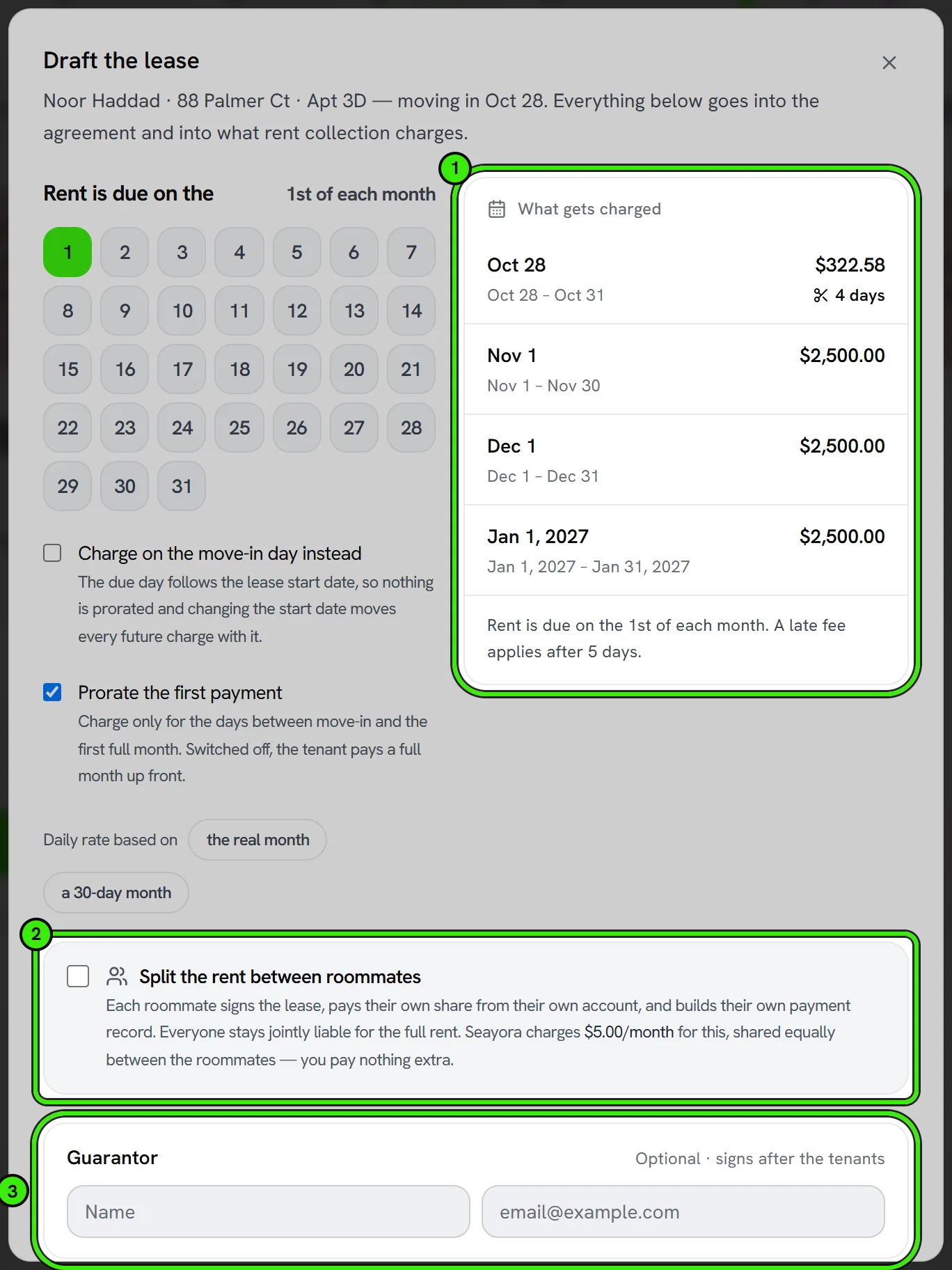
When you accept an applicant, Seayora drafts the lease from your template and sends it for signature in the same action. You choose the rent due day, whether the rent is split between roommates, and any guarantor; every figure in the document comes from the lease itself, so the agreement, the rent schedule and what the tenant is charged can never disagree.
- No template yet? Seayora builds one for you from its clause library, with the clauses your state requires, and makes it your default. It is yours to edit afterwards.
- Signers are worked out from the lease — the applicant, every roommate, every guarantor and you. Each gets their own signing link; nobody needs a Seayora account to sign.
- Before anything is sent, a readiness check lists what would stop a signature (an unfilled field, a missing rent, a request already out) and what you should know (an unchecked compliance review, a payout account that is not approved yet, a deposit that is not set).
- Editing a term on an unsigned lease re-renders the document automatically. A signed lease is never rewritten — amend it instead.
Building the lease
Assemble the lease with rent, term, deposit, and your policies, then send it to everyone who has to sign. Each party signs electronically, and everyone gets a copy.
Legally binding e-signatures
Under the federal ESIGN Act and UETA, electronic signatures generally carry the same legal weight as handwritten ones when the parties intend to sign and consent to transact electronically. Seayora captures a tamper-evident record and an audit trail of who signed, when, and from where.
Important
Seayora is not a law firm and does not guarantee a document is suitable for your jurisdiction. Have important agreements reviewed by your own attorney, and retain copies as required by law.
Editing a lease after sending
Once a lease is out for signature, it shouldn’t be edited in place — void it and send a corrected version so the audit trail stays clean. After all parties sign, use a formal amendment instead of altering the original.
Multiple signers and co-signers
Leases can require signatures from more than one tenant or a co-signer/guarantor. Each signer gets their own signing link and is recorded separately in the audit trail, so it’s always clear who signed what and when.
Roommates who split the rent
When the rent is split, the lease carries a Rent Splitting Addendum naming every roommate and their share, and every roommate must sign and accept the split terms before the split starts. See Splitting rent with roommates for how the shares are charged and reported.
Frequently asked questions
Can a lease be signed from a phone?
Yes. You can read the whole lease and sign it in the Seayora app on iPhone and Android — type your legal name and draw your signature with a finger — or from any device with a browser. Nobody needs to be at a computer.
What if a tenant refuses to sign electronically?
You can offer a traditional paper signing process as an alternative, but you cannot force someone to consent to electronic signatures — consent to sign electronically must be voluntary under ESIGN/UETA.
Is a scanned wet-ink signature the same as an e-signature?
Not quite — a scanned signature is just an image, while an e-signature captured through Seayora’s workflow comes with a verified audit trail of who signed, when, and that the document wasn’t altered afterward.
Can I void a lease after sending it, before anyone signs?
Yes — you can void an unsigned lease at any time and send a corrected version, which is the right move any time you spot an error before signatures come in.
Related guides
Related features and guides
- Rental Applications — Documentation. How online rental applications work on Seayora — what applicants submit, how landlords review, and how to keep the process fair and consistent.
- Documents & Storage — Documentation. How Seayora stores leases, applications, and uploaded documents, and your responsibility to retain your own records.
- Lease Renewals & Amendments — Documentation. Renewing an expiring lease, the last day you can lawfully serve notice, what the local market is asking, and what a served notice freezes.
- Digital Leases & eSignature — Feature. Build digital leases from your templates, send them for legally binding eSignature under ESIGN/UETA with a full audit trail, and store executed copies automatically.
- E-Signing Leases Online: Is It Legally Binding? — Guide. How electronic signatures work for leases under ESIGN and UETA, what makes an e-signed lease enforceable, and why the audit trail matters.
- Document Storage & Templates — Feature. Store leases, addenda, inspection photos, receipts, and templates securely, with the right people able to reach the right documents at any time.