Splitting Rent with Roommates
How roommates on one lease each pay their own share, what it costs, how a late share is handled, and how each roommate’s payments are recorded and reported.
Roommates on one lease can each pay their own share of the rent from their own Seayora account — with their own payment method, their own autopay, their own receipts and their own payment history. The landlord still receives the full rent on the due date, in one place.
How it is set up
- The landlord turns on “Roommates may split the rent” when posting the listing. It shows on the listing so applicants know before they apply.
- When the landlord accepts an applicant and drafts the lease, they add the roommates — name, email and each one’s share. Shares can be equal or any split that adds up to 100%.
- The lease is rendered with a Rent Splitting Addendum naming every roommate and their share, and is sent to each of them to sign. Every roommate must sign the lease and accept the split terms; the split does not start until they all have.
- Once the lease is fully signed, each roommate is emailed their share and a link to add a payment method. A roommate who does not have a Seayora account yet creates one with the email address on the lease.
What it costs
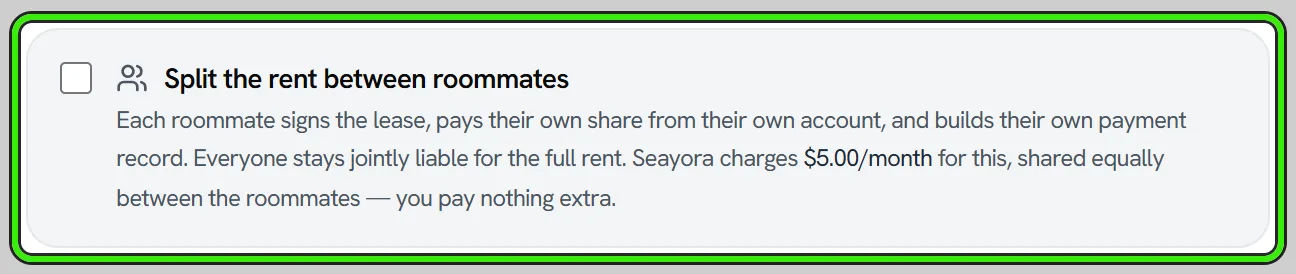
Rent splitting costs a flat monthly fee per home. The current figure is on the Pricing page and on the split itself before anybody agrees to it — it is deliberately not repeated here, because a price typed into a documentation page is a price that goes stale the first time an operator changes it (this sentence quoted $19 while the platform was charging $14). It is shared equally between the roommates and collected together with each roommate’s share, and it is not charged on the move-in part-month. The fee is Seayora’s; the landlord receives the full rent and pays only their normal rent-processing fee.
How each share is charged
- Every charge the lease produces — the monthly rent, a prorated move-in or move-out month — is divided in the agreed proportions, to the cent.
- Each share is due on the lease’s due date and is collected from that roommate’s own payment method. Autopay, “Pay now”, reminders and retries all work per roommate.
- A share not received within the grace period is late. The late fee in the lease applies to that share in proportion (so if every share is late, the household owes the lease’s late fee once, not several times). The other roommates are told when a share goes late.
Everyone is still responsible for the full rent
Splitting the rent is a payment arrangement, not a change to who is liable. Under the lease and the addendum, every tenant is jointly and severally liable for the full rent: if a roommate does not pay, the landlord may collect the unpaid share from any of the others. The household view on the tenant dashboard shows where each share stands so nobody is surprised.
Credit reporting
Each roommate’s share and its payment history are recorded under that roommate’s own name. A roommate who opts in to rent-payment credit reporting has only their own share reported — on time or late — and a roommate’s late share is never recorded against anyone else.
Changing or ending a split
The roommates and their shares are fixed when the lease is signed. To change them, the landlord ends the split and sets a new one up on an amended lease. When a split ends, the full rent is charged to the tenant of record from the next unbilled charge, and every roommate is emailed. Ending the split does not release anyone from the lease.
Frequently asked questions
Can shares be unequal?
Yes — any split that adds up to 100%. Equal shares are the default.
Does a roommate need a Seayora account to sign?
No. Each roommate signs through their own emailed link. They need an account (with the same email address) to add a payment method and pay their share.
What if one roommate pays and another does not?
The paid share is recorded as paid for that roommate. The unpaid share goes late on its own, that roommate is charged the proportional late fee, and the rest of the household is told. Because every tenant is jointly liable, the landlord may still collect the unpaid amount from any of them.
Who pays the roommate fee?
The roommates, equally — it is collected with each share. The landlord pays nothing extra.
Can I add rent splitting to a lease that is already signed?
Not to the signed lease itself — its text is frozen. Draft a renewal or an amendment and set the split up there.
Related guides
- Online Rent Collection
- Creating & E-Signing Leases
- Rent-Payment Credit Reporting
- Fees, Payouts & Refunds
Related features and guides
- Online Rent Collection — Documentation. How to collect rent online with Seayora — setup, payment methods, card surcharges and where state law limits them, records, and how funds move.
- Creating & E-Signing Leases — Documentation. How to build a lease, send it for electronic signature, and rely on the audit trail under ESIGN and UETA.
- Rent-Payment Credit Reporting — Documentation. Nothing is being furnished to a bureau yet — consent and payment history are recorded and pending one. How it works, and what to expect when it starts.
- Split Rent with Roommates — Feature. Roommates each pay their portion of rent directly from their own bank account or card. The landlord sees one compiled total — nobody has to front the whole month.
- Online Rent Collection Software — Feature. Online rent collection: bank transfers free to the tenant, card payments, AutoPay on the lease’s due date, automatic late fees, roommate splitting and receipts issued when rent settles.
- Can Roommates Pay Rent Separately? How Split Rent Works — Guide. Roommates can each pay their own share of the rent, but on a joint lease each is usually liable for all of it. How split rent works for tenants and landlords.