Fees, Payouts & Refunds
How Seayora’s fees, subscriptions, payouts, and refunds work, and where payment disputes are handled.
Seayora is transparent about what things cost. Current pricing is always shown in the product, and the Pricing pages carry a page per kind of account: landlords, management companies, renters, service pros and property owners.
What Seayora charges
Every feature is included in them. There is no plan to upgrade to, no per-seat charge, no setup fee, no gateway fee and no flat platform subscription — accounting, compliance, leases, dispatch, messaging, calls and the phone apps are all part of the account.
- A transaction fee when money moves through Seayora — a percentage of rent collected (lower for management companies than for individual landlords), or of what a service pro invoices. It is the same charge the ledger and a receipt call a processing fee.
- A listing advertising fee: a free period per listing, then a monthly charge for that listing, prorated by the day and charged only while the unit is vacant. It is not an account subscription — a fully occupied portfolio of any size pays nothing in advertising.
- A flat monthly rent-splitting fee per home when roommates choose to each pay their own share, shared equally between the roommates and collected with each share (see Splitting rent with roommates).
Negotiated agreements
A larger portfolio or a higher-volume contractor can sign a negotiated agreement that replaces the published rate. Your own copy is always in the product — Settings → Your pricing on the website, and Tools → Your Pricing in both phone apps — worded exactly as the email you were sent when it took effect. An agreement can carry any of these terms, and each one it does not mention stays on standard pricing:
- Monthly caps: a ceiling on rent processing for any one unit, across the whole portfolio, or on a contractor’s platform fees, per calendar month. Once a cap is reached, the rest of that month’s payments carry no further fee.
- A monthly minimum: a floor on what a month’s fees come to, in total or per unit. The agreement says which fees count toward it — only rent processing (or, for a contractor, transaction fees), or every Seayora fee on the account. You are only ever charged the difference, and only when the month falls short.
- Where the month stands: your pricing screen shows the fees counted so far against the minimum and what is left to reach it. Rent billed for the month counts whether or not the tenant has paid it yet. If the month cannot be read, the screen says so rather than showing zero.
- The true-up: early on the 2nd the previous month is measured, and a shortfall of $1.00 or more is charged to the payment method on file for Seayora charges. You are emailed a receipt, or told if the charge does not go through. A deal can give grace months before the minimum applies, and a first partial month is prorated unless the deal says otherwise. Seayora records each month’s figure before it begins charging minimums, and never charges for a month recorded before billing began.
- Contractor terms: bands can follow the invoice total, your volume processed this month or your number of charges this month; a labor-only deal can set its own rate on parts and materials; fee-free charges can be limited to invoices up to a set size; and the deal says whether promo codes apply while it is in force.
- The term: an agreement can have an end date and renew automatically. You are emailed before it ends, when it renews, and when it ends and your account returns to standard pricing.
Payouts and refunds
Payouts are handled by the payment processor and arrive on its schedule. Except where required by law or expressly stated, fees are non-refundable. The advertising charge keeps accruing while a listing is vacant and stops on the day the unit is marked rented or the listing is removed; any partial balance settles once.
Disputes
Payment disputes between users (rent, deposits, job payments) are between those users. Raise disputes through any in-platform process before a chargeback. See the payments section of the Terms of Service.
Payout timing
Once a payment settles, payouts typically follow the payment processor’s standard schedule to your linked bank account. New accounts sometimes see a short initial delay while the processor verifies your business.
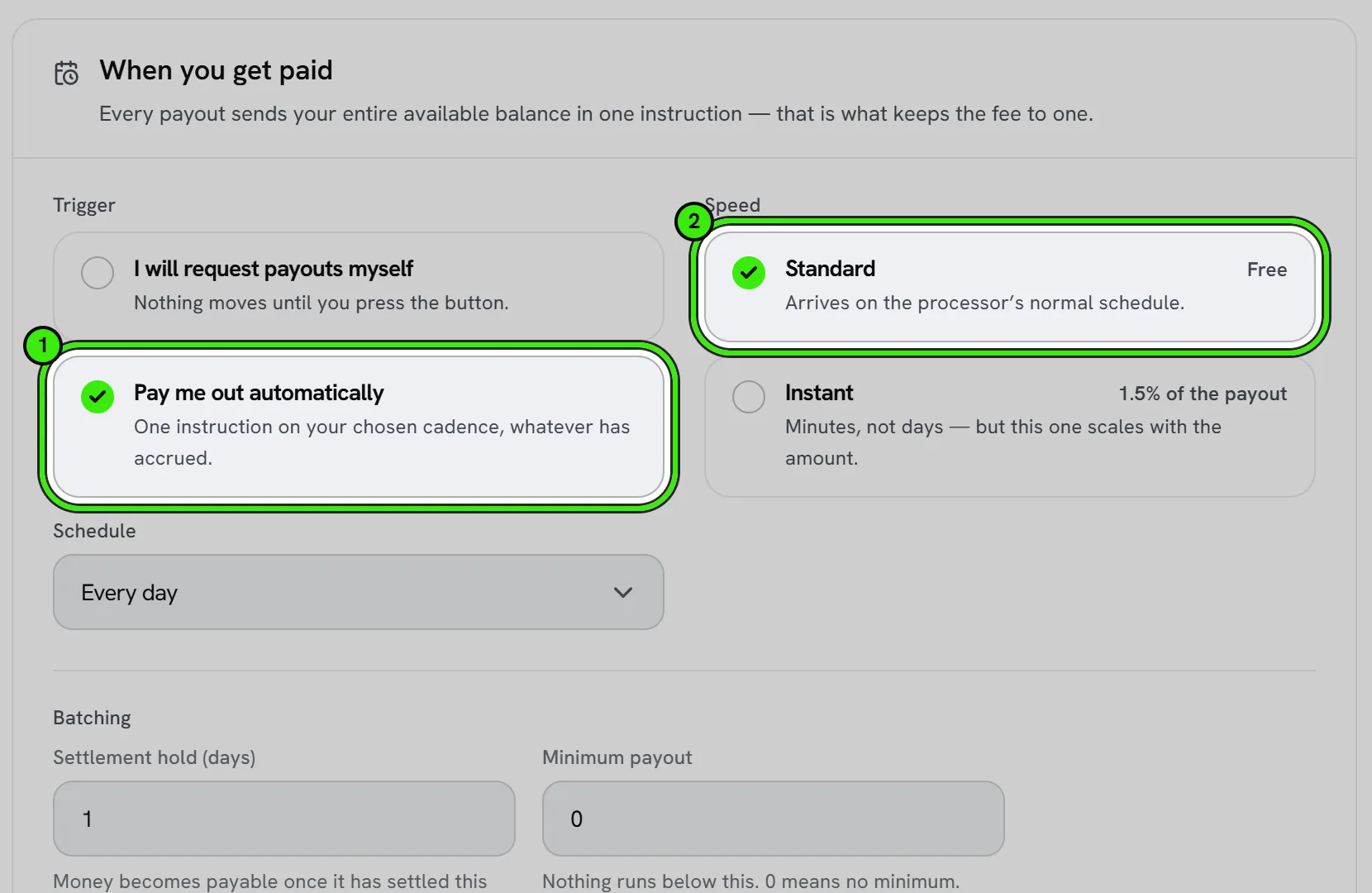
Changing your payout account
You can update your linked bank account from payment settings; changes typically apply to future payouts, and any in-flight payout usually completes to the previous account first.
Frequently asked questions
Are Seayora’s fees negotiable?
Standard pricing applies broadly, but management companies typically receive a lower transaction rate than individual landlords by default, and a negotiated agreement can replace the published rate outright for a larger portfolio or a higher-volume contractor — including monthly caps, a monthly minimum and a renewal term. See current Pricing for the exact structure, or book a call.
Are any features locked behind a higher plan?
No, and there is no higher plan. Accounting, compliance monitoring, leases, dispatch, the shared calendar, messaging, voice and video calls, the phone apps and connecting an AI assistant are all part of the account. The only charges are the transaction fee on payments, the per-listing advertising fee while a unit is vacant, and — only where roommates choose to each pay their own share — the flat monthly rent-splitting fee. Two things are not switched on at the moment rather than being held back for a price: applicant screening needs a consumer reporting agency connected, and rent reporting needs a furnisher agreement with the bureaus — each has its own article saying so.
What happens if a payout fails?
A failed payout (for example, due to an incorrect or closed bank account) is flagged so you can update your payout details and have the funds resent rather than losing track of them.
Are the advertising fee and the transaction fee billed separately?
Yes — advertising a vacant listing and the transaction fee on a payment are distinct charges, shown separately so it is clear what each covers. Advertising is billed in arrears and every unit settles in one charge rather than one per unit; the transaction fee is taken as each payment settles.
Related guides
- Opening Your Payout Account
- Online Rent Collection
- Invoices, Estimates & Statements
- Payment Disputes & Chargebacks
- Your Annual PCI Attestation
Related features and guides
- Opening Your Payout Account — Documentation. The application that lets you be paid — what it asks for, what we fill in for you, what happens to your SSN and bank number, and how to answer when the processor asks for more.
- Online Rent Collection — Documentation. How to collect rent online with Seayora — setup, payment methods, card surcharges and where state law limits them, records, and how funds move.
- Invoices, Estimates & Statements — Documentation. How to create, brand, and send invoices, estimates, and statements — with a price book, good / better / best options and acceptance on the spot — turn estimates into invoices, and get paid online.
- Payment Disputes & Chargebacks — Feature. When a tenant disputes a payment or a card is charged back, Seayora keeps the transaction trail, the lease, and the communication history together so you can respond with evidence.
- Online Rent Collection Software — Feature. Online rent collection: bank transfers free to the tenant, card payments, AutoPay on the lease’s due date, automatic late fees, roommate splitting and receipts issued when rent settles.
- How to Collect Rent Online: A Landlord’s Guide — Guide. A practical guide to setting up online rent collection — the benefits, how autopay and reminders work, and what to look for in a rent payment platform.