Account Security: SSO, 2FA & Passkeys
How to secure your Seayora account with single sign-on, two-factor authentication, device verification, passkeys (WebAuthn), and resetting a forgotten password.
Your account holds financial and personal data, so Seayora offers several layers of protection. Turning them on takes minutes and dramatically reduces the risk of unauthorized access.
Sign-in options
- Email and password — use a strong, unique password.
- Continue with Google — on seayora.com and in both the iPhone and Android apps.
- Sign in with Apple — on seayora.com and in the iPhone app.
- Passkeys (WebAuthn) — sign in with your device’s biometrics or security key, with no password to phish.
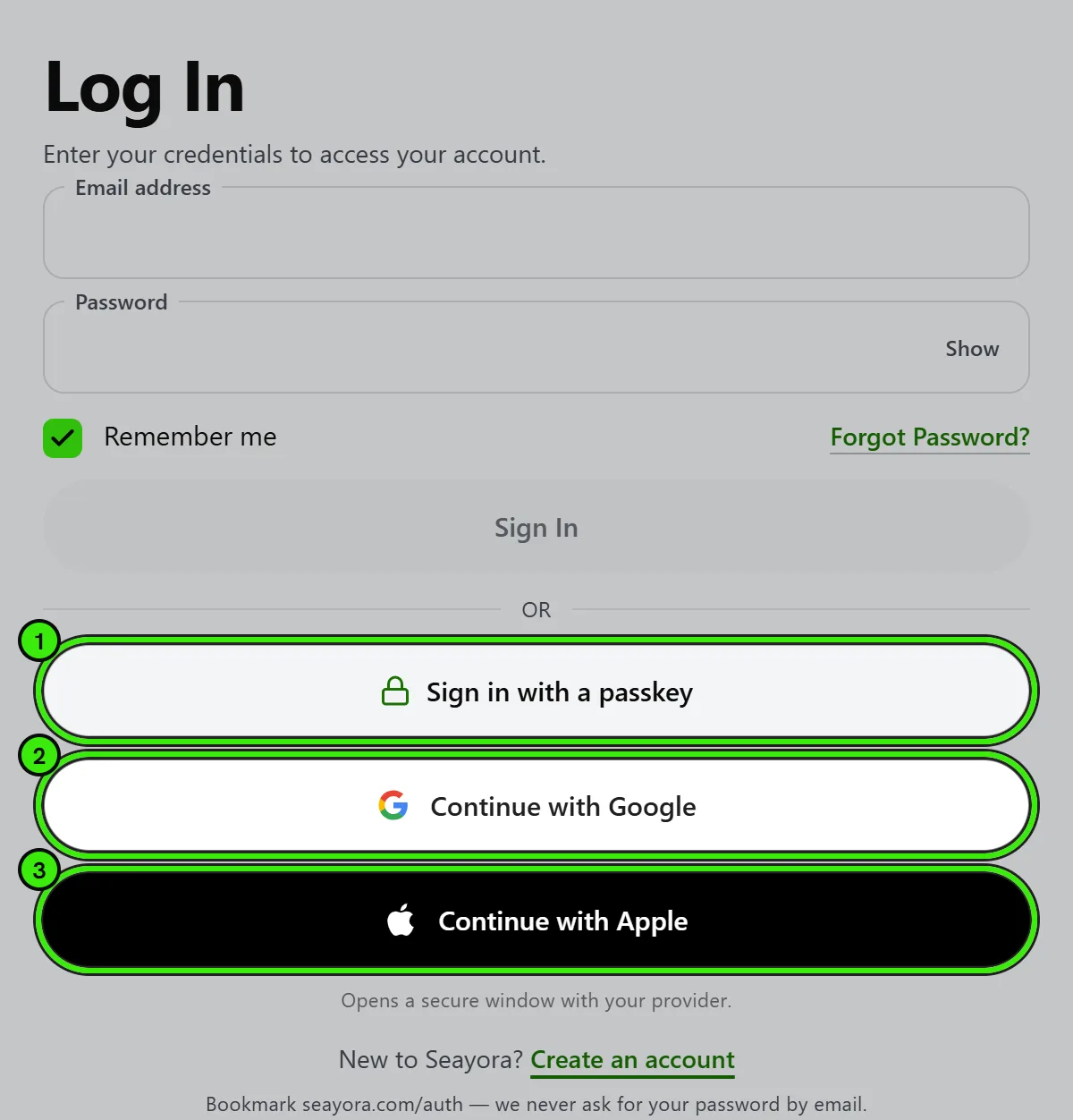
However you sign in, you land straight on your own dashboard — or, if you were in the middle of something when you were asked to sign in (sending a message about a listing, connecting an AI assistant, a code you scanned), straight back to it. If your account has no passkey yet, Seayora offers to add one a moment after you arrive, once on each browser or phone. “Maybe later” is an answer and the offer does not come back; you can add a passkey any time in Settings → Security.
Signing in with Apple or Google
Choosing Apple or Google means Seayora never sees or stores a password for you. The provider confirms who you are and passes us three things: a permanent identifier for your account with them, your email address, and whether they have verified it. Google may also pass your name and profile picture. That is all — we cannot read your mail, your contacts, or anything else in that account.
The first time you use one we still need a few details neither provider can give us: what kind of account you want (renter, landlord, management company or service professional), a US phone number and a mailing address. Those decide what the app shows you and where anything we have to send you goes.
If you already have a Seayora account with the same email address, signing in with Apple or Google connects the two rather than creating a second account. You can keep using your password as well — adding a provider does not remove it.
Seeing and removing a linked Apple or Google account
Settings → Security → Sign-in methods lists every Apple or Google account that can sign you in to Seayora, with the address it gave us and when it was last used, on seayora.com and in both phone apps. Removing one stops it signing you in; removing Apple also tells Apple the connection is over, so Seayora leaves the list of apps under your Apple ID.
Removing one asks for a one-time code first, like any other change to how your account is protected. Two removals are refused, and the screen says why: the only way you have left to sign in (set a password first — “Forgot password?” on the sign-in screen emails you a link to choose one), and Apple while your Seayora email is an Apple “Hide My Email” address, because that relay stops forwarding the moment Apple is unlinked. Change your email in Settings first.
Apple’s “Hide My Email”
Apple can give us a relay address (it ends in @privaterelay.appleid.com) instead of your real one. It is real, working mail and everything we send reaches you through it — but only for as long as you keep Seayora authorized under your Apple ID. If you turn that off in your Apple settings, the relay stops forwarding and rent receipts, lease documents to sign, failed-payment notices and security alerts stop arriving. Nothing on our side can tell that has happened.
If you would rather we had an address you control, change it in Settings after your account is created.
Deleting your Seayora account also tells Apple the connection is over, so it stops appearing in the list of apps under your Apple ID.
Which sign-in methods can be used on which device
Sign in with Apple is offered on seayora.com and in the iPhone app. It is not offered in the Android app — Apple publishes no way for an Android app to run it directly. If you created your account with Apple and want to use it on an Android phone, sign in there with the email address on the account: use “Forgot password?” once to set a password, and both methods will work from then on.
Continue with Google works everywhere, including in both apps. On a phone it opens your browser for a moment so you can pick the Google account you want, then returns you to the app.
If you have forgotten your password
Tap or click “Forgot password?” on the sign-in screen — it is there on seayora.com and in the iPhone and Android apps — and enter the email address you sign in with. We email you a link that lets you choose a new password. The link expires after one hour and works once.
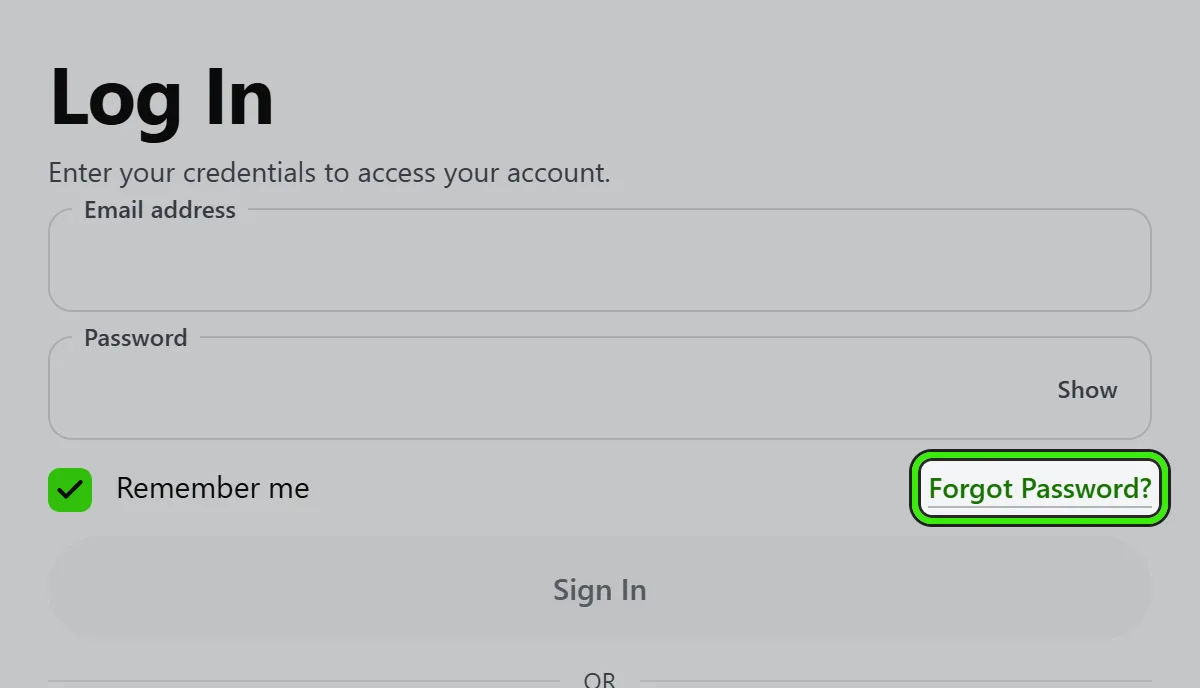
The message you see after asking is the same whether or not that address has a Seayora account. That is deliberate: an answer that said “no account found” would let anybody test a list of addresses to discover which ones are registered here.
On a phone you can finish either way. Tapping the link in your email opens it in your browser and works normally; or copy the link out of the email, return to the app, and tap “I have my link” to set the new password without leaving it.
Your new password has to be at least 10 characters and include an upper case letter, a lower case letter, a number and a symbol. Resetting it signs out every device that was signed in, including this one, so the next sign-in anywhere needs the new password. Changing it from your security settings signs out every other device and keeps you signed in on the one you are using.
Two-factor and device verification
Enable two-factor authentication so a password alone isn’t enough to sign in. New or unrecognized devices require an extra verification step, and you’ll be notified of sign-ins from unfamiliar locations.
Using an authenticator app
An authenticator app — Google Authenticator, Authy, 1Password, or any app that supports standard 6-digit codes — is the strongest second factor Seayora offers that does not need the Seayora app installed. The codes are generated on your phone and are never sent anywhere, so there is nothing for somebody to intercept from your inbox.
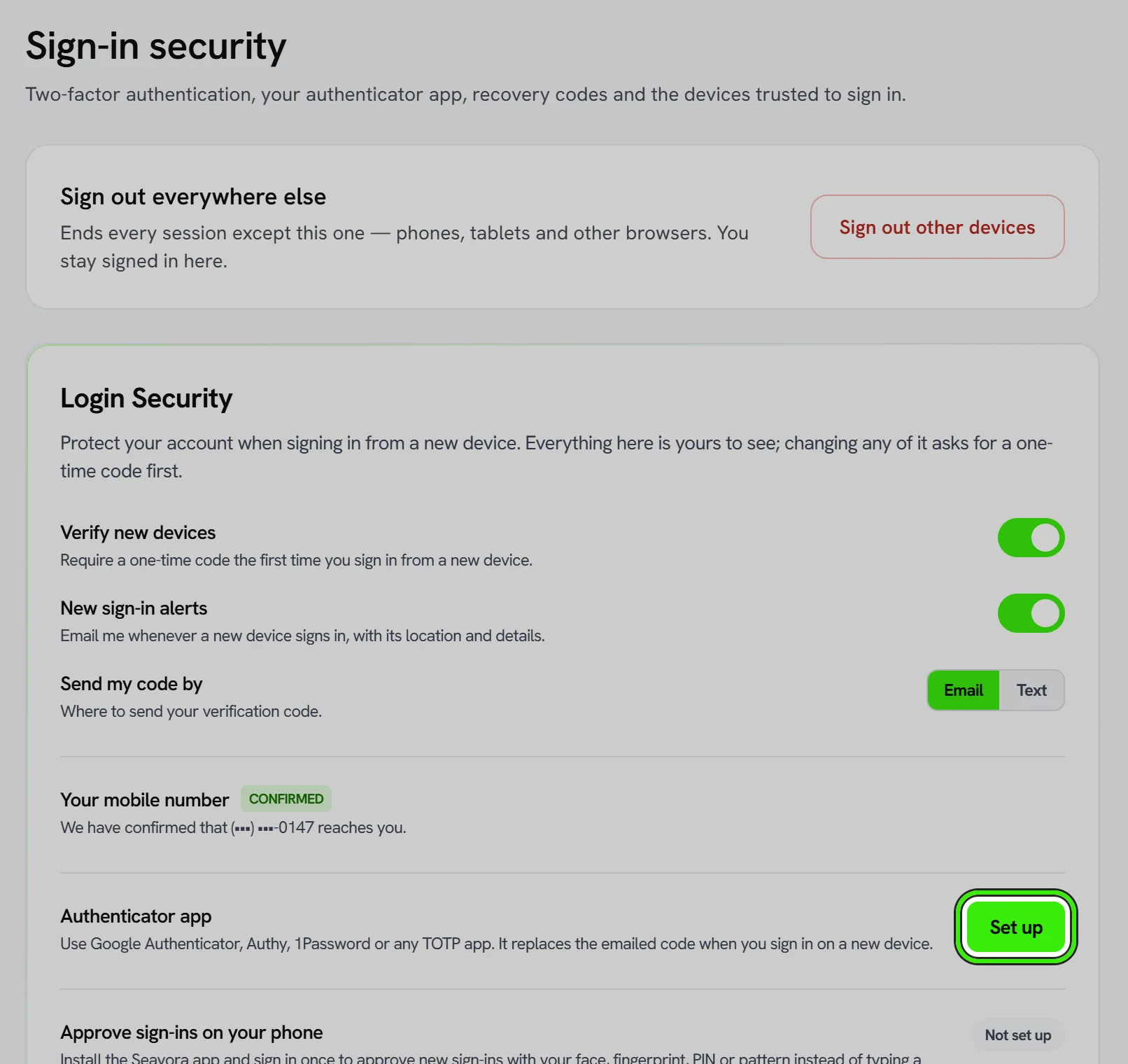
Go to Settings → Security, find “Authenticator app” and choose Set up. Scan the QR code with your authenticator app (or type the key underneath it), then enter the 6-digit code it shows to confirm the two are talking to each other. From then on, signing in on a new device asks for a code from the app instead of emailing you one.
Recovery codes
Turning on the authenticator app gives you ten recovery codes. Each one signs you in once, and together they are the way back into your account if you lose the phone your authenticator app is on. Save them somewhere you can reach without that phone — a password manager, or printed and kept with your documents.
We show them once and cannot show them again: we store a one-way fingerprint of each code, not the code itself, so nobody at Seayora can read them back to you. Your security settings show how many you have left, and you can generate a fresh set at any time — doing so cancels every code from the previous set immediately.
Once you hold recovery codes, Seayora stops offering to email or text you a code instead of using your authenticator app. That is the point of the authenticator: if a code sent to your inbox were still accepted, anyone who reached your inbox would still reach your account, and the second factor would be protecting nobody. Your recovery codes take that job instead.
If you used a recovery code, we email you to say so and tell you how many are left — so if it was not you, you find out the same day.
All of this works the same on seayora.com, on the iPhone app and on the Android app — the codes are shown once wherever you turned the authenticator on, and Settings → Security on any of the three shows how many you have left and can generate a fresh set. Until September 2026 the phone apps quietly dropped the codes after turning the authenticator on, so if you set yours up from a phone before then you may be holding a second factor and no codes at all: open Settings → Security and generate a set.
When two-factor is required on your account
Some accounts are set to require a second factor — by a Seayora administrator, or by the owner of the company account you belong to. On those accounts you are asked to verify every time you sign in with your password, not only on a new device, and the authenticator app cannot be turned off from your own settings. Signing in with Apple or Google relies on that provider’s own sign-in and its two-step verification instead, so Seayora does not ask for a second code there. Your security settings say so plainly when this applies to you. If you think it should not, the person who administers the account is who can change it.
Good habits
- Never share your credentials or one-time codes.
- Review active sessions and sign out devices you don’t recognize.
- Report any suspected unauthorized access to Seayora immediately.
You are responsible for safeguarding your credentials; see the Terms of Service and Security page for details.
Approving a sign-in on your phone
If you have the Seayora app installed, signing in on a new device sends a prompt to your phone instead of a code to your inbox. Both screens show the same two-digit number; you confirm with Face ID, your fingerprint, or the PIN or pattern you set on the app. See “Approving sign-ins on your phone” for the whole flow, including what happens when the sign-in was not you.
Seeing your own details, and changing them
Everything Seayora holds about you is visible in Settings whenever you are signed in — your name, your mailing address, every email address and phone number on the account, and the state of every login protection you have turned on. Looking at your own record never asks for a code. That is deliberate: your settings screen is the place an unauthorized change would be visible, and it is no use to you if you cannot open it.
Changing any of it is different. Before Seayora will save a change to your name, your address, your email addresses or phone numbers, your password, your two-factor settings, your authenticator app, your passkeys or your trusted devices, it asks you to confirm it is you with a 6-digit code sent to your email or texted to your phone. Once you pass it, changes stay unlocked for 10 minutes and the screen counts down, so a run of edits only asks once.
The check is enforced by our servers, not just by the screen: a change submitted without a recent, confirmed code is refused, whichever app or device it comes from. This is what stops a browser left signed in on a shared computer — or a session taken by someone else — from moving the address your lease is served to or the phone number your sign-in codes are sent to.
- Changing your password, or signing every other device out, immediately ends the 10-minute window — including on the device that made the change.
- Signing every other device out is never behind a code. If you think your account has been taken, you should not have to wait for an email to shut the door.
- Closing your account is never behind a code either, for the same reason.
- Adding a new email address or phone number asks for two different codes: one proves it is you asking, and a second, sent to the new address or handset, proves you actually hold it.
How long you stay signed in
By default a sign-in lasts 24 hours in a browser and 60 days in the Seayora app. Under Settings → Security → “Sign out automatically after” you can make it shorter — 1 hour, 8 hours, 24 hours, 7 days or 30 days. The time is counted from when each device signed in, and choosing a shorter one also ends older sessions within about a minute.
If you run a contractor team, you can set the same rule for everyone on it, and require two-factor for the team, under “Team sign-in rules” — in Settings → Sign-in security on the website, and in your business settings in the app. When the team’s time and a person’s own time differ, the shorter one applies.
Device management
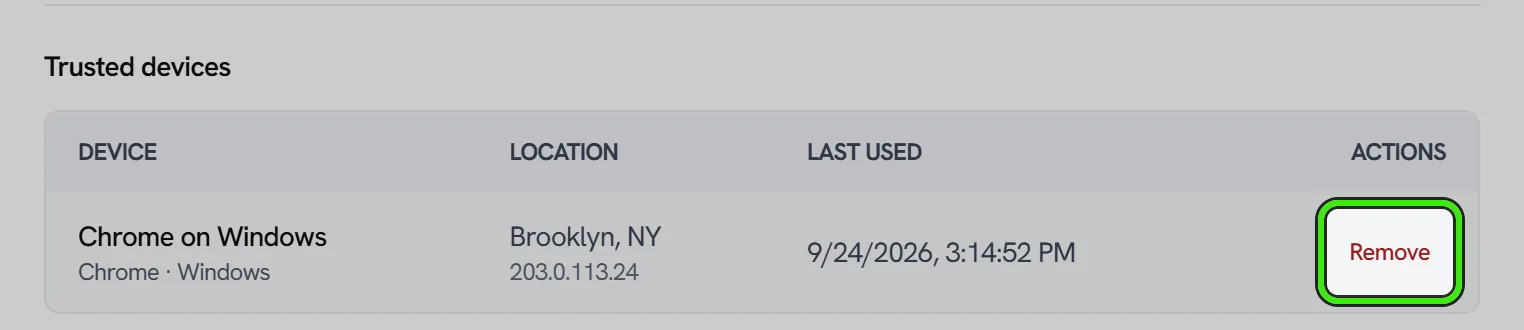
From your security settings you can see every device that has been verified at sign-in, with its approximate location and when it was last used, and remove any of them. A removed device has to be verified again the next time it signs in. Do this whenever you use a shared or public computer, or if you no longer recognize a listed device.
If you suspect a compromise
- Change your password immediately, and remove every trusted device so the next sign-in anywhere has to be verified again.
- Enable two-factor authentication if it isn’t already on.
- Review recent account activity for anything unfamiliar.
- Contact Seayora support so we can help secure the account.
Frequently asked questions
Is two-factor authentication required?
It’s strongly recommended for every account and required for certain sensitive roles and actions. Even where it’s optional, turning it on is one of the single most effective things you can do to protect your account.
I lost the phone my authenticator app was on. How do I get in?
Use one of the recovery codes you saved when you set the authenticator up. At the sign-in screen choose “Use a recovery code” and type it in — each one works once. Once you are back in, go to Settings → Security, turn the authenticator off and set it up again on your new phone, then generate a fresh set of recovery codes.
I have lost my authenticator app AND my recovery codes.
Contact [email protected]. There is no self-service route out of this one, and that is deliberate — a way past both factors that we could operate on request would be a way past both factors that somebody could talk us into. Expect to be asked to prove who you are.
Why can I no longer have a code emailed to me?
Because you have an authenticator app and recovery codes, which means you already have a way in that does not depend on your inbox. If an emailed code were still accepted in place of the authenticator, then reaching your inbox would still be enough to reach your account, and the authenticator would not be adding anything. If you have not generated recovery codes yet, the emailed code stays available — we will not close the door before you hold the key.
How many recovery codes do I get, and can I get more?
Ten, and yes — Settings → Security → Recovery codes → Generate new set. Generating a new set cancels every code in the old set the moment it happens, so do not do it because you have mislaid one or two unless you are ready to save the new ten.
Can Seayora tell me what my recovery codes are?
No. We keep a one-way fingerprint of each code so we can check one when you type it, and the codes themselves exist only in the moment we show them to you. Nobody at Seayora can read them back, and anybody who offers to is not from Seayora.
What’s the difference between a passkey and a password?
A passkey uses your device’s built-in biometrics or a hardware security key instead of a typed secret, so there’s nothing to phish or reuse across sites. It’s generally more secure and faster to use than a password.
I never received my password reset email. What now?
Check your spam folder first, then send it again from the same screen. If nothing arrives, the likeliest reason is that the address you typed is not the one on your account — we answer identically either way, on purpose, so we cannot tell you which it was. Try any other address you may have signed up with, or contact support.
My reset link says it is invalid or expired.
Each link lasts one hour and can be used once, and asking for a new one immediately cancels the previous link. Request a fresh one and use the newest email in your inbox. If you are pasting the link into the app, make sure you copied the whole address including everything after “token=”.
Does resetting my password sign out my other devices?
No. Your new password is required for every sign-in from that point on, but sessions already open elsewhere stay open. If you are resetting because you think somebody else has your password, sign in afterwards and use “Sign out all other devices” — that is what actually closes them, and it never asks for a code.
Will I be notified of a new device login?
Yes — logins from an unrecognized device or unfamiliar location trigger a notification so you can confirm it was you, or act quickly if it wasn’t.
What should I do before selling or giving away a device I used to sign in?
Remove it from your trusted-device list and sign out of the Seayora app on it. Signing out of the app also deletes the PIN or pattern stored on that handset, so nothing of yours is left behind.
Why does Seayora ask for a code before I change my own details?
Because being signed in proves a browser or a phone is yours, not that you are the one holding it right now. A laptop left open at a desk, a session someone else has taken, or a phone handed to a colleague all look identical to us. Asking for a code that reaches your inbox or your handset is what makes moving your address or your phone number something only you can do. Reading your details never asks — only changing them does.
How long do changes stay unlocked after I enter the code?
Ten minutes, counted from the moment the code was accepted, and the screen shows the time remaining. The window does not extend while you work, so a long form may ask you again — your entries are kept and the save carries on once you confirm. Changing your password or signing out your other devices ends the window immediately.
What if I never receive the code?
You can send another after 60 seconds, and switch between email and text if you have a mobile number on your account. If neither reaches you, contact support — but note that support can never read a code back to you, and will never ask you for one.
Do I have to press anything after typing the code?
No. Seayora checks the code as soon as the sixth digit lands, whether you typed it, pasted it, or let your phone fill it in from the text message. There is still a button if you prefer to use it.
Related guides
Related features and guides
- Approving Sign-ins on Your Phone — Documentation. How the Seayora app asks you to approve a sign-in, what the two-digit number is for, how to block one and secure your account, and the PIN or pattern that locks the app.
- Roles & Account Types — Documentation. The difference between landlord, management, service professional, and tenant accounts — and what each role can do on Seayora.
- Data & Privacy Controls — Documentation. How Seayora handles your data, the privacy rights you may have, and how to exercise them.
- Two-Factor Authentication & Device Security — Feature. Two-factor authentication (2FA/TOTP), new-device sign-in alerts, device verification, and passkey-based sign-in protecting every Seayora account.
- Single Sign-On (SSO) — Feature. Single sign-on with supported providers, so your team authenticates through your existing identity provider instead of another password.
- Warranties, QC Audits & Photo Verification — Feature. Photo verification gates, QC audits, and warranty tracking, so completed work is documented and warranty obligations do not get forgotten.