Data & Privacy Controls
How Seayora handles your data, the privacy rights you may have, and how to exercise them.
Seayora is built to give you transparency and control over your personal information.
Your controls
- Manage cookie and tracking preferences with “Your privacy choices” in the site footer, or in Settings → Your data when you are signed in.
- Access, correct, delete or get a copy of your data, get a list of the third parties we have shared it with, and appeal a decision — we honor these for anyone in the United States who asks, whichever state they live in.
- Opt out of marketing communications.
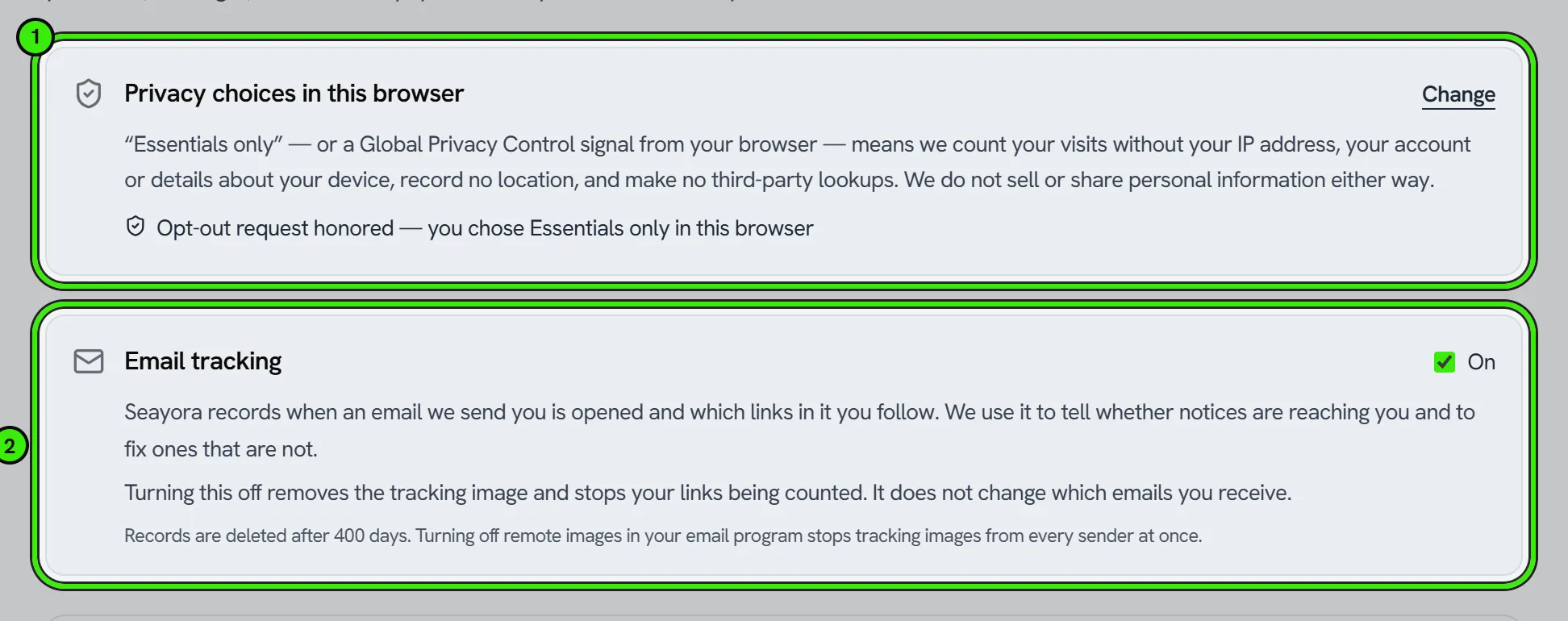
What “Essentials only” actually does
Choosing Essentials only — or browsing with Global Privacy Control switched on — stops three things. We record no location for your visit, we make no third-party lookups about you, and your visit is counted without being attributed to you: we keep which pages were viewed and for how long, the kind of device and browser, and whether you were signed in, but not your IP address, your account, your screen, processor, memory, connection or language, the text of what you clicked, or the query strings of the pages you visited. Our servers enforce this even if a browser sends those details anyway.
While an opt-out is in force the site says so: “Opt-out request honored” appears beside Your Privacy Choices in the footer, at the top of the Privacy and Cookie Policies, and in Settings → Your data. We honor a Global Privacy Control signal for every visitor, wherever they are — we do not use your IP address to decide whether your state requires it. The choice belongs to the browser that made it, so another browser or device starts with its own.
How to exercise rights
Email [email protected], open a conversation at Contact Support and choose “Privacy & Data Requests” (no account needed), or use the in-product controls. We answer within 45 days. If we decline any part of a request you can appeal by replying with “Privacy Appeal”; a different person reviews it and we explain the decision in writing. Seayora does not sell personal information, does not use it for cross-context behavioral advertising, and does not use it to train AI models. For the full picture — including the state privacy laws we follow and connected financial data from integrations like QuickBooks — see the Privacy Policy. Health-related data is covered separately in the Consumer Health Data Privacy Policy.
Confirming your identity before you apply or sign
Where Seayora has switched identity verification on, you are asked to photograph a government ID and take a short selfie at up to four points: before you submit a rental application, which is before anything is charged to you and before any consumer report is ordered; before you sign a lease if you are an outside signer such as a co-signer or guarantor; when a support agent asks you to confirm who you are, in place of uploading photographs to them; and before the access instructions for a self-guided viewing are released to you. Each is switched on separately and none is on unless we have turned it on; where it is off, none of this is collected.
The check is run by Didit, our identity-verification provider, inside a window in our own page or app — so you may not see their name on it, which is why we tell you here. Your ID images and your selfie go to Didit, not to Seayora. Didit reads the document, checks that a live person is in front of the camera, and compares the face in the selfie to the photograph on the document. That comparison involves a scan of your facial geometry, which is a biometric identifier. It is used for that comparison and for nothing else.
What Seayora gets back is the outcome, not your identity:
- Whether the document was genuine, and whether a live person presented it.
- Whether the face matched the photograph on the document.
- Whether the name matched the name on this account — matched, did not match, or was not checked.
- Whether the holder is over 18. Didit checks this itself, so your date of birth never reaches us.
- The document type, the region that issued it, and its expiry date.
We do not receive and do not store your date of birth, your document number or any part of it, the machine-readable code on the document, the address printed on it, or any image or video of you or your document. On this path we keep no part of the document number at all — less than we keep when you upload photographs to a support agent, described below.
Didit destroys your images and the face scan on the same schedule the support check uses: once the check is decided, and at 30 days from when it was opened at the very latest, whatever the outcome. Closing your account orders their destruction at once. We mark them destroyed only once Didit confirms it, and retry when it does not.
We do not send Didit your email address. So it can recognize you if you come back, we send a one-way code derived from your address instead. That is not anonymity — you have just shown Didit your ID and your face — and we would rather say so than describe it as something it is not. What it limits is the link between your Seayora account and the identity record they hold.
You are shown what is collected, by whom, why and for how long before anything is submitted, and asked to agree. You can decline: nothing is submitted and nothing is charged, though the application or the signature may not be able to go ahead without it.
Identity documents you send to support
This is a different check from the one above, and it works differently. If a support agent asks you to confirm who you are, you may be asked for a photo of an identity document or a short selfie video. A person watches it; no scan of your facial geometry is made. Those images are deleted automatically — we do not keep them once the check is finished. A scheduled job erases the files when the support ticket is closed, within 24 hours of an agent reviewing what you sent, and at 30 days from upload at the very latest, whichever of those comes first. Deleting your account erases them immediately.
What we keep afterwards is the record that a check happened: the type of document, the region that issued it, its expiry date, the last four digits of the document number, and which agent reviewed it and what they decided. We never store the full document number at any point. The record stays so we can show a check was really performed if that is ever questioned; the images behind it are gone.
Where Seayora has moved the support desk onto the identity check described above, an agent’s request opens that check on your screen instead of asking for uploads. You do it with Didit exactly as described there; the agent sees the outcome and never an image, and nothing is uploaded to Seayora.
Crash and error reports from the apps
The first time you open the iPhone or Android app you are asked whether to send crash and error reports. It is off unless you turn it on, and you can change it at any time in Settings. With it on, a report is sent when the app crashes or a request fails: what broke, where in the app it happened, your device model, OS version, app version, and the screens you visited just before. It is used to fix the app and nothing else.
With it off, none of that is sent — no crashes, no failed requests, no record of the screens you opened.
The one thing the apps report either way
If you open something the app does not have yet — a tool that currently only exists on the website — we record which tool it was, so we know what to build next. That is sent whichever way you answered above, and it is disclosed on the consent screen in the same words.
What it contains is the name of the screen and nothing else. With crash reports off it carries no name, no email address and no device identifier; it cannot be traced back to you, and it is never used to decide anything about your account. It is the same principle as the view count on a listing: the count of how many people looked for a feature is how the product gets built, and attaching your identity to it is a separate question that you answer with the switch.
What happens when you delete your account
You can close your account yourself from Settings, then Account, then Delete my account — on the website, the iPhone app or the Android app. You are shown what is removed and what is kept before you confirm, and the account closes seven days later so you can still cancel. Signed leases, settled payments and other legally required records are kept, but stop pointing at you. See Data Export & Account Deletion for the full breakdown.
Frequently asked questions
Does Seayora sell my data?
No — Seayora does not sell personal information for money and does not use it for cross-context behavioral advertising, as described in the Privacy Policy.
How do I see what data Seayora has about me?
Email [email protected] to request access; depending on your state of residence, you may have a right to know what personal information is held and how it’s used.
Does Seayora honor Global Privacy Control (GPC) signals?
Yes, for every visitor, wherever they are. A GPC signal is treated as a request to opt out of any sale or sharing and of targeted advertising, and to limit sensitive data: we record no location, make no third-party lookups, and count your visit without your IP address, account or device details. The site shows “Opt-out request honored” while the signal is on.
Which state privacy laws does Seayora follow?
All of them. Twenty-three states have comprehensive privacy laws — nineteen in force today, with Louisiana, Oklahoma, Alabama and Vermont taking effect in 2027 and 2028 — and rather than test which thresholds apply, we give every US resident the same rights: access, correction, deletion, a copy, a list of the third parties we share with, opt-outs, and an appeal. Washington, Nevada and Connecticut residents also have our Consumer Health Data Privacy Policy.
How long does Seayora keep the ID photo I sent to support?
Not long, and not by choice of the agent. A scheduled job deletes it when the ticket is closed, within 24 hours of the review, and at 30 days from upload at the latest — whichever happens first. Closing your account deletes it immediately. Only the record that a check took place is kept, never the full document number and never the image.
Is my selfie video used for facial recognition?
It depends which check you are in, and the two are genuinely different. A selfie video you send to support is watched by a person to confirm you match your document and can say the phrase you were given — no biometric template is created from it. The identity check before a rental application or an outside lease signature is not like that: there, our provider compares your selfie to the photograph on your ID using a scan of your facial geometry, which is a biometric identifier. You are told that on the consent screen before it starts, it is used only for that one comparison, and the images and the scan are deleted on the schedule above.
Who actually sees my ID during an identity check?
For the check before an application or a signature: Didit, our identity-verification provider, and not Seayora. The window is embedded in our page, but the images go to them. We receive the result — genuine document yes or no, live person yes or no, face matched yes or no, name matched or not, over 18 yes or no, plus the document type, issuing region and expiry. No image, no document number and no date of birth reaches us. For a support check it is the other way round: a Seayora support agent looks at what you sent, and it is deleted on a schedule.
Do I have to do the identity check?
You can always decline, and nothing is submitted or charged if you do. But where it is switched on it is a condition of that step, so the rental application, the lease signature or a self-guided viewing’s access instructions may not be able to go ahead without it. It is off unless Seayora has turned it on for that flow.
I turned crash reports off. Is the app still sending anything?
One thing, and it is named on the consent screen: if you open a tool the app does not carry yet, we record which tool it was so we know what to build next. It is the name of a screen — with the switch off it carries no name, no email address and no device identifier, and nothing about it can be traced to you. Crashes, failed requests and the screens you visit are not sent at all.
Why did the app ask me about privacy again?
The wording changed, so everyone is asked again — that is the only mechanism that reaches people who already answered. Your previous choices are not carried over silently; you get to answer the new wording. Both switches start off.
Related guides
Related features and guides
- Account Security: SSO, 2FA & Passkeys — Documentation. How to secure your Seayora account with single sign-on, two-factor authentication, device verification, passkeys (WebAuthn), and resetting a forgotten password.
- Notifications, Email & SMS — Documentation. How Seayora sends transactional and marketing notifications, choosing which alerts reach your phone and inbox, what the text-message program actually sends, and how to stop it.
- Data Export & Account Deletion — Documentation. How to export your data before closing your account, how to delete the account yourself from any device, and exactly what Seayora keeps afterwards and why.
- Data Privacy & Portability — Feature. Privacy controls, GLBA financial privacy handling, data export, and account deletion — plus encryption in transit and hardened infrastructure.
- Compliance Alerts & Required Filings — Feature. Seayora watches your properties for new violations and works out which recurring filings each building owes, turns both into a dated checklist, and emails you when something new appears. Live violation data for New York City; rule-based filing obligations across the NYC metro.
- FCRA-Compliant Screening — Feature. Tenant screening built to FCRA requirements, including secure applicant-entered data and adverse-action support when you decline an applicant.