Deleting your activity data
Delete what Seayora recorded while you used the product — browsing history, which homes you looked at, saved homes — without closing your account.
Closing your account is a big step, and most of the time it is not the one people actually want. If what you want is for Seayora to stop holding what you browsed, you can delete that on its own and keep everything else — your account, your lease, your messages, your documents and your payment history are untouched.
It lives in Settings → Your data, in the web app, the iPhone app and the Android app. There is also a public page at /data-deletion that explains it without signing in.
What you can delete
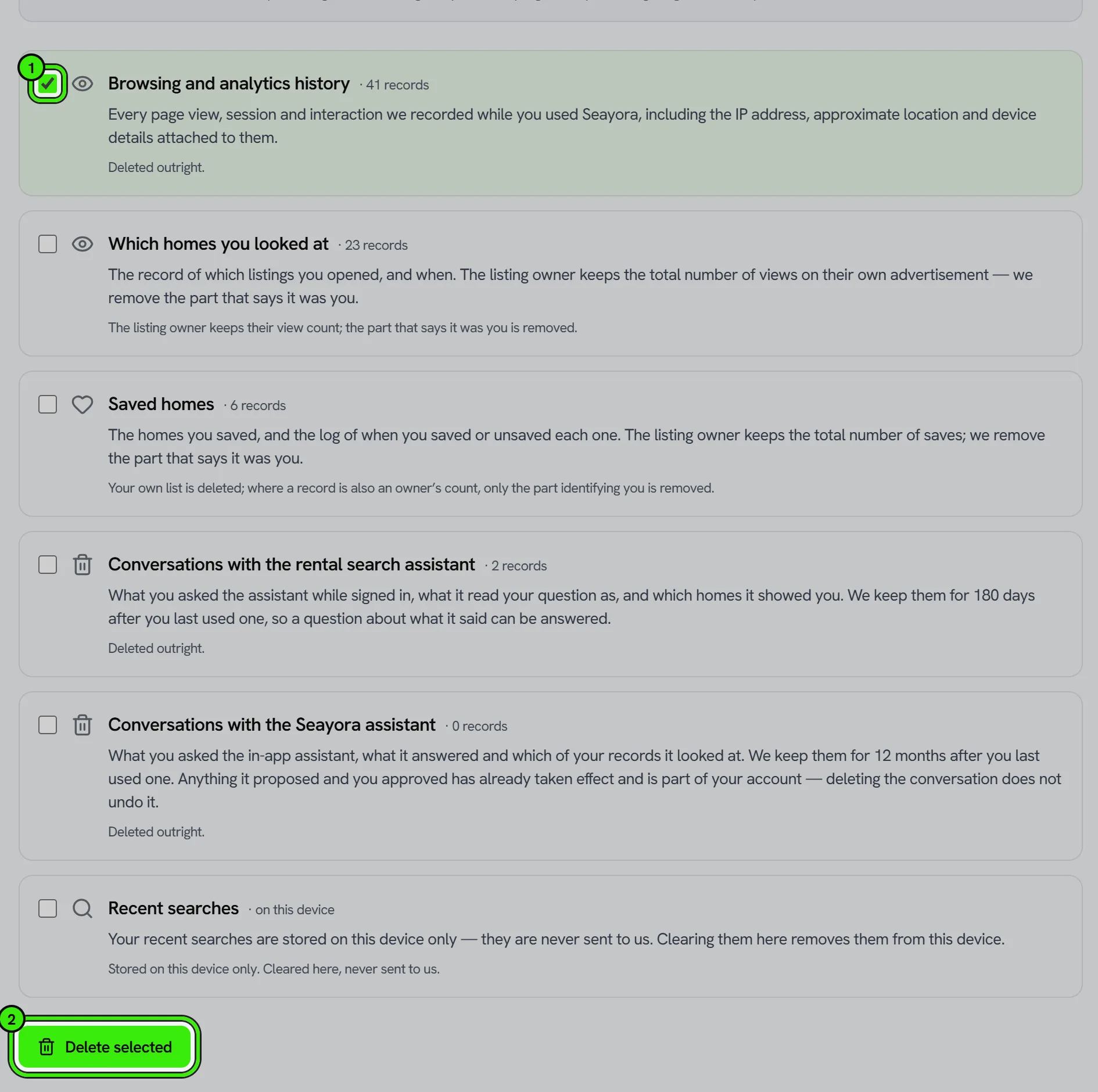
- Browsing and analytics history — every page view, session and interaction we recorded, including the IP address, approximate location and device details attached to them.
- Which homes you looked at — the record of which listings you opened, and when.
- Saved homes — the homes you saved, and the log of when you saved or unsaved each one.
- Recent searches — these are stored on your device only and are never sent to us. Clearing them here removes them from that device.
Deleted, and de-identified: the difference
Two of these work differently, and Seayora says which is which on the screen rather than using one word for both.
Your browsing history and your saved-homes list exist only to serve you. They are deleted outright.
A listing view is also something else: it is one unit of the view count on a landlord’s own advertisement, which is their business record and not ours to revise. So those rows keep counting, and the part of them that says it was you — your email address, the visitor key, the IP address — is removed. Afterwards the owner still sees how many people looked at their listing, and nobody can tell that any of them was you.
When it happens
Immediately. There is no waiting period and nothing to cancel, because nothing here affects anybody else’s records — which is the opposite of closing an account, where a week’s grace exists precisely because a live tenancy is somebody else’s contract.
It is safe to run twice. If you are not sure whether it went through, run it again — the second run finds nothing left and reports the same thing.
If a category says "couldn’t check"
That is not the same as "you have nothing". It means we could not read the count, and we would rather say so than show you a zero we cannot stand behind. You can still delete it; the screen tells you afterwards if any part could not be finished, and support can clear the rest.
What this does not do
It does not close your account, and it does not touch your messages, documents, leases or payment history. If you want to leave entirely, that is a separate request with its own page and its own disclosure of what we keep and why.
Frequently asked questions
Does this close my account?
No. Your account, lease, messages, documents and payment history are all untouched. Closing an account is a separate request in Settings → Delete my account.
Can I undo it?
No. It runs immediately and there is no recovery step, which is why the app asks you to confirm first.
Why does my listing view still count for the landlord?
Because the count is their record of traffic to their own advertisement, not a record about you. We remove everything that identifies you from those rows and leave the count alone.
Do I have to delete all of it at once?
No. Each kind is a separate checkbox and you can delete one and keep the others.
What happens to my recent searches?
They are stored on your device and never sent to us, so there is nothing on our side to delete. Clearing them in the app removes them from that device.
Related guides
Related features and guides
- Data Export & Account Deletion — Documentation. How to export your data before closing your account, how to delete the account yourself from any device, and exactly what Seayora keeps afterwards and why.
- Data & Privacy Controls — Documentation. How Seayora handles your data, the privacy rights you may have, and how to exercise them.
- Account Security: SSO, 2FA & Passkeys — Documentation. How to secure your Seayora account with single sign-on, two-factor authentication, device verification, passkeys (WebAuthn), and resetting a forgotten password.
- Data Privacy & Portability — Feature. Privacy controls, GLBA financial privacy handling, data export, and account deletion — plus encryption in transit and hardened infrastructure.
- Compliance Alerts & Required Filings — Feature. Seayora watches your properties for new violations and works out which recurring filings each building owes, turns both into a dated checklist, and emails you when something new appears. Live violation data for New York City; rule-based filing obligations across the NYC metro.
- Audit Logs — Feature. Audit logging across consequential actions, so account activity, permission changes, and financial entries all leave a reviewable trail.