Approvals: How an Assistant Proposes Changes
Why a connected assistant usually proposes rather than performs, what the Approvals queue is, and the one action that can never be automated.
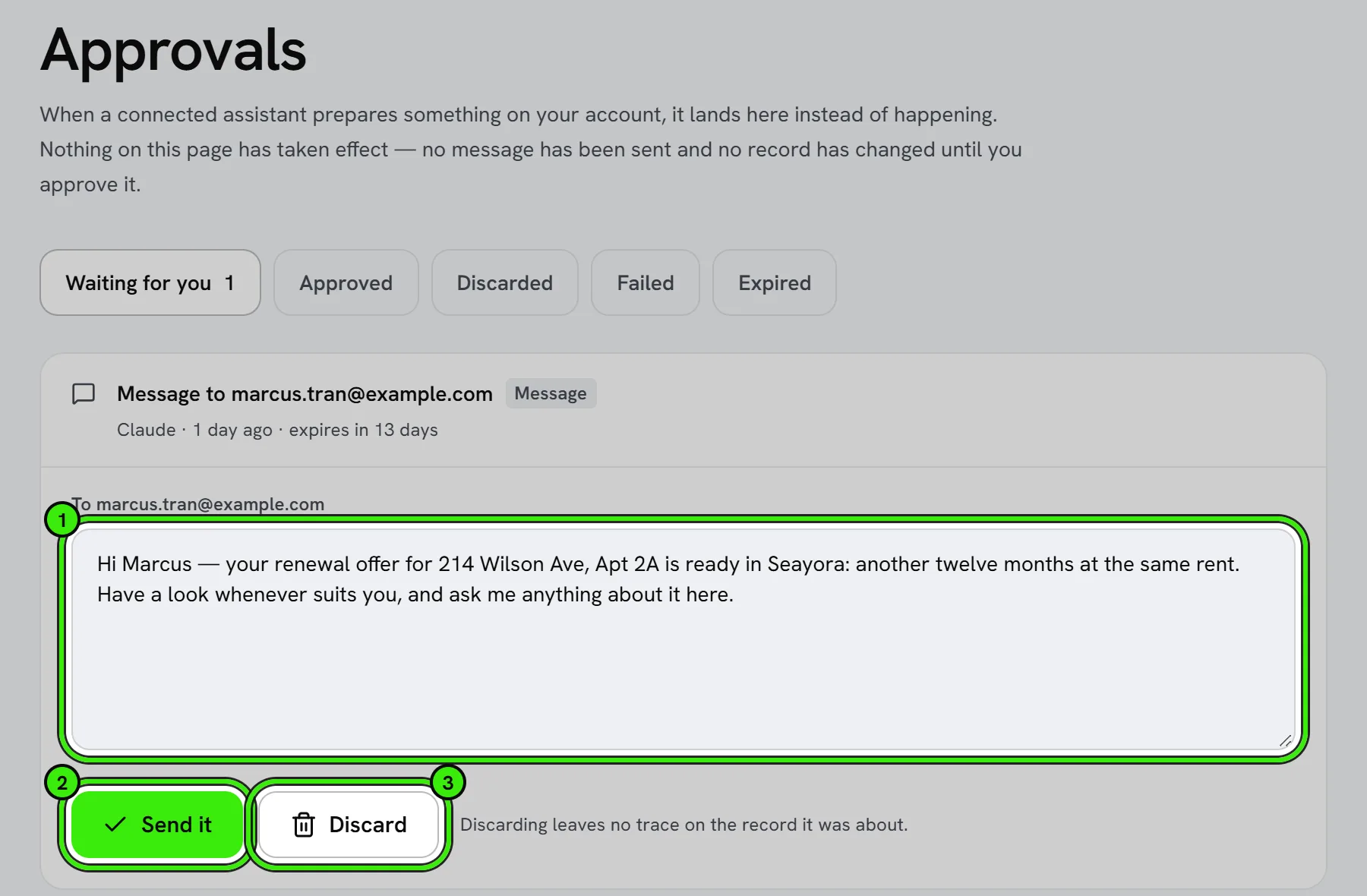
A connected assistant proposes; you dispose. On most Seayora workspaces every change an assistant tries to make — a message, a work order, a rent change — is staged into your Approvals queue instead of being performed. You see exactly what it wants to do, and nothing happens until you approve it.
Why it works this way
An assistant is very good at understanding what you asked and occasionally wrong about the details. A proposal you can read costs you a click; an action you did not intend costs a tenant a confusing message or a listing a wrong rent. So the default write mode is "draft", and it stays "draft" on every failure path — if Seayora cannot read the setting, it proposes rather than acts.
What approving does
- The proposal is re-checked against your own permissions at the moment you approve, not the assistant's. Approving can never do something your account could not do on the website.
- Two people approving the same proposal in two tabs produce one change, not two.
- A proposal that fails to apply is marked failed and stays visible — it never silently returns to the queue.
- The queue is at /approvals and is only reachable from a signed-in session, never from an API credential.
The one thing that is never automated
Publishing a listing. An assistant's create_listing always saves a draft, on every workspace, regardless of the write mode. An advertisement is public, permanent in answer engines and starts the advertising meter; a wrong rent is not catchable afterwards. Only you can publish, from your portfolio in Seayora.
Reading a result
When an assistant reports back, look for whether it says the change was staged or applied. "Staged" means nothing has changed yet and it is waiting in Approvals. A good assistant will tell you which; if yours does not, the Approvals queue is the truth.
Frequently asked questions
Can I turn approvals off?
Workspaces that allow it expose a write-mode setting under AI & integrations. Even with it off, publishing a listing remains something only a signed-in person can do.
What if I approve something by mistake?
Approvals apply the same changes you could make yourself, so they are undone the same way — edit the record, cancel the work order, or contact the tenant. The activity log shows what was applied and when.
Related guides
Related features and guides
- Connecting an AI Assistant to Seayora — Documentation. What it means to connect Claude, ChatGPT or your own software to your Seayora account, what an assistant can and cannot do, and the one URL you need.
- Permissions Reference — Documentation. Every permission an assistant or API key can hold, what it unlocks, and which ones can change records — generated from the server.
- MCP Server Reference — Documentation. Transport, protocol versions, and the full generated catalog of tools, resources and prompts the Seayora MCP server offers.
- AI Financial Analyst — Feature. An AI layer over your accounting data that surfaces trends, anomalies, and answers about your portfolio finances without building a report first.
- AI-Assisted Maintenance Dispatch — Feature. AI-assisted dispatch routing and configurable automation rules send maintenance work to the right service pro, so routine repairs never wait on a manual decision.
- Live Support, Callbacks & Tickets — Feature. In-app live support with a real agent queue, scheduled callbacks, support tickets, business-hours awareness, and satisfaction feedback on every interaction.