Building Health Score
What the building health score is made of, what each factor means, what it deliberately does not claim, and how to show a building condition badge on a listing.
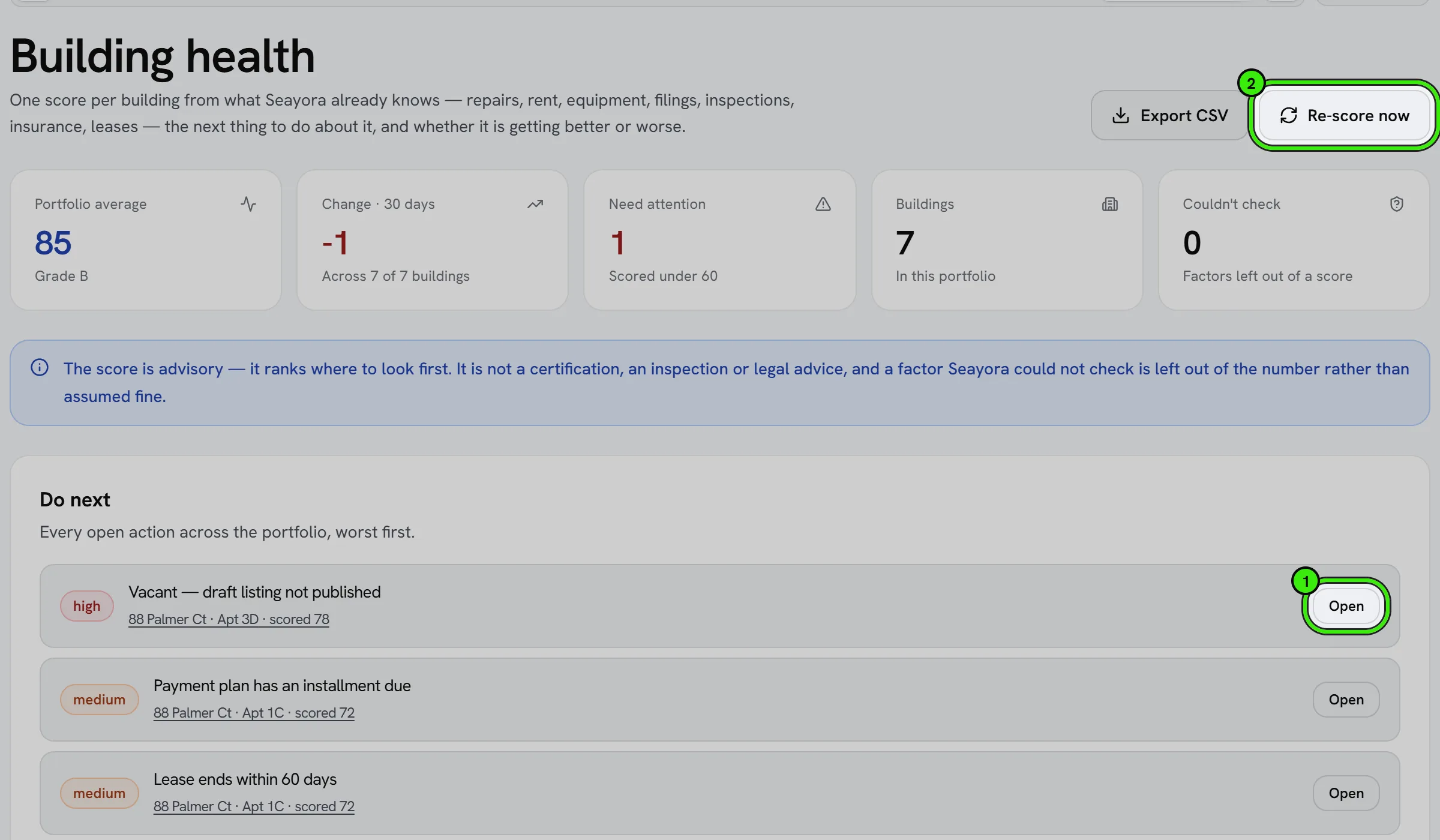
Every building you manage gets a score from 0 to 100 and a grade from A to F, computed from the records Seayora already keeps. It ranks where to look first and comes with the next thing to do. It is advisory: it is not an inspection, a certification or legal advice.
The eight factors
The score is the weighted average of the factors that could be scored. A factor that does not apply to a building takes no share, and the others keep the same proportions to each other.
| Factor | Weight | What it reads |
|---|---|---|
| Maintenance | 18% | Open work orders, and how long they have been open (two weeks and 45 days are the thresholds). |
| Rent collection | 18% | Rent charges in the last 90 days that were late or failed. |
| Equipment | 14% | Registered equipment past its expected life, in poor condition, or with a warranty lapsing within 30 days. |
| Compliance | 14% | Overdue housing-program filings and, for NYC buildings, whether the latest LL97 assessment is over the cap. |
| Inspections | 9% | How long since the last completed inspection (12 and 24 months are the thresholds). |
| Renters insurance | 9% | Active leases with a verified, unexpired policy on file. |
| Leases & occupancy | 9% | Leases ending within 60 days with nothing decided, and vacancy. |
| Sensors | 9% | Open alerts from the building’s connected devices — critical ones, other alerts, and devices that have stopped reporting — and any open for more than a week. A resolved alert stops counting. Not applicable when no connected device is active. |
Three states, never confused
A factor is either scored, not applicable (nothing to score — for example no equipment registered yet), or could not be checked. The last two are left out of the number. A factor Seayora could not read is never assumed fine.
Whether it is moving
Seayora records one score per building per day, so every building carries a 7-day and a 30-day change and a small chart of where it has been. A building scored for the first time this morning has no comparison yet, and the screen says that rather than showing no change — “flat since July” and “we were not measuring in July” are different facts.
Where to go first
- “Do next” lists every open action across every building, worst first, with the building named on each row.
- “Where the portfolio is weakest” averages each factor across the buildings it could actually be scored on — tap one to see only the buildings it is dragging.
- Search, filter by grade, and sort by needs-attention, falling fastest, best first or name.
- Export CSV downloads exactly the rows on the page, built by the server so the spreadsheet and the screen cannot disagree. A factor that could not be scored is an empty cell, never a zero.
When it updates
Scores refresh overnight and whenever you open a building that was scored more than six hours ago. “Re-score now” forces it.
Showing it on a listing
You can show a building condition badge on a building’s public listing. Open the building in Building Health and switch on “Show a building condition badge on this listing” — on the website or either phone app. It is off for every building until you turn it on.
- Only four factors are published: maintenance, equipment, compliance and inspections. Rent collection, renters insurance and leases & occupancy are about your tenants, and a sensor alert can say when a home is empty, so those four are never published. The public grade is worked out from the four building factors alone and can differ from your Building Health Score.
- Renters see the grade, the score out of 100, one line per factor (for example “2 open work orders, 1 open longer than two weeks”), the date it was worked out, and a note that it is advisory — not an inspection or a certification.
- The preview under the switch is exactly what the listing shows, drawn the same way.
- It follows your records every day. If a factor slips, the badge shows it. Switch it off at any time and it leaves the listing at once.
- Nothing is shown when the building has not been scored in the last two days, or when fewer than two of the four factors have records — too little on file is not a verdict.
- Assistants connected to Seayora that search listings see the same badge, in the same words.
Frequently asked questions
Will a listing without the badge look worse?
No. The badge is optional and most listings will not have one. A listing without it shows nothing in its place, and connected assistants are told that no badge says nothing about the building.
Does the badge mean the building was inspected or certified?
No. It is worked out from the records in your account and says so on the listing. It is not an inspection, a certification or a warranty of condition.
Can I change the weights?
Not yet. The weights are the same for every account so a B means the same thing across portfolios.
Why does a new building show “not enough on file”?
Nothing has been recorded yet — no lease, no work orders, no equipment. Add them and the score appears.
Does it pull city violation data?
Not live. The compliance factor reads the filing deadlines and LL97 assessments already stored in Seayora, so a network outage can never move a score.
Why does a building show no 30-day change?
Because there is no reading from 30 days ago to compare against — usually the building is new to Seayora, or scoring only started recently. Seayora will not invent a comparison it cannot make, so it says so instead of showing a change of zero.
Related guides
Related features and guides
- Move-In & Move-Out Checklists — Documentation. How to document a unit’s condition at move-in and move-out to protect both landlord and tenant when it’s time to return a deposit.
- The rules library — what Seayora publishes, and what it deliberately does not — Documentation. How Seayora’s statute-cited landlord, tenant and contractor rules work: where each figure comes from, how to filter them by any set of states and topics, how to compare states side by side, and why a state you expect to see is sometimes missing on purpose.
- Room Sizes and Floor Plans on a Listing — Documentation. Measure rooms by hand, with the camera or with an iPhone depth-sensor scan, and show their sizes — and a floor plan of the whole home — on your listing. Every size says how it was measured.
- Two-Factor Authentication & Device Security — Feature. Two-factor authentication (2FA/TOTP), new-device sign-in alerts, device verification, and passkey-based sign-in protecting every Seayora account.
- Accounting for Service Professionals: A Practical Starter Guide — Guide. Bookkeeping basics for contractors and trades: a clean chart of accounts, cash or accrual, job costing, and the reports that show if a job made money.
- Call Recording & Consent — Feature. Where enabled, calls can be recorded or transcribed for quality and dispute resolution — with recordings attached to the conversation and consent obligations made explicit.