Customer & Vendor Portals
What a customer or vendor can see and do from the portal link you send them — invoices and their PDFs, statements, paying online, automatic payment, memberships, and sending you a bill.
Not every customer or vendor needs a Seayora account. A portal link shows them their own records with you and lets them act on them — no password, no sign-up.
What a customer can do
- See every invoice from you, its balance and its due date, and open its PDF.
- See the late-fee term an unpaid invoice was issued with, if you charge one.
- Open a statement of everything open today.
- Pay an invoice online, when you accept online payments. If you add a card surcharge, it is shown before they pay and they agree to it; a debit card or a bank payment adds nothing.
- Turn on automatic payment of every invoice from you, on its due date, from a card or bank account — when you allow it. They read the terms and agree; only they can turn it on, and they can turn it off on the same page at any time. An invoice already overdue is not charged automatically, and no card surcharge is added to an automatic payment.
- Turn automatic payment on or off for a membership, or cancel it.
What a vendor can do
See their bills with you and the open balance, and send you a bill with its amount and reference. It waits under Submitted until you review it. With Bill approvals & vendor portal switched off, vendors cannot send bills this way.
Sharing portal access
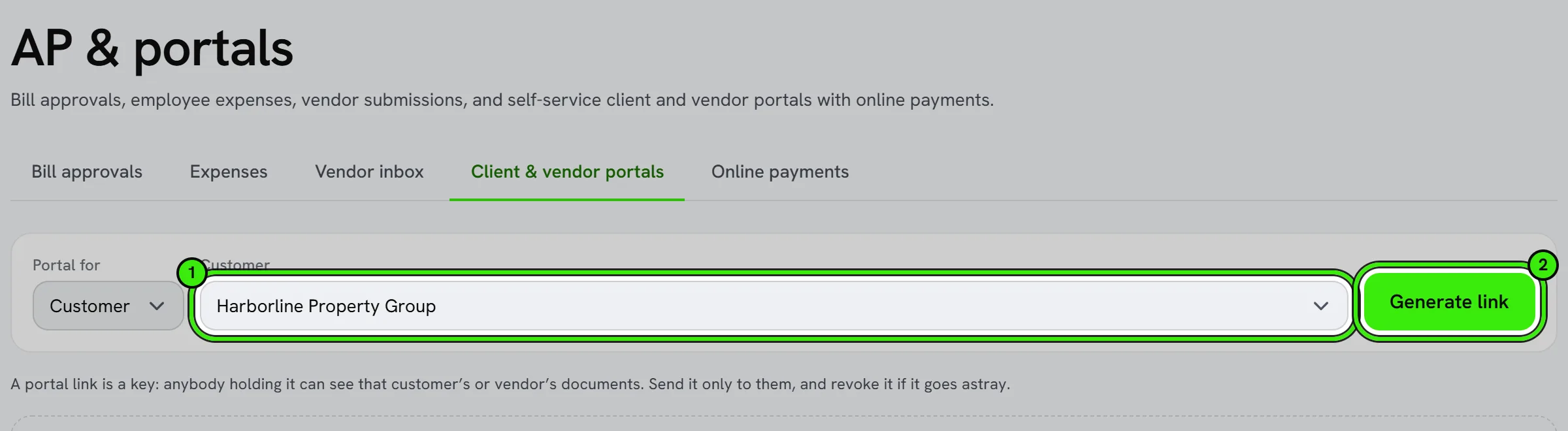
Make a portal link for a customer or vendor in Accounting → AP & portals → Client & vendor portals and send it to them. It shows only their records. You can revoke a link at any time, and switching off Customer portal & online payments stops every link opening.
What they receive by email
Depending on your Books settings, Seayora emails your customers on your behalf: reminders before and after an invoice is due, statements of what is open, a notice when a late fee is added, a confirmation when they turn on automatic payment, and a note if an automatic payment does not go through. Each email names your business and links back to their portal.
Frequently asked questions
Can a customer pay directly from the portal?
Yes, when you accept online payments and your payout account is approved. The money goes to your payout account.
Is portal access secure?
The link is the key: it opens only that customer’s or vendor’s records with you. Revoke it to stop it working.
Can I turn on automatic payment for a customer?
No. Only the customer can, on their portal, because it is their agreement to be charged.
Does the customer see my card number or bank details?
No, and you never see theirs. Card and account numbers go straight to the payment processor.
Related guides
Related features and guides
- Invoices, Estimates & Statements — Documentation. How to create, brand, and send invoices, estimates, and statements — with a price book, good / better / best options and acceptance on the spot — turn estimates into invoices, and get paid online.
- Books Modules — Documentation. How to switch off the parts of your books you do not use — recurring invoices, progress invoicing, budgets, bank feeds, the customer portal and more — and what switching one off does.
- In-Platform Messaging — Documentation. How to message tenants, landlords, managers, and service pros inside Seayora with a record of every conversation — and draft a reply to an inquiry about your listing.
- Invoicing, Estimates & Statements — Feature. Create invoices and estimates, send customer statements, and collect payment through the same rails as rent — with everything posting to the ledger automatically.
- Vendor & Subcontractor Management — Feature. Manage subcontractors and vendors, track their compliance, and keep customer and vendor portals connected to the jobs they are working on.
- Owner Portals & Reporting — Feature. Owner portals and multi-property accounting let property owners see performance and financials for their assets without a monthly email from you.