Reporting something, blocking someone, and what happens next
How to report abuse, what a block does and does not stop, what we check automatically, and what happens if a limit is put on your own account.
Almost everyone on Seayora is a landlord, tenant, manager or contractor doing an ordinary job. This page is about the small number who are not, and about what happens if a decision ever lands on you by mistake.
If somebody is in danger right now
Call 911. Seayora is not an emergency service, nobody is watching messages in real time, and a report to us is read in the ordinary course of a working day, not in seconds. For a crisis, the 988 Suicide & Crisis Lifeline is free and confidential 24/7 — call or text 988. The National Domestic Violence Hotline is 1-800-799-7233.
Reporting something
Any message, listing or profile can be reported, from the website, the iPhone app and the Android app. Open the message menu (or the conversation info screen) and choose Report. Pick what happened and add anything you want us to know.
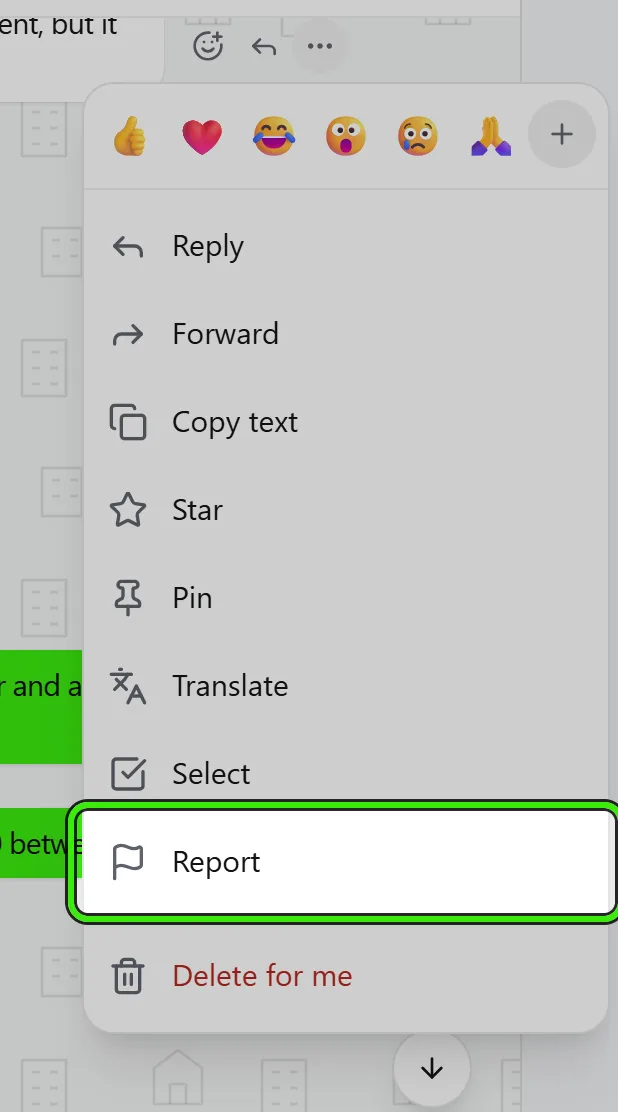
What happens then:
- A person on our safety team reads it. It is not an automated queue that closes itself.
- We freeze a copy of what you reported at the moment you report it, so it can still be reviewed if the other person edits or deletes it afterwards.
- We never tell the person who reported them.
- We email you when it has been reviewed, and tell you whether we acted — but not what we did to the other account. That is their private record, and telling you would make reporting risky.
- Tapping Report twice does not file two reports. We answer honestly that it is already with us.
Some things are more urgent than others, and we do not work the queue oldest-first. A threat, anything about a child’s safety, terrorism, or signs somebody is being exploited pages a person rather than waiting in line. Several different people reporting the same account is the strongest signal we have and moves it up; one person reporting six times is one signal, not six.
Blocking, which is different and immediate
Blocking is yours. It takes effect the moment you do it, we do not review it, and you can undo it whenever you like. Reporting is slow because a person reads it; blocking is instant. Do both if you want to — the report sheet offers it in the same step.
What blocking stops: new conversations, messages and calls from that person.
What blocking does NOT stop, deliberately: rent receipts, a lease waiting for your signature, a payment failure, a security alert, a served notice, or any other legal or financial obligation. Those are not conversation, and blocking your landlord must never become a way to avoid being served notice — or a way for somebody to avoid serving you one.
What we check automatically
We run automated checks over messages and listings for a narrow, published set of serious harms: threats of violence, terrorism, child safety, hate directed at a protected group, harassment, fraud, exploitation, publishing somebody’s private information, and unlawful housing discrimination.
- Nobody reads your conversations. The checks compare text against published patterns and record which ones matched — not what you wrote.
- A check is not a decision. It puts something in front of a person; it does not restrict anybody by itself.
- It is limited and imperfect. It misses things and it flags ordinary sentences — a maintenance report saying a boiler could kill somebody is exactly the kind of sentence a naive filter fires on, which is why a person always decides.
- None of it is used for advertising, for profiling, or to train a model.
Fair housing is the one most worth knowing about, because it contains no bad language at all. "No children", "no Section 8", "no service animals" and "we prefer a professional couple" are the sentences that most often break the law on a rental platform, and they are usually written by somebody who did not know. Those are flagged for a person to look at, never acted on automatically — several of them are lawful in some states and not in others, and a machine cannot make that call.
If a limit is put on your account
We start with the narrowest thing that stops the problem, and we tell you every time: what the limit is, why, whether it ends, and how to challenge it. You can see all of it in Settings → Safety & account standing, on any of the three clients.
The measures, from lightest to heaviest:
- A warning.
- Content removed — a listing, a photo, a message or a review.
- No new conversations. Every thread you are already in keeps working, so you can still answer your landlord, still report a repair, still be served notice.
- No attachments — messages still send, photos and files do not.
- No calling.
- No contact with one named person, in either direction. Neither of you can lift that one.
- No messaging at all.
- The account is closed.
Serious harm skips the ladder. A credible threat, child sexual abuse material, trafficking or fraud against another user can close an account the first time.
A limit affects conversation only. Rent receipts, leases, payment notices and legal notices still reach you.
One photo on a listing can also be hidden on its own — for example because it shows a person, a document or somebody else’s work. Renters then see a placeholder in its place; you and your team still see the original, and nothing else about the listing changes. The owner of the listing, and the managing company when there is one, are emailed and notified in the app with the photo’s position and the reason, and can replace it from their listings. Nothing is deleted.
Appealing
Every limit can be appealed from Settings → Safety & account standing. Tell us what we got wrong. An appeal is read by somebody other than the person who made the original decision — that is a rule, not a courtesy — and we email you the outcome and the reasons for it. If a limit is overturned it is lifted and it does not count against you afterwards.
If somebody has used your photograph
Everything on a listing was uploaded by a Seayora user. If a photograph of yours has appeared here without your permission, the copyright process at seayora.com/copyright is the route — it is a legal procedure with a form, and it works whether or not you have a Seayora account.
If a notice arrives about something YOU uploaded, we remove it and tell you. That is not a finding that you did anything wrong: the law requires us to take material down on a properly made notice and to put it back if you tell us it was a mistake. Filing a counter-notice puts it back in 10 to 14 business days unless the person who complained goes to court, and it also withdraws the strike against your account.
To file one, open Settings → Safety & account standing on the website or either app and press File a counter-notice beside the notice. The form asks for everything the statute requires — your name, postal address and phone number, which material was removed and where it appeared, the three statements (made under penalty of perjury), and your typed name as your signature. We forward it, with your contact details, to the person who sent the notice.
You can see your own copyright record, and the number of upheld notices at which an account is reviewed for closure, in Settings → Safety & account standing. We always tell you before an account is closed for this.
What we will not do
- We will not restrict an account because somebody said they were struggling or in crisis. That reaches a person who can help, never an enforcement action.
- We will not tell the person you reported who reported them.
- We will not read your conversations, sell what is in them, or use them to build a profile of you.
- We will not pretend to be watching in real time. We are not, and a product that implied otherwise would be dangerous.
Related features and guides
- Customer campaigns and referrals — Documentation. Email your own customers once or automatically after their last job, with follow-ups that stop when they book or pay, and reward the customers who refer someone new.
- Where Your Listing Appears on Seayora — Documentation. The city, neighborhood, size, budget and feature pages a published listing shows up on automatically, the rent report your asking price feeds, and how to check.
- Does a Rental Property LLC Have to File a BOI Report in 2026? — Guide. No: FinCEN’s August 2026 final rule exempts companies created in the U.S. from beneficial ownership reporting. What changed, and who still has to file.
- Seayora AI: Repairs, Lease Questions, Briefs and Reports in Plain Words — Documentation. What each Seayora AI tool does — describing a repair, asking about a lease, briefing a visit, checking an invoice, summarizing a month, turning a sentence into a report, reading a lease PDF, writing a campaign and the day’s brief — where to find them on the website and in the iPhone and Android apps, what happens before anything is sent, and what is kept.
- Rent Autopay and ACH Debits: The Federal Authorization Rules — Guide. What Regulation E requires before rent is debited automatically: a signed authorization, a copy, stop-payment rights and notice when the amount changes.
- Texting Tenants: TCPA Consent, Opt-Outs and Quiet Hours — Guide. What the TCPA and the FCC’s rules require before a landlord texts tenants: consent, the STOP words, 10 business days to honor an opt-out, and quiet hours.