Voice Messages After Hours
Have the voice messages residents and customers send you written out under the recording, let your automations act on the words, and answer a call that rings out with an invitation to leave a voice message.
People call and send voice notes when something is wrong — often at night, and often when nobody can listen. Switch on “Write out voice messages” and each one is written out under the recording, so you can read it at a glance, and your automations answer the words exactly as if they had been typed. It is off until you switch it on.
Switching it on
Open Messages, then Automations — on the website, the iPhone app or the Android app — and switch on “Write out voice messages”. Add the emergency number you want given out after a missed call while you are there. It is for the account that receives the messages: a landlord, a management company or a service business.
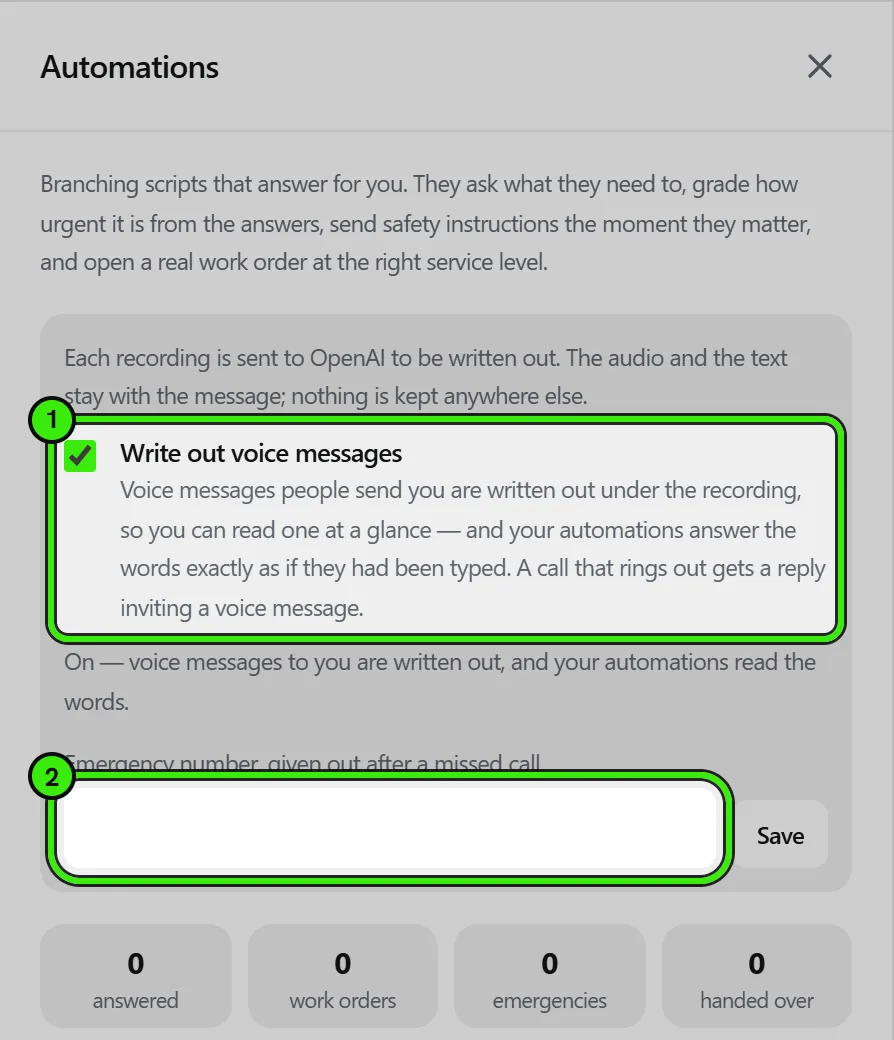
What happens to a voice message
- The recording is sent to our transcription provider and written out, usually within seconds. The text appears under the recording for you and for the person who sent it, marked as automatic.
- Your automations read the words the same way they read a typed message. If you run the after-hours script or the leak, gas or no-heat scripts, a voice message saying “water is coming through the ceiling” starts the same script a typed one would — paging your on-call number and opening the work order are the scripts’ own steps.
- A voice note answering a question an automation asked counts as the answer.
- Nothing is rewritten. The recording stays; the text sits under it.
A call nobody answers
When a call to you rings out, the caller gets one message from you inviting them to leave a voice message, with your emergency number if you set one and a reminder to call the emergency services if anyone is in danger. Somebody who calls again straight away is not sent it twice within half an hour. A call you decline, or one the caller hangs up on after a ring, gets nothing.
What it is not
- It is not an answering service or an emergency service. Nothing is dispatched unless an automation you switched on does it.
- A transcript is written by a machine and can mishear a word. The recording is the message.
- Voice messages to anybody who has not switched it on are never written out.
Frequently asked questions
Why does a voice message have no text under it?
Either the account it was sent to has not switched on “Write out voice messages”, the recording had no words in it, or transcription is not available right now. The recording always plays.
Does the person who sent it see the text?
Yes. The text is part of the message, so both of you see the same words under the recording.
Can a connected assistant read voice messages?
An assistant connected to Seayora that reads your messages sees the text of a voice message once it has been written out, labeled as automatic so it is not quoted as somebody’s exact words.
Does it cost anything?
There is no charge for it on your Seayora account.
Related guides
Related features and guides
- Automations — scripts that answer for you — Documentation. Build a branching script that triages a repair report, grades how urgent it is from the answers, sends safety instructions the moment they matter, and opens the work order at the right service level.
- Contacting Support from Messages — Documentation. Your support conversation is a real conversation — the same thread on the website and both apps, with calls, identity checks and payment requests handled in it.
- Agents: a Leasing Agent and a Renewals Agent That Work Inside Your Limits — Documentation. Answer prospects at any hour, follow up, remind applicants and ask residents about renewing — with every message disclosed, every act logged and anything sent in chat undoable.
- Texting Tenants: TCPA Consent, Opt-Outs and Quiet Hours — Guide. What the TCPA and the FCC’s rules require before a landlord texts tenants: consent, the STOP words, 10 business days to honor an opt-out, and quiet hours.
- Sign In From Any Device — Feature. Seayora runs in the browser on desktop, laptop, tablet, and phone with one account. Messages, voice notes, call history, documents, and payments stay in sync in realtime across every device you are signed in on.
- Voice Notes in Messaging — Feature. Record and send voice notes in any Seayora conversation. Transcoded server-side so they play on iPhone, Android, and desktop alike, stored with the thread, and searchable as part of the property record.