Your Contractor Network
Who you have used before, what you paid them, whether their license and insurance are in date, and who you would call first for each trade.
Contractors (Operations → Contractors) lists every service pro Seayora has verified, and puts your own history with each of them on the card: how many jobs you have given them, what you have actually paid, when you last used them, and whether their paperwork is current.
Can they legally do the work
Every card shows the license and the insurance with a real date. There are four answers and they are deliberately different: in date, expiring within 60 days, expired, and not on file. “Not on file” means the pro has not given Seayora an expiry date — it is not the same as being covered, and Seayora will not say it is.
Seayora verified the documents a pro supplied when they registered. That is a check of the paperwork, not a guarantee of cover on the day. For work where it matters, confirm with the carrier.
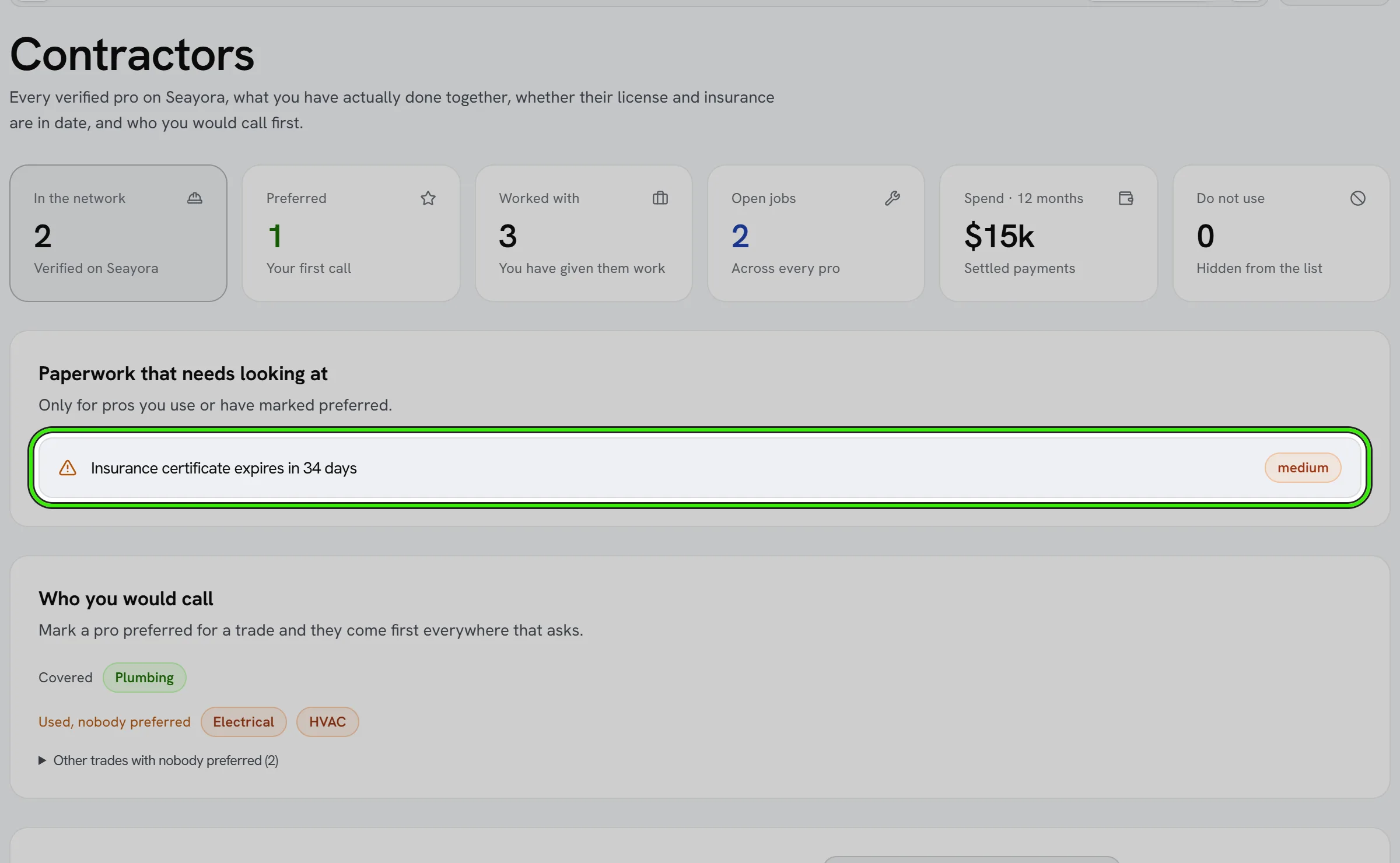
Paperwork that needs looking at
The panel at the top lists only pros you actually use or have marked preferred, with expired first. A lapsed certificate on somebody in another state you have never hired is not your problem, and a list that includes them is one nobody reads.
Your own list
| Setting | What it does |
|---|---|
| Preferred | They come first in this list and anywhere Seayora asks who you would call for their trades. |
| No preference | They stay in the network, ranked by what you have done together. |
| Do not use | Hidden from your list and never suggested to you. |
“Do not use” is your own preference and nothing more. It does not stop a contractor trading on Seayora, working for anybody else, or messaging you, and the contractor is never told. Your notes, tags and rate note are private to your account for the same reason.
Who you would call
Mark a pro preferred and tell Seayora which trades you call them for. The “who you would call” panel then shows the trades you have covered and — more usefully — the trades you have already needed and chosen nobody for. That is the list worth closing before the next 2am boiler.
Opening a pro
- Overview — credentials with dates, their rate and radius, and everything you and they have done together.
- Work history — every job you have sent them, with what happened to it.
- Payments — what you paid and what it was for. Only payments that settled count as spend.
- Their profile — the contractor’s own words and portfolio. Seayora does not check any of it, and the page says so.
- Contract — set standard terms once and sign them.
What a blank figure means
If Seayora could not read your job history or your payments, the card says “couldn’t check” rather than showing zero. “You have never used them” and “we could not find out” are different facts and only one of them is a reason to hire somebody else.
Frequently asked questions
Where do the job and spend figures come from?
From your own records on Seayora — work orders raised against that contractor and payments that settled. Work arranged off-platform is not counted, because Seayora has no record of it.
Can the contractor see my notes or that I marked them “do not use”?
No. Everything in that dialog is private to your account and is never shown to them or to any other customer.
Why is there no rating on some pros?
Seayora does not publish a reputation score until there are enough responses for it to mean anything. “Not enough reviews yet” is not a low score — a made-up number would be worse than none.
Can a management company set up a contract?
Not yet — signing a service contract is a landlord action on Seayora today. Everything else on the screen works the same for a management company.
Does marking somebody “do not use” stop them being assigned work?
It stops Seayora suggesting them and takes them out of your list. It is not a block: anyone on your team can still raise a job to them from Maintenance if they choose to.
Related guides
Related features and guides
- Announcements, Packages & Amenities — Documentation. Post notices to residents, log deliveries so residents know where to find them, let residents book shared spaces, and give them a board and a directory of their own.
- Building Health Score — Documentation. What the building health score is made of, what each factor means, what it deliberately does not claim, and how to show a building condition badge on a listing.
- An eviction case has been opened on my tenancy — what Seayora shows me — Documentation. If your landlord opens an eviction case on Seayora you are told, and you can see it: the stage it has reached, what is outstanding, any hearing date, and — first on the page — what would end it, including free legal help where it is available.
- Field Service Management Software — Feature. The unified service-pro command center: estimates, jobs, crew, fleet, inventory, safety, payroll, invoicing, reputation, and forecasting — free to join, 4% only when you are paid.
- Safety Records & Certifications — Feature. Employee document tracking, workers-comp records, and certification expiry alerts — in the system where the work happens.
- Vetted Contractor Network — Feature. Dispatch maintenance to identity-verified service professionals in your area, or bring your own contractors onto the platform — with quality tracking on every job.