Announcements, Packages & Amenities
Post notices to residents, log deliveries so residents know where to find them, let residents book shared spaces, and give them a board and a directory of their own.
Community (Communications → Community) is the day-to-day layer between a building and the people who live in it. Residents are whoever holds an active lease on the property — there is no list to maintain. It sits under Communications rather than Operations because talking to a whole building is messaging, not maintenance.
Announcements
Post to one building or all of them: water shut-offs, package-room hours, a rooftop event, a policy change. Residents get an in-app alert and an email the moment you post. Pin the important ones; set an expiry on the temporary ones.
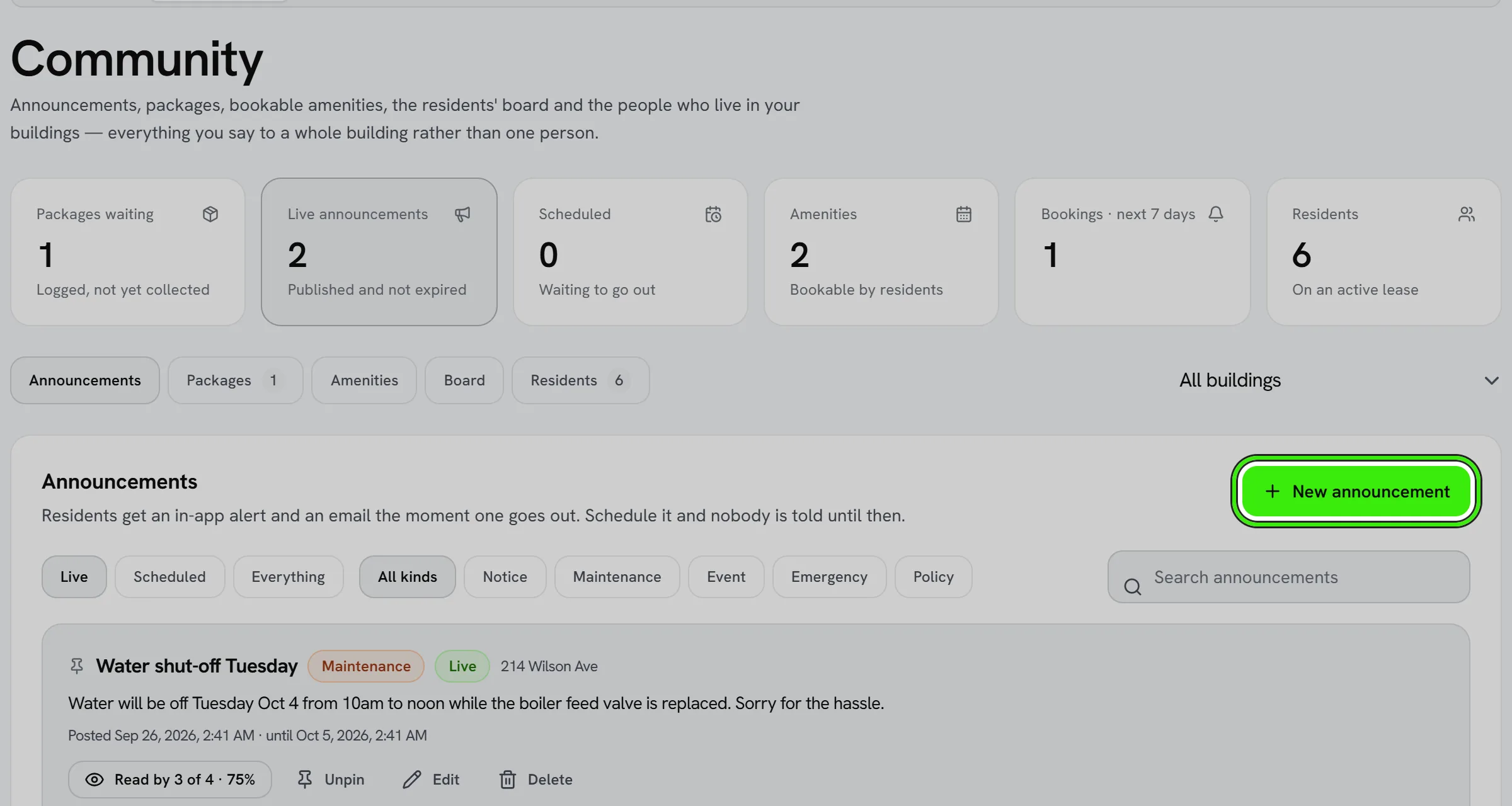
- Send it later. Choose a time and nobody is told and nobody can see it until then — the list shows it as Scheduled, and you can still move it or change the wording while it is waiting.
- See who read it, not just how many. “Read by 4 of 12” opens the list of who has and who has not, which is the half that tells you whether to knock on doors.
- Edit a posted announcement to correct it. Nobody is emailed a second time — the people who received it keep the email they were sent.
- Live, Scheduled and Everything are separate views, so an expired notice is never mistaken for one that is still up.
Packages
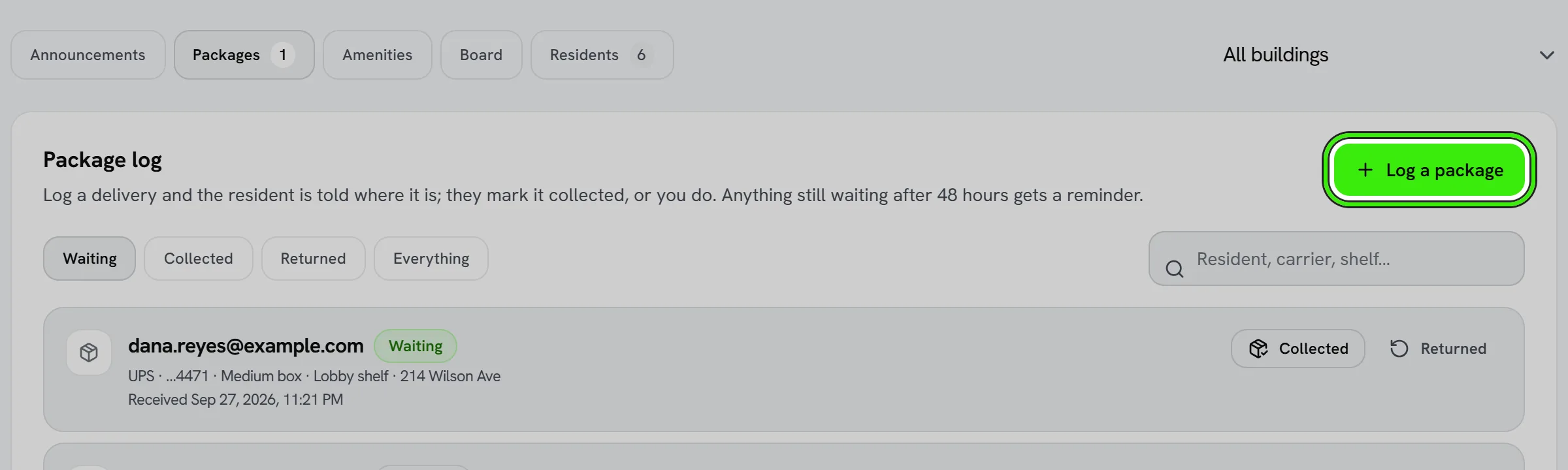
- Log a delivery with the carrier, the last four of the tracking number and where you put it. The resident is told immediately.
- Every waiting package has a 6-digit pickup code on the resident’s My building screen. At the desk, choose Collected and type it in: the handover is recorded as made with the resident’s code, and a wrong code is refused.
- No code? You can still hand it over — say why (they showed ID, they are known to the desk, or something else) and it is recorded as marked by staff, with that reason, rather than as a checked handover.
- The resident can also mark it collected themselves from My building. Anything uncollected after 48 hours gets a reminder.
- “Returned” is for a package that went back to the carrier.
- Tapped the wrong one? “Still waiting” puts it back on the list — without it, a package marked collected by mistake is one the resident is never reminded about again.
- Logging a whole delivery round: turn on “keep the form open” and the building and carrier stay while the resident clears.
- Anything waiting more than five days is flagged, and the count is on the tile at the top.
Amenities
Add a roof deck, gym, party room or laundry slot with its hours, slot length, how many people fit in a slot, and the house rules. Residents book from My building in a tap and get a confirmation with the rules; you see every booking and can cancel one with a notice to the resident.
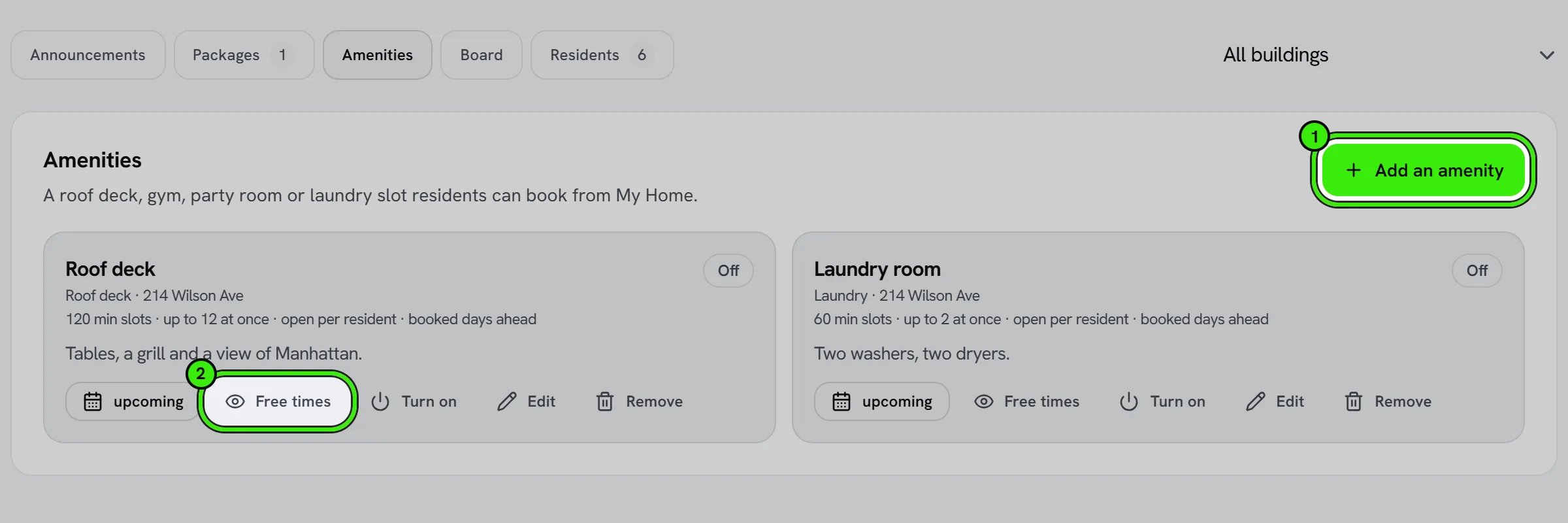
- “Free times” shows exactly what your hours produce — the same diary residents book against, with anything already taken removed. It is the fastest way to find out that a day you meant to open is closed.
- Turning an amenity off stops new bookings and keeps everything set up. Removing it does neither of those things to bookings already made, and the confirmation says so.
- Everything here works on the phone apps too, hours included.
The residents’ board
Residents have a board of their own on My building: things for sale or to give away, things wanted, lost and found, events, recommendations and general notes. Only people with a lease in force at the building see it, and a neighbor is shown as a first name and a last initial — never an email address, a phone number or a unit.
- Posting. Choose a kind, give it a title and write it. A resident can post five times a day. When somebody moves out, their posts stop showing.
- Messaging about a post. A live post is an invitation to be contacted about it, so a neighbor can message the author in Seayora from the post — the conversation shows the same first name and last initial.
- Safety. Every post is checked by Seayora’s automated safety systems when it is published, and one that looks dangerous is held for a person to review; the author still sees it, with the reason. Any resident can report a post to Seayora’s safety team — the report goes to Seayora, not to the building, with a copy of the post as it was.
- Moderation. The building sees every post on the Board tab of Community and can take one down with a reason — the author is told the reason — or put it back. A post held by Seayora’s safety checks can only be released by Seayora.
- Deleting. An author can delete their own post at any time; it comes off the board for everyone.
Neighbors — the building directory
The directory is opt-in and works both ways: nobody is in it until they add themselves, and only people who have added themselves can see who else has. A listed resident shows as a first name, a last initial and an optional line they write (“dog walker on 4”), and neighbors who are listed can message each other in Seayora. Leaving takes you out of everybody’s list at once.
Residents
The Residents tab is the exact audience an announcement reaches and the only people a package can be logged for — derived from active leases, with nothing to keep up to date. Message any of them from there.
Frequently asked questions
Who counts as a resident?
Anyone with a fully executed lease on the property that has not ended. A former resident keeps read access to what was posted while they lived there, and their package history for 120 days.
Can a resident see other residents’ packages or bookings?
No. A resident sees only their own packages and bookings; the building sees all of them.
Can the building see a resident’s pickup code?
No. Only the resident’s own screen shows it — not the package log, not the owner’s app and not a connected assistant — because a code the desk could read off its own screen would prove nothing when somebody asks for the parcel.
Can residents post?
Yes — on the residents’ board on My building, for things for sale, wanted, lost and found, events and recommendations. Announcements are still the building’s own voice; residents reply to those through Messages.
Can my neighbors see my email address or unit?
No. On the board and in the directory a neighbor sees your first name and last initial, plus anything you choose to write. If they message you, the conversation shows the same name and never your email address.
Who can take a post down?
The author can delete it, the building can take it down with a reason (the author is told), and Seayora’s safety team can hold or remove it. A post held by Seayora’s safety checks can only be released by Seayora.
Can I see the directory without being in it?
No — it works both ways. Add yourself (a line about you is optional) and you see everyone else who has. Leave at any time and you disappear from everyone’s list at once.
If I schedule an announcement, can residents see it early?
No. A scheduled announcement is invisible to residents and nobody is alerted until the moment it goes out. Until then you can move the time, change the wording, or delete it.
Does editing an announcement email everyone again?
No, deliberately. Residents keep the email they were sent; editing changes what is on screen from then on. If the correction matters, post a new announcement.
Related guides
Related features and guides
- Building Health Score — Documentation. What the building health score is made of, what each factor means, what it deliberately does not claim, and how to show a building condition badge on a listing.
- Booking Tours & Showings — Documentation. How prospective renters book a tour from your listing, what you control (hours, slot length, in-person, self-guided or video), and what the visitor receives.
- Your Contractor Network — Documentation. Who you have used before, what you paid them, whether their license and insurance are in date, and who you would call first for each trade.
- Apartment & Rental Search — Feature. Search rentals by city, neighborhood, price, bedrooms, and amenities. Save homes, get alerts when something changes, and apply online in minutes with a reusable renter profile.
- Calendar & Scheduling — Feature. Schedule showings, inspections, site visits, and maintenance jobs on a shared calendar so field work and leasing activity stop colliding.
- In-App Video Calls — Feature. Start a video call from any Seayora conversation, or upgrade a voice call to video mid-conversation. Run remote showings, walk a contractor through a repair, and schedule video meetings on the shared calendar — no personal number, no third-party meeting app.