Booking Tours & Showings
How prospective renters book a tour from your listing, what you control (hours, slot length, in-person, self-guided or video), and what the visitor receives.
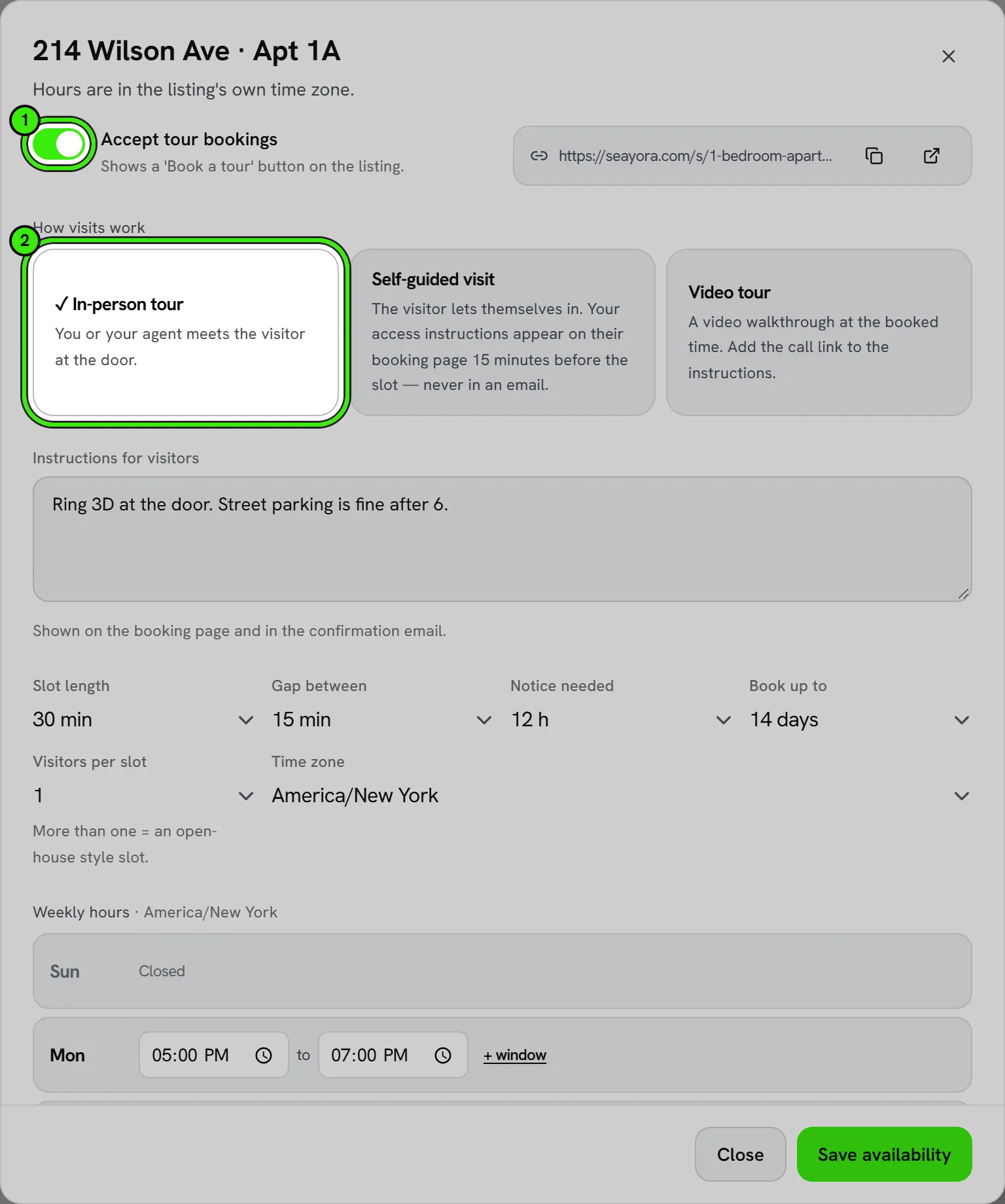
Every published listing can take tour bookings straight from its page. You set the hours, the visit type and how much notice you need; visitors pick a time and get a confirmation, a reminder the day before, and a link to reschedule or cancel — no account required on their side.
Switching it on
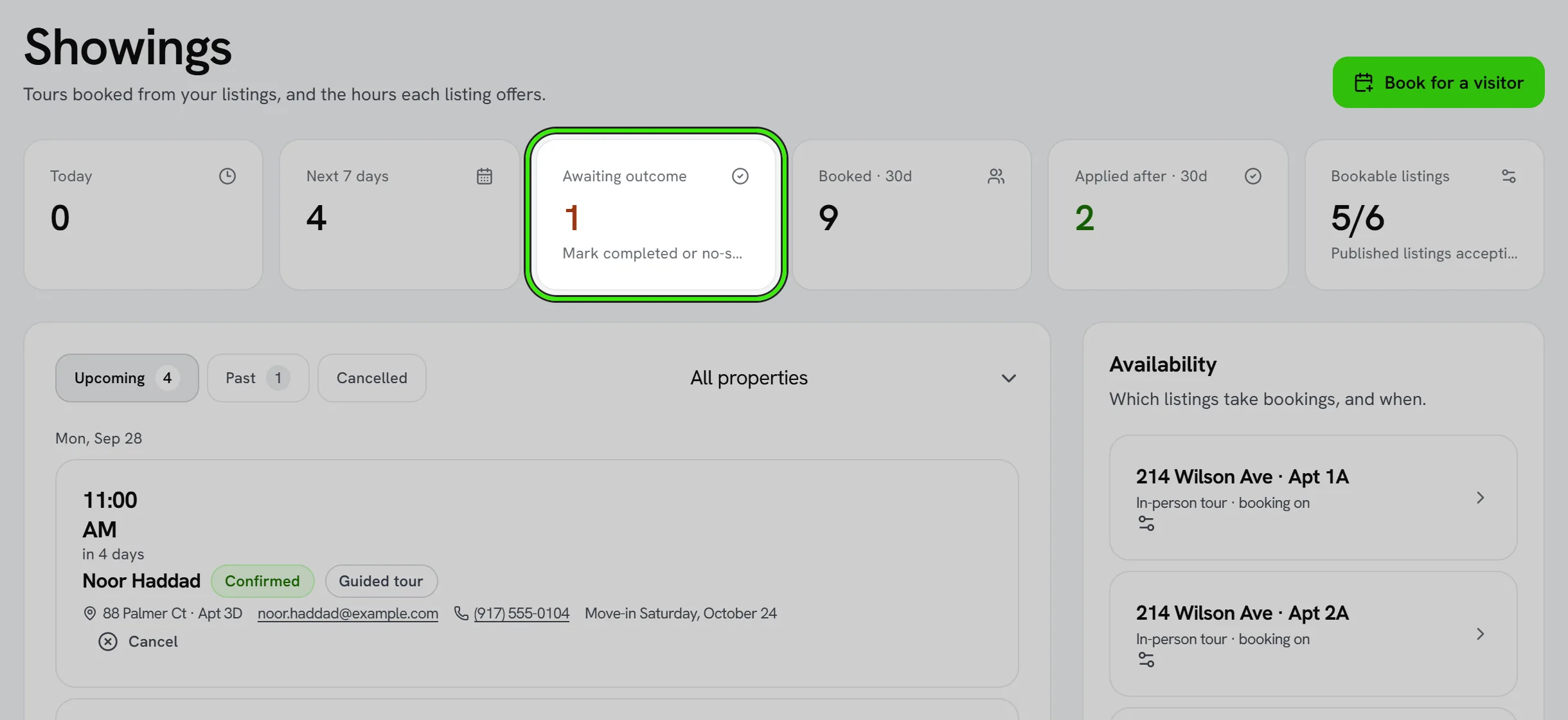
- Open Showings (Operations → Showings) and pick a listing under Availability.
- Choose the kind of visit: in-person (you or your agent meets them), self-guided (they let themselves in), or a video tour.
- Set weekly hours in the listing’s own time zone, the slot length, the notice you need, and how far ahead people may book. Add a blackout for any window you need closed.
- Turn on “Accept tour bookings”. A Book a tour button appears on the listing page.
Self-guided visits
For a self-guided visit you write the access instructions yourself — for example a lockbox and its code. They are never emailed. They appear on the visitor’s booking page only from 15 minutes before their slot until 30 minutes after it. Use a lockbox you can re-code rather than the unit’s permanent door code.
Where Seayora has switched it on, a self-guided visitor is also asked to confirm their identity — a photo of a government ID and a short selfie, checked by our identity provider — before the access instructions appear or the door can be opened from the booking page. The instructions stay hidden inside the visit window until that check passes, so ask visitors to do it before they set off. A visit that is rescheduled is a new booking and asks again.
What the visitor gets
- A confirmation email (and a text, if they gave a number and asked for one) with the time, your instructions and a manage link.
- A reminder 24 hours before.
- A follow-up two hours after the visit with a link to apply.
Wallet passes
The visitor’s booking page offers “Add to Apple Wallet” on an iPhone and “Add to Google Wallet” on an Android phone, so the viewing shows up on their lock screen at the right time. You can add an upcoming viewing to your own wallet the same way from Showings in the Seayora app.
- The pass carries the home, its address and the time — never the access instructions or a door code.
- Rescheduling keeps the same pass: a Google Wallet card moves to the new time on its own; on an iPhone, add it again from the new confirmation and it replaces the old one.
- Canceling moves a Google Wallet card to Expired passes and says it was canceled. Either kind of pass expires by itself a day after the visit.
What you get
Every booking lands on your calendar and in the Showings queue with the visitor’s name, email, phone, party size and anything they wrote. After the visit, record what happened — interested, applied, not for them, or a no-show — so the queue stays honest. You can cancel with a reason (the visitor is told) or book on a visitor’s behalf for a phone inquiry or walk-in.
Frequently asked questions
Do visitors need a Seayora account?
No. They book with a name and email; the link in their confirmation email is how they manage the booking. If they are signed in, the booking is linked to their account as well.
Can two people book the same slot?
Only if you allow it — “visitors per slot” is a setting. At 1, the second person is told the time was just taken and shown the others.
Which time zone are the hours in?
The listing’s. A Denver owner managing a Brooklyn unit sets and sees Brooklyn time everywhere on the Showings page, and the visitor sees the time in the listing’s zone too.
What happens if I cancel?
The visitor gets an email (and a text if they opted in) with your reason and a link to pick another time. Your calendar entry is marked canceled.
Related guides
Related features and guides
- Creating & Publishing a Listing — Documentation. How to post a rental listing on Seayora — property details, pricing, availability, amenities, and how listings appear in search.
- Listing Distribution (Dwellsy) — Documentation. How to send a published listing to outside rental networks, what data leaves Seayora when you do, where inquiries land, and what “in the feed” means versus “live on the partner”.
- Marketing Spend and Cost per Lease — Documentation. Record what you pay for each way people find you, set a monthly budget per channel, and see the cost per lead, per tour, per application and per lease — measured against your contact book, with Seayora's own listing fees counted automatically.
- Rental Listing Software — 60 Days Free, Then $9/Month — Feature. Advertise apartments, houses, condos, and townhomes for rent. Every listing gets its first 60 days free, then $9/month while the unit stays vacant — charged a month ahead, with the unused days refunded the moment it rents. No brokerage fee, no setup fee, no subscription.
- Listing Descriptions and Photos That Actually Rent the Unit — Guide. How to write honest, compelling rental listings and take photos that fill vacancies faster, while staying within fair housing advertising rules.
- In-App Video Calls — Feature. Start a video call from any Seayora conversation, or upgrade a voice call to video mid-conversation. Run remote showings, walk a contractor through a repair, and schedule video meetings on the shared calendar — no personal number, no third-party meeting app.