Charging a Customer Quickly
One form: the kind of work, labor and parts, the job site — and the card or a pay link, with the right sales tax and the rule behind it.
Sales tax on contracting work is decided line by line, and that is not something anybody wants to do standing in a customer’s basement. On the website, Finance → Take a payment is one form that does it for you: pick what kind of job it was, type the labor and the parts, give the job site, and take the card or send a pay link — the total, the tax and what you receive are worked out live beside the form, and the button charges exactly that figure. (Quick charge used to be a separate page that then opened the card terminal in a window; it is part of Take a payment now, and the old link opens it.) In the phone apps it is Finance → Quick charge.
What kind of work was it?
- Repair or service call — something broke and you fixed it. Taxable in most states, including the labor.
- Capital improvement — a permanent addition that increases the property’s value. Often exempt, but only with the customer’s signed certificate.
- Maintenance agreement — a recurring service plan rather than a one-off visit.
- Materials only — you supplied the parts and somebody else fitted them.
- Labor only — no materials at all.
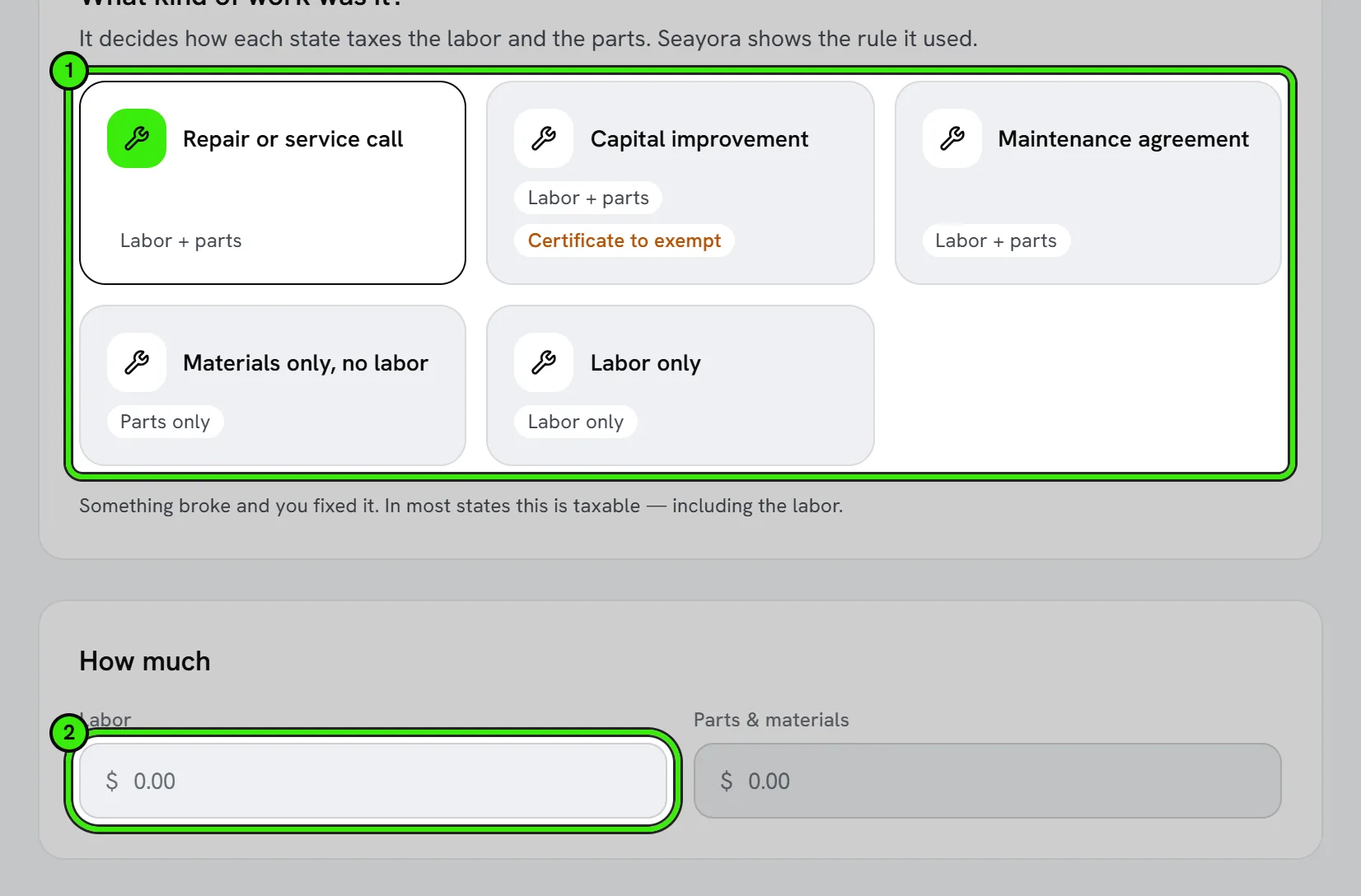
Each card says what the kind of work covers, with examples, so the choice is quick to make. The kind only says what each half of the bill IS. Your state’s rule then decides whether it is taxable, and Seayora shows you which rule it used and the citation behind it.
Labor and parts
Type the labor and the parts & materials as two amounts — the figures you actually billed — and they become two correctly classified lines that add up to exactly what you tell the customer. A kind of work with no labor (materials only) or no parts (labor only) says so beside that box.
The job site decides the tax
Work on real property is taxed where the property is, not where the customer lives — an out-of-state owner of a Brooklyn building is a common case. So the form asks for the job site, and as you type it suggests real addresses; picking one fills in the street, the city and the ZIP code. There is no state to choose: the ZIP code decides the state and the local rate — in Westchester that is 8.375%, not New York’s 4%; in New York City it is 8.875%. If the ZIP sits across a boundary between two different rates, Seayora will not guess and will not charge the state rate alone: it asks for the street address, or your own combined rate for the job.
The job site starts filled in
You rarely have to type the job site. Seayora already knows most of them, and the form lists them under the address: the job you are clocked in to, a job on your schedule today, a job or a property somebody messaged you about, the jobs a landlord or management company dispatched to you, and where you last charged a customer. Pick one and the street, the city, the ZIP code and — when Seayora is sure of it — whether the property is commercial are filled in, along with the customer who dispatched the job. Seayora fills one in by itself only when it is not a guess: the job you are clocked in to, the one job you have in progress, or, in the phone apps, a job site within about 200 meters of where you are standing.
In the iPhone and Android apps, with nothing like that to go on, the ZIP code comes from where the phone is. The app asks for your location once; after that it uses it only if you allowed it, or when you tap Use my location. Your location is compared with your own job sites and then dropped — Seayora does not store it. The street is never taken from GPS, because a house number worked out from a position is often the neighbor’s; the ZIP code is what prices the job.
From a job itself it is one tap: open the job (Jobs or Operations in the apps, the job’s card under Active jobs on the website) and press Charge for this job. The payment opens with that job’s site and customer filled in and linked to that job — however long ago the work was done. It is not offered on a canceled job, or to a team member who cannot take payments.
Everything filled in stays editable, and the form says where it came from until you change it. Nothing you have already typed is replaced by an automatic fill — only by a site you pick yourself or by Use my location. A linked job shows above the address with an Unlink button: unlinking keeps the address and drops the job.
A state you are not registered in
Seayora does not charge tax in a state you have no registration for, unless you have switched on "Collect wherever the job is" in Tax settings. It does not quietly show you $0.00 either: it tells you the work WOULD have been taxable there, and that the liability for the uncollected tax is yours rather than your customer’s. That is usually the moment somebody discovers they need to register.
Tax-exempt customers
A certificate you already have on file takes the tax off by itself, as long as the payment names who it is for or which job: an exempt organization’s or a direct-pay certificate is held for the customer (found from the email you enter, or from whoever dispatched the job), and a capital-improvement certificate such as New York’s ST-124 is held for one job (found when the payment is linked to that job). The form then says which certificate took the tax off, in the same words the receipt prints — on the website, on both phones, on a pay link and on Tap to Pay on iPhone alike.
For a certificate that is not on file yet, check "Tax-exempt" and enter the customer’s exemption certificate number, and the tax comes off — the number is printed on the receipt as the reason, and it travels with a pay link too. Checked with no number, the tax stays on and the form says why: the certificate is the exemption, not the box.
What you see before you charge
Beside the form: labor, parts & materials, the sales tax with its rate and jurisdiction, the total the customer pays, the Seayora processing fee, and what you receive. Then choose Card now (key in the customer’s card — the number goes straight to the payment processor and never to Seayora) or Pay link (the customer pays on their own device). The receipt, or the link, goes to the email you give.
Things you bill often
Under the form is a short list of lines you have billed before, with what you typically charged for them. It is built from your own invoices — Seayora ships no price book and sets no prices — so it is empty at first and fills in once you have billed the same thing a couple of times.
History
The History tab lists every card charge and pay link: search by customer, email or what it was for, filter by status (paid, waiting to be paid, refunded, failed, canceled), by how it was paid and by date, and export what is on screen. From a charge you can refund all or part of it, and from a pay link you can resend it or cancel it. A refund asks you to confirm first, because money that has left cannot be called back. On the phones the same history is Finance → Charge history.
Frequently asked questions
Does Seayora file my sales tax returns?
No. It computes the tax, records what you collected and the basis for it, and prints that on the document. It does not register you, file a return or remit anything.
Why is my capital improvement being taxed?
Because no exemption certificate was found for that project. The certificate IS the exemption — at audit, “it was obviously a capital improvement” is not a defense. Add the customer’s signed certificate to the job, then press Charge for this job on that job (or pick it under the address) so the payment is linked to it, and the tax comes off.
Does Seayora keep my location when it fills in the ZIP?
No. The app sends where the phone is once, Seayora compares it with your own job sites to find the one you are standing at, and then drops it; the ZIP code of anywhere else is worked out on the phone itself. Nothing about where you were is stored.
The figure on screen and the charge are different.
They cannot be. The form asks the same tax engine the charge uses, with the same arguments, and the button is only offered against the current figure. If you change anything, the figure is worked out again before you can charge.
Where did the state picker and the labor/parts slider go?
The ZIP code decides the state, so there is nothing to pick; and labor and parts are two amounts you type, because they are the figures you actually billed. Both changed on 2026-10-09.
Can a technician use this, or only the owner?
A technician can price and charge. The registration list and the billing history behind the suggestions are the owner’s.
Related guides
- Invoices, Receipts & Sales Tax for Contractors
- Tax Settings: Registrations, Rates & Exemption Certificates
- Compliance, Safety & 1099s for Contractors
Related features and guides
- Invoices, Receipts & Sales Tax for Contractors — Documentation. How a contractor invoice is built in Seayora, how sales tax is worked out for the job site line by line, what the customer sees at checkout, and when a receipt is issued.
- Tax Settings: Registrations, Rates & Exemption Certificates — Documentation. Telling Seayora where you are registered to collect, collecting wherever a job is, filing exemption certificates, and reading each state's rule.
- Compliance, Safety & 1099s for Contractors — Documentation. Setting what your business is required to hold, how Seayora grades your certificates, and exporting 1099s for your accountant.
- Timesheets & Labor Tracking — Feature. Technicians clock in and out against a job, hours flow into job costing and invoicing, and you see real labor cost per job instead of an estimate.
- Job Costing — Feature. Track labor, materials, and vendor costs against each work order or capital project, so you know real margin per job instead of guessing.
- Pricing Tiers, Tax Quotes & Receipt Capture — Feature. Configurable pricing tiers, tax quoting, late fees, promo redemption, PDF invoices, and OCR receipt scanning that turns a photo into a booked expense.