Invoices, Receipts & Sales Tax for Contractors
How a contractor invoice is built in Seayora, how sales tax is worked out for the job site line by line, what the customer sees at checkout, and when a receipt is issued.
Invoices & Tax (in the service-pro portal, and in the Money section of the mobile apps) is where a contractor bills a customer, collects the right sales tax for the job, sends the invoice with a link the customer can pay from, and issues a receipt once the money has actually arrived. This guide explains how each of those works and — because it is the part people ask about — how the tax is decided.
Building an invoice
- Customer — name and email. The email is where the invoice and the receipt go.
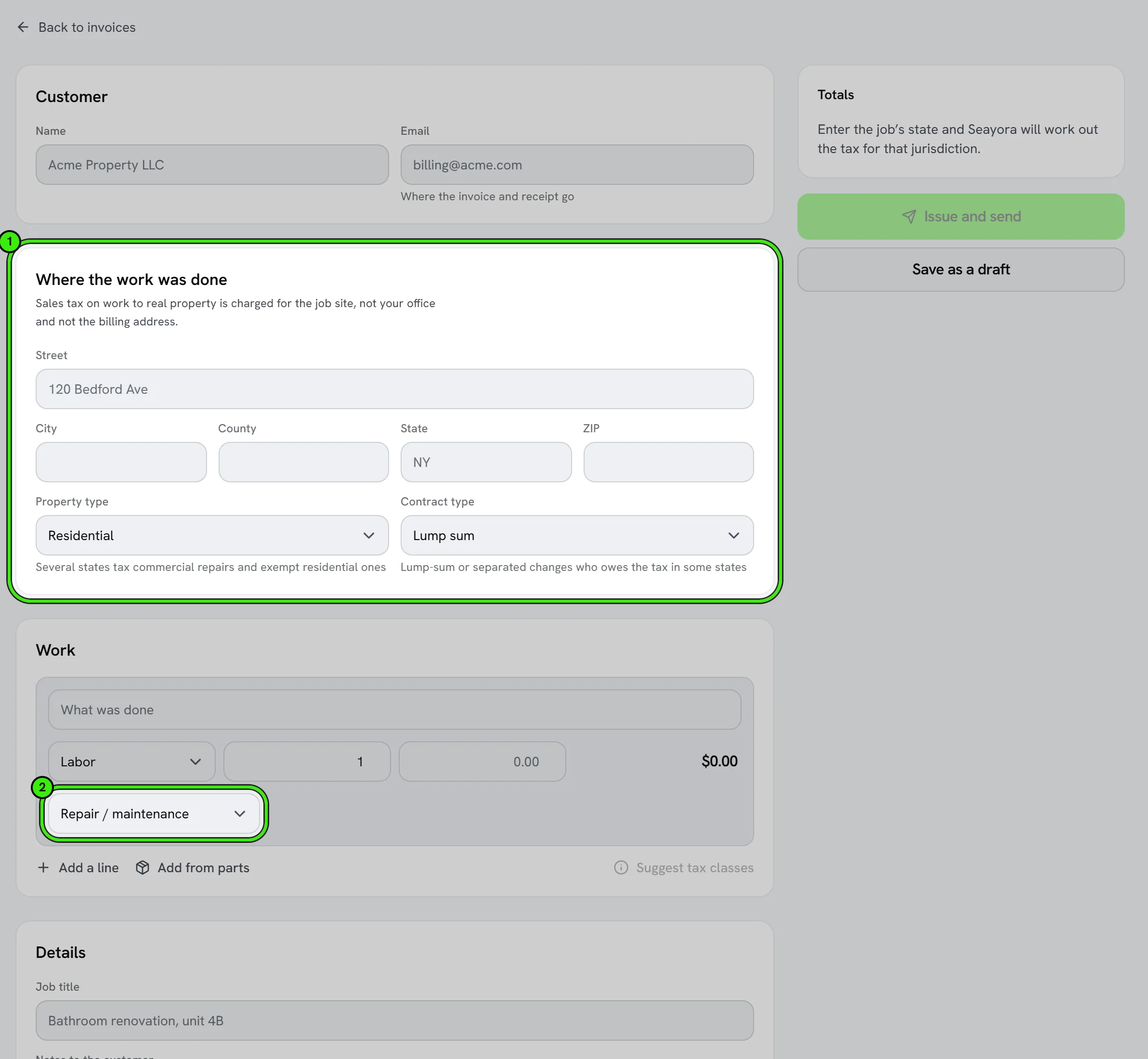
- Where the work was done — the job-site address. Sales tax on work to real property is charged for the place the work was done, not your office and not the billing address, so an out-of-state owner's Brooklyn building is taxed as Brooklyn.
- Property type — residential or commercial. Several states tax commercial repairs and exempt residential ones (Texas is the clearest example), so this changes the answer.
- Contract type — lump sum, or separated / time-and-materials. In roughly fifteen states this decides whether you are treated as the consumer of the materials or as a retailer of them.
- Lines — each line has a kind (labor, materials, equipment, fee, discount), a quantity and price, and a tax class. Materials can be picked from your parts catalog, which fills in the price and the tax facts for you.
Why tax is decided per line
A single invoice can carry an exempt line and a fully taxed one. In New York, a capital improvement (a new bathroom) is exempt to the customer while a repair (fixing the faucet) is taxable including the labor — same contractor, same day, opposite answers. One rate applied to the whole invoice gets one of those wrong every time, which is why every line carries its own tax class and its own verdict.
The tax classes
| Class | Use it for |
|---|---|
| Repair / maintenance | Work that restores something to its existing condition — most service calls. |
| Capital improvement | Work that adds value permanently and becomes part of the building. In states that name a form (NY ST-124, NJ ST-8) the customer signs it, and without it on file the work is taxed. |
| New construction | Ground-up construction. |
| Appliance / equipment repair | Repair of something that is not part of the building — a plug-in dishwasher, a portable unit. |
| Sale of goods | Selling a part with no installation. |
| Service | A non-construction service — an inspection, a consultation. |
| Exempt | You are asserting an exemption. It still needs a certificate on file to be honored. |
What Seayora checks, in order
- Are you registered to collect in the job's state? If not, no tax is charged — collecting tax in a state you have no return to file on is its own problem — and the invoice tells you whether the work would have been taxable, which is your signal to register.
- What does that state's rule say about this class of work, on this property type?
- Are you the consumer of the materials or a retailer of them? If you paid sales tax when you bought a part and the state treats you as its consumer, the customer is not charged tax on it again — and the invoice says so under that line.
- Is there an exemption certificate on file for this customer or this job? The certificate is the exemption; a checkbox is not.
When the tax cannot be worked out
"Undetermined" is not zero. If the work is taxable but Seayora has no rate on file for the address — usually because the job is outside the published table below — the invoice cannot be issued, and the screen says exactly what is missing. Issuing it anyway would bill the customer $0.00 tax on taxable work, and the shortfall would be yours to pay. Set your own combined rate in App preferences (it prints on the invoice as your own rate) and the button comes back.
Rates for every ZIP code in New York, New Jersey, Pennsylvania and Connecticut
Every ZIP code in these four states — 5,485 of them, including PO-box and single-organization ZIPs — is in Seayora's directory, with the county (and, in New York, the city) it covers. The rate is the state's own published figure, with its citation printed on the invoice. New Jersey and Connecticut have one rate everywhere. Pennsylvania adds a local rate in Philadelphia and Allegheny County only, charged where the job is (Act 21 of 2026). New York adds a county rate everywhere, and in New York City and eighteen other cities a city rate.
| Where the job is | Combined rate |
|---|---|
| New York City (all five boroughs), Yonkers | 8.875% |
| Erie, Suffolk, Oneida (including Utica and Rome) | 8.75% |
| Nassau | 8.625% |
| Allegany | 8.5% |
| Westchester (outside Yonkers), Rockland, Putnam | 8.375% |
| Herkimer | 8.25% |
| Orange, Dutchess | 8.125% |
| Most other New York counties, including Albany, Monroe, Onondaga, the Catskills | 8% |
| Ontario | 7.5% |
| Saratoga, Warren, Washington | 7% |
| New Jersey (everywhere — Salem County's half rate and the Urban Enterprise Zone rate do not apply to services) | 6.625% |
| Pennsylvania: Philadelphia / Allegheny County / everywhere else | 8% / 7% / 6% |
| Connecticut (everywhere) | 6.35% |
When the street address decides
Most ZIP codes sit inside one county and the ZIP alone sets the rate. Some cross a line where the rate changes — 12302 is partly Schenectady County (8%) and partly Saratoga County (7%); 19118 is mostly Philadelphia (8%) with a corner of Montgomery County (6%); nearly half of 10708 "Bronxville" is the City of Yonkers (8.875%) — and for those the job's street address decides. Seayora asks the US Census Bureau's address service which county and city the street is in, once per address, and charges that place's rate; the invoice says the job was placed by its street. Without a street on such a ZIP, the screen names each possible rate and the invoice waits for the street (or for your own combined rate in App preferences). A ZIP typed with the wrong state — "Hoboken, NY 07030" — is refused rather than priced at the wrong state's rate.
How the rates are kept current
On the 1st of every month Seayora reads each state's own publications — New York's Publication 718, 718-A and locality rate-change notices; New Jersey's Rates and Boundaries page and bulletin S&U-4; Pennsylvania's sales-tax and local-tax pages; Connecticut's DRS page — and compares every published rate with the rate it charges. Nothing changes automatically: if a state publishes a new rate, a person reads it and adds the new rate with the date it takes effect. Invoices issued before that date keep the rate they were issued at.
What the customer sees
The customer gets an email with the amount, a note of how much of it is tax, and a link. The page behind the link shows every line, the tax on each, the reason any line carries no tax, the rate and jurisdiction, the citation, and a card form. The receipt and the PDF carry the same basis. Nobody has to call you to ask why there is or is not tax on a line.
Receipts
A receipt is issued when the money actually arrives — not when the card is submitted. On a card that is effectively immediate. On a bank transfer it is a few days later, and if the bank returns the payment the receipt is marked reversed and the customer is told, rather than left holding a document that says they paid. Receipts have their own numbering, separate from invoices.
Saving and editing a draft
An invoice can be saved as a draft without sending it — on the website, the iPhone and Android. A draft goes to nobody and has no number yet. Open it from the invoice list (Edit draft) to change the customer, the job address, the lines or anything else; the tax is worked out again when you save, and nothing is sent until you issue it. A draft whose tax cannot be worked out can still be opened and fixed — change the address or a line's class and save.

Correcting an issued invoice
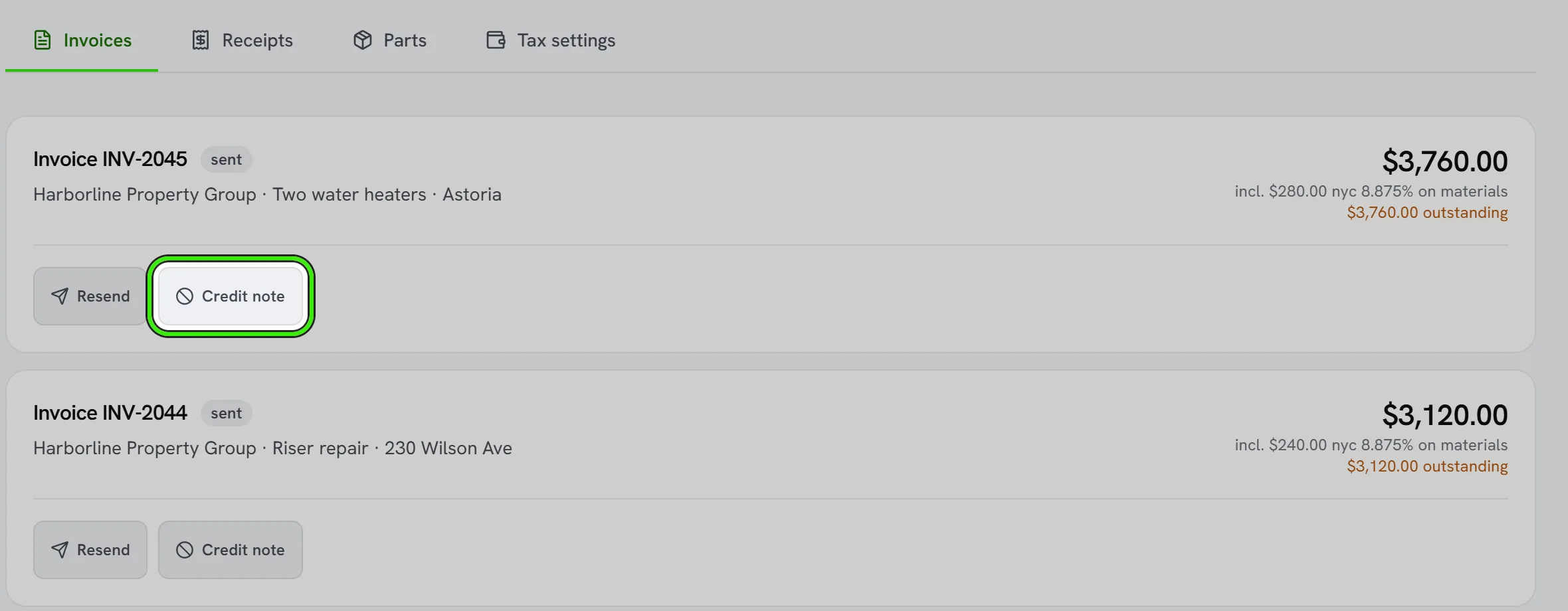
An issued invoice is not edited. The customer has it, your books have posted it, and a return may have been filed off it. To change one, raise a credit note against it (which reverses the tax at the rate the original was issued at) or void it and issue a new one. You can credit part of an invoice more than once, but the credits together can never come to more than the invoice — a credit that would is refused and tells you how much is left to credit. Voiding keeps the number; a gap in the sequence is what an auditor asks about, so nothing is ever deleted.
What Seayora does not do
Seayora computes the tax from the rules and rates on file and records the basis on every document. It does not register you with a state, file a return, or remit tax, and none of this is tax advice. The state rules it applies are published on the Tax settings screen with their citations; confirm anything material with your accountant, especially in states the screen flags as carrying exceptions.
Frequently asked questions
Why is there no tax on my invoice?
Open the invoice — the reason is printed under the tax line. The common ones: you are not registered to collect in that state yet, the work is a capital improvement with a certificate on file, the state does not tax that kind of work, or you are the consumer of the materials and already paid tax on them.
Can I just type a tax amount in?
No. A typed amount has no basis behind it, and the document would not be able to say why. Set the line's tax class, the property type and the job address and Seayora works it out — or mark a part taxable or not in the catalog with a reason, which does print.
The rate looks too low.
If only the state rate is on file for an address in a state with county or city taxes, the invoice warns that the figure is almost certainly short and does not issue as confident. Add the local rate for that area in Tax settings.
Why is my invoice asking for the street address?
The job's ZIP code crosses a county or city line where the rate changes, so the ZIP alone cannot say which rate applies. The screen names each possible rate. Add the street and Seayora places the job (through the US Census Bureau's address service) and charges that place's rate. A PO-box ZIP needs the job site's street too, since no work is done at a post office.
Related guides
- Parts & Materials: What Gets Taxed and What Does Not
- Tax Settings: Registrations, Rates & Exemption Certificates
- Accounting Suite Overview
Related features and guides
- Parts & Materials: What Gets Taxed and What Does Not — Documentation. The parts catalog, why "tax paid at purchase" matters, what buying on a resale certificate changes, use tax, purchase-tax credits, and the parts tax report.
- Tax Settings: Registrations, Rates & Exemption Certificates — Documentation. Telling Seayora where you are registered to collect, collecting wherever a job is, filing exemption certificates, and reading each state's rule.
- Accounting Suite Overview — Documentation. A tour of Seayora’s accounting and bookkeeping tools — invoicing, bills, ledger, bank feeds, reports, automations, and the AI analyst.
- Pricing Tiers, Tax Quotes & Receipt Capture — Feature. Configurable pricing tiers, tax quoting, late fees, promo redemption, PDF invoices, and OCR receipt scanning that turns a photo into a booked expense.
- Vetted Contractor Network — Feature. Dispatch maintenance to identity-verified service professionals in your area, or bring your own contractors onto the platform — with quality tracking on every job.
- Sales Tax Basics for Contractors and Service Businesses — Guide. When contractors charge sales tax: how states treat repairs, capital improvements and materials, what nexus means, and the exemption certificates to keep.