Chat Appearance & Wallpapers
Themes, accents, bubble styles and wallpapers for your conversations — including your own photo, for every chat or just one.
Appearance settings are saved to your account, so the theme you pick on your phone is the theme the website opens with.
Wallpapers
Choose from the built-in wallpapers, or upload your own photo (JPEG, PNG or WebP, up to 8 MB, up to 12 per account). An uploaded photo is resized and stripped of location and camera metadata before it is stored, and only you can use it.
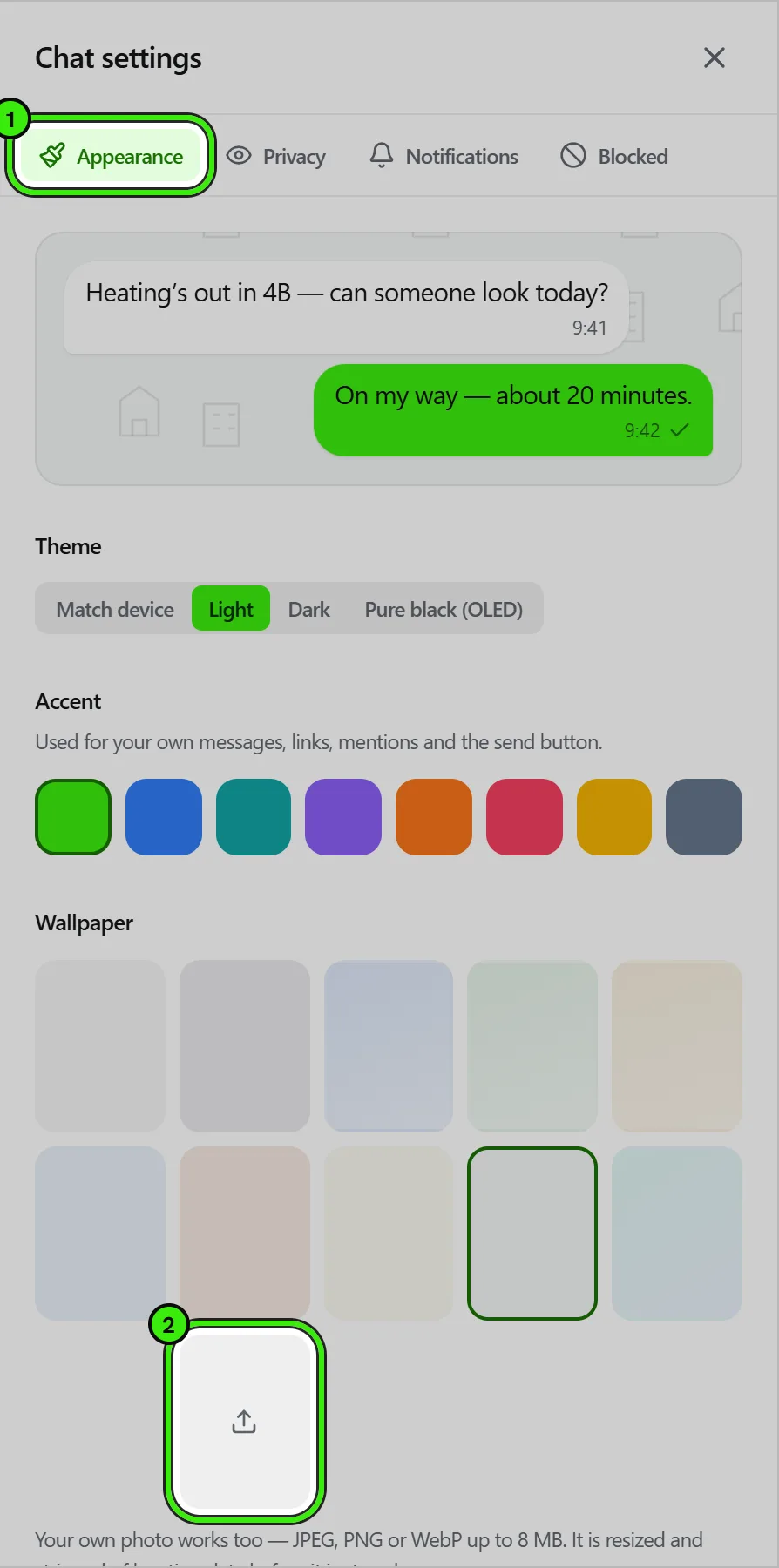
Every built-in wallpaper carries the same faint hand-drawn pattern of homes, apartment blocks, cranes and tools, each in its own color. The default, Seayora, is white in light mode and charcoal in dark mode. None is a plain background with no pattern.
- A wallpaper set in Chat settings applies to every conversation.
- A wallpaper set from a conversation’s info screen applies to that one thread — useful for telling a building’s residents apart at a glance.
- The dim slider keeps message text readable over a busy picture.
- Deleting an uploaded wallpaper puts every chat that used it back to the default.
Everything else
Theme (match device, light, dark, pure black), accent color, bubble shape, text size and font, density, delivery marks, and per-conversation notification sounds are all in Chat settings.
What you can change
| Setting | What it does |
|---|---|
| Theme | Light, dark, pure black for OLED screens, or match your device. |
| Accent | The color of your own messages and the read marks — the real color, filled, not a hint of it. Pick one of the named accents or any color you like from the color picker. Some colors are drawn a shade deeper than the swatch so the words on them stay readable; that is worked out for each one rather than guessed, and it is why no color makes a message hard to read. |
| Wallpaper | A background for the conversation, including a photo of your own. The dim slider darkens it behind your messages — worth using on the brighter ones. |
| Bubbles | Rounded, soft, square, pill or minimal, with or without the tail that points at whoever sent the message. |
| Density | Compact, comfortable or spacious — how much room each message gets. |
| Text | The typeface and the size of message text. It applies to messages only; the rest of Seayora follows your device. |
| Delivery marks | Check marks, dots, words, or nothing at all on your own messages. |
| Privacy | Read receipts, typing indicators, whether you appear online, and who can see when you were last active. |
| Notifications | Message sound, ringtone, vibration, whether the message text shows on your lock screen, and quiet hours. |
| Chats | Whether media downloads automatically, what the return key does on a phone, and whether muted chats are filed into Archived. |
They follow your account, not your device
A theme you pick on your phone is the theme the website opens with. That is deliberate: four places to arrange the same thing is four that stop matching. The only settings that behave differently by surface are the ones that have to — the return key does not exist on a phone keyboard the way it does on a laptop — and each of those says so where you change it.
A single conversation can look different
One conversation can have its own wallpaper and its own accent. On a busy inbox that is what lets you tell where you are without reading the header.
Read receipts work both ways
Turning read receipts off also stops you seeing other people’s. A one-way switch would be a way to read everyone silently while still being told who read you, so the platform does not offer one. The same applies to appearing online: hiding your status hides other people’s from you.
Frequently asked questions
Does my wallpaper show to the other person?
No. Wallpapers, themes and accents are yours alone; the other side of the conversation sees their own choices.
Does an uploaded wallpaper count against my storage?
No. Wallpapers are kept separately from the photos, videos and documents you send in messages, which is what Seayora Storage counts.
What happened to the Neighborhood wallpaper?
It is now the same picture as Seayora, so it is no longer listed separately. If you had chosen it, nothing changes: your chats show the Seayora wallpaper and it is marked as your choice.
Do Seayora Alerts follow my wallpaper?
Each alert (a rent receipt, a repair update, a security notice) is a solid card on top of your wallpaper, the same color as a message someone sends you, with its time and, where there is one, a link to the right screen.
Related guides
- In-Platform Messaging
- Your Messaging Profile: About & Availability
- Seayora Storage: Messages Media and Camera Footage
Related features and guides
- In-Platform Messaging — Documentation. How to message tenants, landlords, managers, and service pros inside Seayora with a record of every conversation, send anything later at a time you choose, and draft a reply to an inquiry about your listing.
- Your Messaging Profile: About & Availability — Documentation. Add an about line to your messaging profile and set yourself Available, Busy, Do not disturb or Away — on every device at once.
- Seayora Storage: Messages Media and Camera Footage — Documentation. How the media you send in Messages and the footage your cameras record in Seayora’s cloud are stored, how much is included, what happens when it is full, and how plans and billing work for an account or a company.
- Live Support, Callbacks & Tickets — Feature. In-app live support with a real agent queue, scheduled callbacks, support tickets, business-hours awareness, and satisfaction feedback on every interaction.
- Message Threads, Drafts & History — Feature. Threaded conversations with unread counts, drafts, read state, archiving, and a permanent history tied to the listing, lease, or job it concerns.