Your Messaging Profile: About & Availability
Add an about line to your messaging profile and set yourself Available, Busy, Do not disturb or Away — on every device at once.
Your messaging profile is what the people you talk to on Seayora see beside your name: a short about line and your current availability. Both are set once and follow you to the website, the Android app and the iPhone app.
The about line
Up to 280 characters — what you manage, when you answer, how you like to be reached. You choose who can see it: everyone you can message, only people you share a conversation with, or nobody.
Availability
- Available — calls ring and messages notify as normal.
- Busy — people see you are busy before they call; everything still comes through.
- Do not disturb — no banners and no ringing on any of your devices. Messages still arrive, still count as unread, and still show in every conversation.
- Away — shown as away; if you are on the support desk, calls to support are not routed to you.
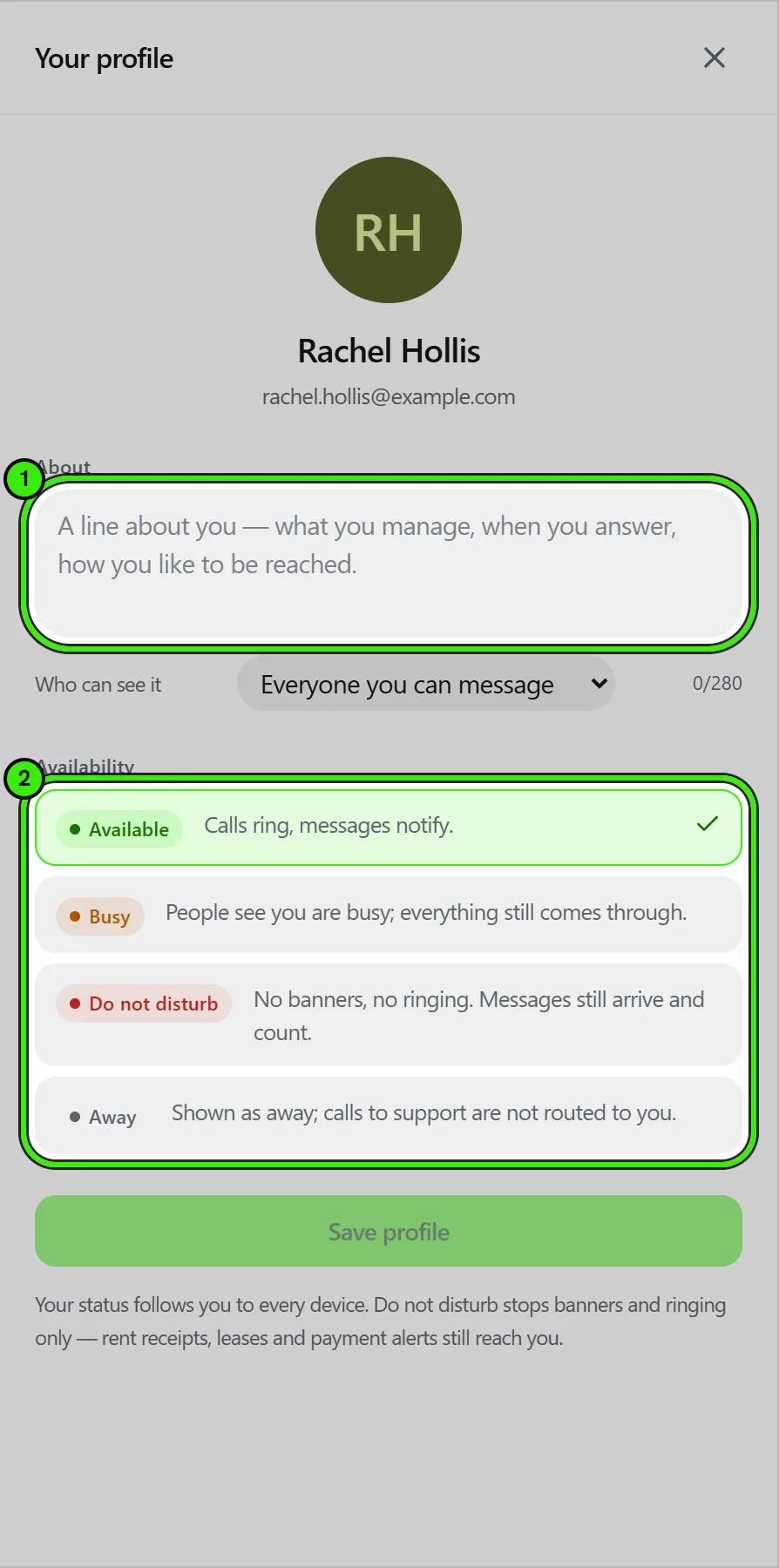
Busy, Do not disturb and Away can be timed (an hour, four hours, the rest of the day) or kept until you change them, and can carry a short note — "on site at 214 Ross St", "back at 3".
What Do not disturb never stops
Rent receipts, a lease waiting for your signature, a failed payment and a security alert reach you regardless of your availability. Do not disturb is about conversation, not about obligations.
Frequently asked questions
Does Do not disturb hide my messages?
No. It only stops banners, sounds and ringing. Every message lands in the conversation and the unread count still updates.
Can somebody call me while I am on Do not disturb?
They are told you are busy and the call is logged as a missed call; your devices never ring.
Where do I set it?
Messages → your avatar (website), Chat settings → Your profile (Android), Messages → the profile icon (iPhone).
Related guides
Related features and guides
- In-Platform Messaging — Documentation. How to message tenants, landlords, managers, and service pros inside Seayora with a record of every conversation, send anything later at a time you choose, and draft a reply to an inquiry about your listing.
- Notifications, Email & SMS — Documentation. How Seayora sends transactional and marketing notifications, choosing which alerts reach your phone and inbox, what the text-message program actually sends, and how to stop it.
- Chat Appearance & Wallpapers — Documentation. Themes, accents, bubble styles and wallpapers for your conversations — including your own photo, for every chat or just one.
- Reusable Renter Profile — Feature. Build a reusable renter profile once and apply to multiple Seayora properties without starting over — and, once screening is available, without paying a new application fee each time.
- Broadcast Messaging & Notices — Feature. Broadcast SMS and email notices to an entire building or portfolio at once — water shutoffs, policy changes, and seasonal reminders, without a mail merge.
- Message Threads, Drafts & History — Feature. Threaded conversations with unread counts, drafts, read state, archiving, and a permanent history tied to the listing, lease, or job it concerns.