Seayora Storage: Messages Media and Camera Footage
How the media you send in Messages and the footage your cameras record in Seayora’s cloud are stored, how much is included, what happens when it is full, and how plans and billing work for an account or a company.
Seayora Storage covers two things, each with its own allowance and its own plans: the photos, videos, documents and voice notes you send in Messages, and the footage your security cameras record in Seayora’s cloud. Both are in Settings → Storage; camera footage is also under Cameras → Cloud storage, on the website and in both apps.
Messages: what counts
Everything you send in Messages is kept on Seayora so it opens on every device without being downloaded first. Storage counts what you (or your company) sent, not what was sent to you. A management company that sends forty inspection videos is using forty videos of storage; the tenant who received them is not. A company’s usage is the sum across its seats — the owner and every employee.
Messages: the included plan and the others
- Every account starts with the included plan, at no charge; Storage shows how much it holds.
- Bigger plans are shown in Messages → Storage and in Settings → Storage, with the allowance and the monthly price.
Messages: when storage is full
You are emailed at 80% and at 100%. When the allowance is reached, text messages still send; new photos, videos, documents and voice notes do not, until you free space (Messages → Storage shows the heaviest conversations) or choose a bigger plan. Nothing already sent is deleted to make room.
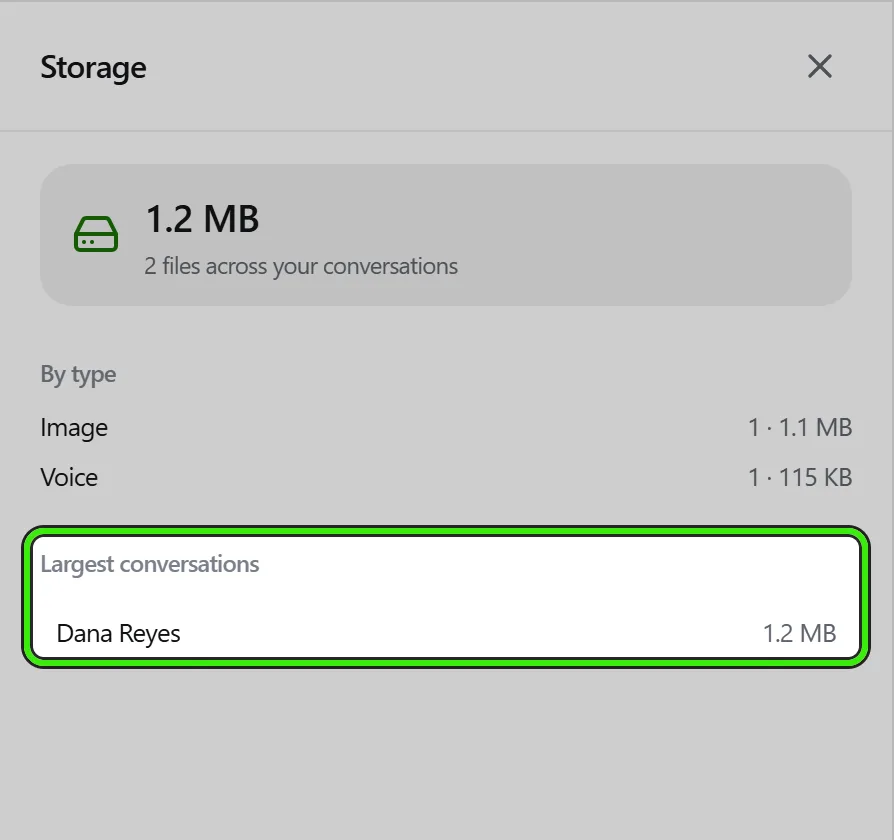
Camera footage: what counts
Footage counts when a camera records it in Seayora’s cloud — a camera set to record in the cloud, or in both places. Footage kept on a Seayora Bridge is on your own computer’s disk and does not count. A company’s footage is added up across every camera it runs, and Cloud storage shows how much each camera uses.
Camera footage: how much is included
Seayora sets how much cloud footage an account gets at no charge, and Cloud storage shows the figure. Until Seayora sets one, footage is limited only by how long each camera keeps it, and the screen says so. More room comes with a camera storage plan. A plan may also be priced per camera, cover a set number of cameras recording to the cloud, and set the longest time a camera can keep footage.
Camera footage: when it is full
You choose what happens when footage reaches the allowance:
- Delete the oldest footage first (the usual choice). Seayora removes the oldest recordings until the total is just under the allowance, starting with the cameras you marked Low priority, then Normal, then High. Cameras keep recording. You can also choose what goes first: footage in which nothing moved and nothing happened goes before footage that did, and the most recent hours always stay.
- Stop recording to the cloud. Nothing already kept is deleted for space. Cameras stop recording to the cloud until there is room again (footage expires and the total drops below 95%) or you choose a bigger plan. A camera that records to both the cloud and a bridge keeps recording on the bridge, and a clip from that time is fetched from the bridge.
Either way, Seayora never deletes footage to make room if it is on legal hold, if an export or a live share link was made from it, if an export or clip is being cut from it right now, or if it is a camera’s most recent recording. Bookmarked moments and clips kept by an event rule are protected too, unless you switch that off. If everything left is protected, recording to the cloud stops instead of deleting any of it, and you are told why.
- You are emailed when footage reaches your warning level (80% unless you change it), when it is full, when cameras stop or start recording to the cloud, and — at most once a day — with a list of what was removed.
- If the included allowance goes down, or you move to a smaller plan, nothing is deleted or paused during a grace period first. Seayora sets how long it is, and the screen and the email give the time, so you can export anything you need.
- If Seayora cannot read how much a camera has recorded, nothing in that account is deleted or paused until it can.
- Cloud storage lists what would go next and what was removed recently, camera by camera, with the times it covered.
Plans for an account or a company
- Plans are shown with the allowance and the monthly price. A company plan is bought by the company owner and shared by everybody on the account; some are priced per extra seat (Messages) or per camera (footage).
- A plan may be included with an account tier; those are shown but locked until the tier applies.
- Seayora may agree a custom plan with an account or a company — a different allowance, price, number of cameras or longest retention. You are emailed whenever that starts, changes or ends.
- A custom plan can start on a later date and can have a last day. You are emailed when it is agreed, again when it starts, 14 days and 3 days before its last day, and when it ends; after the last day the account returns to what is included unless the terms are renewed. Nothing is deleted the moment an allowance goes down — camera footage over it waits out the grace period first.
- Before you switch, Seayora shows what changes: the new allowance, what is charged today and each month, and, for footage, whether anything would be deleted or paused to fit a smaller plan.
- If you are on a company’s shared plan and are not its owner, Storage shows what the company shares, how much of it you have used yourself, and who manages the plan. Only the owner can change it.
Choosing a plan: the checkout
Choosing a plan opens a checkout, on the website and in both apps. On the left (or first, on a phone) are the cards and bank accounts already saved on your account — pick the one Seayora should charge, or add a card right there. On the right is the order summary: the plan, its storage, what it costs each month, the plan it replaces, any free trial, any credit for the plan being replaced, and what is due today. The button says exactly what it does — Pay, Start free trial, or Confirm plan — and the line under it says when the next charge comes. Your card number goes straight to Seayora’s payment processor and is never stored on Seayora’s servers.
Free trials
Seayora may offer a free trial on a first upgrade — a number of days or months, shown on each paid plan and in the checkout. During the trial nothing is charged. You still choose a payment method, because that is what the plan is charged to when the trial ends.
- You are emailed a few days before the trial ends, with the date, the price and the card it will be charged to.
- On the day the trial ends, the rest of that month is charged, then the plan bills on the 1st of each month like any other.
- Cancel before the trial ends (Storage → Cancel the trial) and nothing is charged at all.
- A trial is once per account (or company) per product. Changing plan during a trial keeps the same end date; canceling and buying again does not start a new one.
- Seayora may give a particular account a longer or shorter trial, or none.
Billing
- A paid plan needs a card or bank account for Seayora charges, which you can add in Storage.
- When you choose a paid plan, the rest of the current month is charged straight away, less the unused part of what your current plan was charged this month — unless the plan starts with a free trial, when nothing is charged until the trial ends. The plan switches on only when that payment goes through; a declined payment leaves your current plan exactly as it was. An amount under 50 cents is not charged at all.
- After that, the plan is charged on the 1st of each month.
- A payment that fails is tried again a few days later, a set number of times, and you are emailed each time with what happens next. If the last try fails, the plan can end and you go back to what is included; you are emailed when that happens.
- Moving back to what is included is never charged, and nothing already paid for the month is refunded.
- Until Seayora starts billing for storage, a paid plan is recorded and shown as not yet charged, and you are emailed before the first charge.
Keep media on Seayora
The switch in Storage decides whether your devices rely on Seayora for Messages media. Off, a phone keeps its own copies and clears them after 30 days; on, media streams from Seayora and stays available everywhere.
Frequently asked questions
Do wallpapers or listing photos count?
No. Seayora Storage counts the attachments you send in Messages and the footage your cameras record in the cloud. Listing photos, documents in your document library and wallpapers are kept separately.
What happens to my media if I move back to the included plan?
Messages media is never deleted: if you are over the smaller allowance you cannot send new media until you free space. Camera footage over the smaller allowance is handled the way you chose — the oldest deleted, or cloud recording paused — after the grace period.
Can a team member buy a plan for the company?
Only the company owner can change the company plan; every seat shares it. A team member’s Storage shows what the company shares and how much of it they have used themselves.
Do I need a card for a free trial?
Yes. Nothing is charged during the trial, but the plan is charged to that card or bank account when the trial ends unless you cancel first. You are emailed a few days before.
Does footage on my Seayora Bridge count?
No. Footage recorded on a bridge is on that computer’s own disk, so how much it keeps depends on the disk and how long you keep it. Only footage recorded in Seayora’s cloud counts.
Can footage be recovered after it was deleted to make room?
No. Deleted footage cannot be recovered by anybody. Export anything you need to keep, bookmark it, or place the camera on legal hold — Seayora never removes those to make room.
Which cameras lose footage first?
Cameras you mark Low priority, then Normal, then High — and within those, the oldest recordings first. Set a camera’s priority in its recording settings or in Cloud storage.
Related guides
Related features and guides
- In-Platform Messaging — Documentation. How to message tenants, landlords, managers, and service pros inside Seayora with a record of every conversation, send anything later at a time you choose, and draft a reply to an inquiry about your listing.
- Security Cameras — Documentation. How to connect the security cameras at your properties — install a Seayora Bridge with one command, connect DW Spectrum or a camera that sends to Seayora — then watch them live, record and play back, act on what they see, and export footage as evidence.
- Chat Appearance & Wallpapers — Documentation. Themes, accents, bubble styles and wallpapers for your conversations — including your own photo, for every chat or just one.
- Voice Notes in Messaging — Feature. Record and send voice notes in any Seayora conversation. Transcoded server-side so they play on iPhone, Android, and desktop alike, stored with the thread, and searchable as part of the property record.
- Sign In From Any Device — Feature. Seayora runs in the browser on desktop, laptop, tablet, and phone with one account. Messages, voice notes, call history, documents, and payments stay in sync in realtime across every device you are signed in on.
- Digital Leases & eSignature — Feature. Build digital leases from your templates, send them for legally binding eSignature under ESIGN/UETA with a full audit trail, and store executed copies automatically.