ENERGY STAR Portfolio Manager for Local Law 97
Connect the Portfolio Manager account your NYC benchmarking already uses, see every building graded against the City’s checklist, and approve each change before Seayora enters it.
Every covered building in New York City reports its energy use through ENERGY STAR Portfolio Manager, the free EPA tool the City imports from each night. Seayora connects to the Portfolio Manager account you already use, reads each shared building, and grades it against the City’s own benchmarking checklist — so a missing BIN, a gap in the gas bills or an unshared building is found in Seayora in September, not in a violation letter in May.
Seayora never writes to Portfolio Manager on its own. When a fix is something Seayora can enter for you — a corrected BBL or BIN, or the fuel-oil deliveries no utility uploads — it prepares the change, shows you exactly what will be entered, and waits until you tick the approval sentence and press Approve.
Connect your Portfolio Manager account
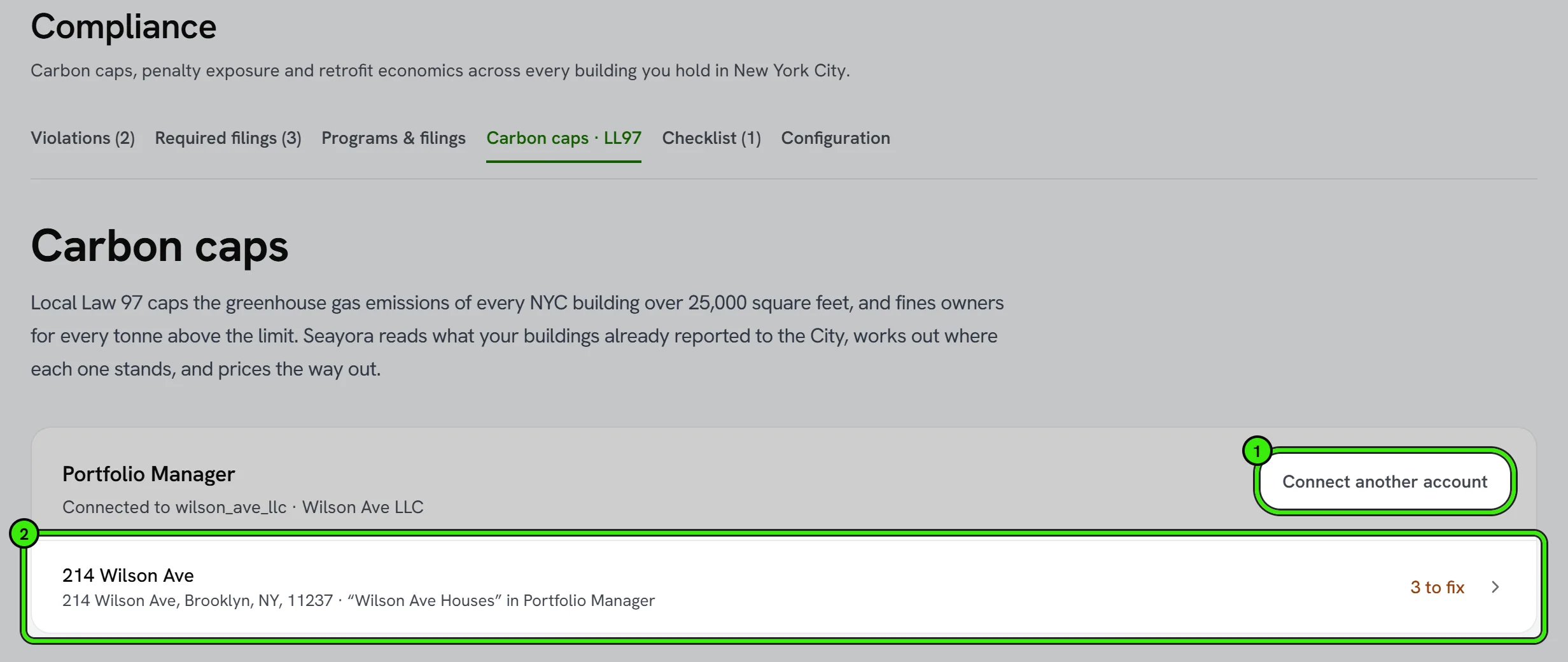
Open Compliance → Carbon caps on the website, or Local Law 97 → Benchmark on the iPhone or Android app. You get a connection code that is yours alone, and three steps:
- Sign in to Portfolio Manager with the account your benchmarking is filed from.
- Under Contacts, search for Seayora’s username (shown in the second step beside your code), click Connect and paste your connection code. Seayora accepts the request within a few minutes; a request with no code or a code that matches nobody is declined, with a note telling you why.
- On the Sharing tab, share your buildings with Seayora for exchanging data. Read Only is enough for the checklist; choose Full Access only if you want Seayora to be able to enter fuel deliveries or fix a BBL or BIN — it still writes nothing until you approve each change.
If a benchmarking consultant keeps your Portfolio Manager account, press “Send them the steps” and Seayora emails them the same instructions with your code. They connect and share on your behalf, and the buildings appear in your account.
You do not need a new Portfolio Manager account. If your buildings are over 25,000 square feet, Local Law 84 already requires one, and it is the account the City reads.
Which of your buildings is it?
Each shared property is matched to one of your Seayora buildings. When the Portfolio Manager ID is the one the City publishes for that building, the match is automatic. When only the BBL matches, Seayora asks you to confirm — anyone can type a BBL into Portfolio Manager, so a BBL alone is a suggestion, not proof. Nothing from Portfolio Manager is added to a building’s carbon position until the match is confirmed, and unlinking removes those figures again.
The benchmarking checklist
Each building is checked against what the City needs for the 2025 filing, from what Portfolio Manager says today. On the screen they are grouped by who can fix them — you, your utilities, or Seayora with your approval — blockers first. A check Seayora could not read is shown as “Couldn’t check” with a dashed ring — never as a pass.
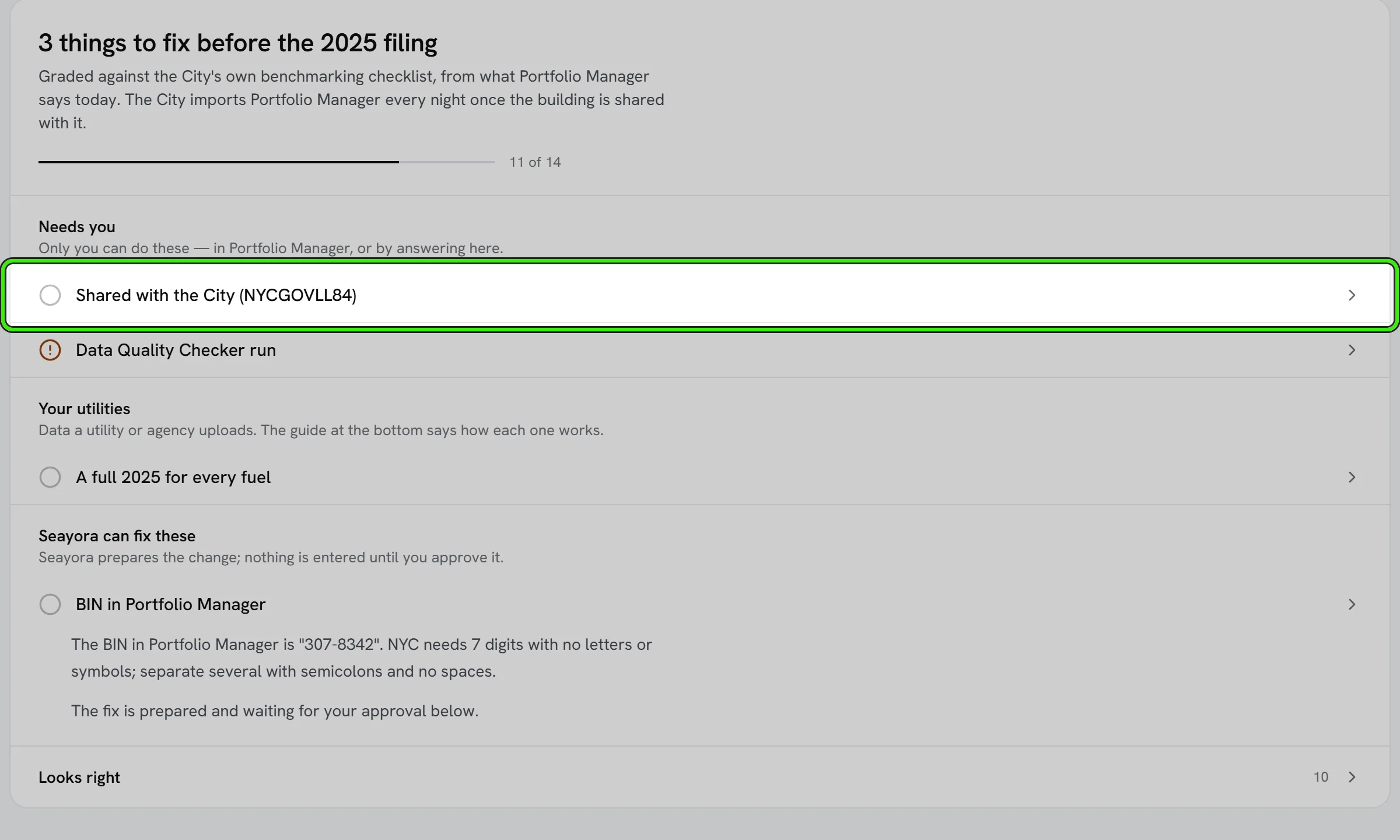
- BBL in Portfolio Manager
- BIN in Portfolio Manager
- Gross floor area
- Property uses
- Meters counted in the totals
- Whole building covered
- A full 2025 for every fuel
- No gaps between bills
- No overlapping bills
- No bill longer than 65 days
- Energy use intensity in range
- Data Quality Checker run
- Water data
- Shared with the City (NYCGOVLL84)
- Fuel oil entered as deliveries
- Actual readings, not estimates
Two checks need an answer only you have. Seayora cannot see who else a building is shared with, so “Shared with the City” stays open until you confirm you have shared it with the City’s account, NYCGOVLL84. And whether water data is required depends on the building’s entry on the City’s Covered Buildings List, so you answer yes, no or not sure.
The checklist is a guide to the City’s published requirements, not a certification. The City’s own review is what decides whether a filing is complete.
Approving a change
When a building is shared with Full Access, two kinds of change can be prepared: a corrected BBL or BIN in the format the City needs, and fuel deliveries — every delivery ticket of fuel oil, diesel, kerosene or propane, which no utility uploads. A prepared change waits under “Waiting for your approval”, showing what is in Portfolio Manager now and what it will be afterwards, or each delivery line by line.
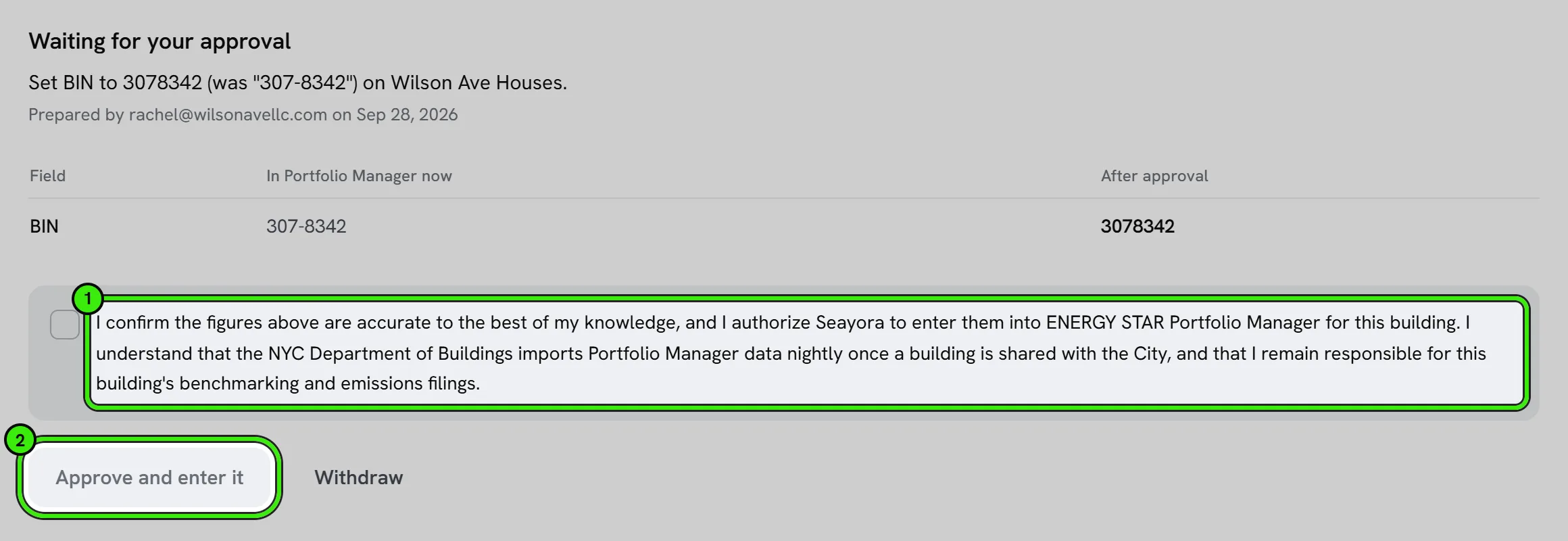
To approve it you tick this sentence, word for word, and press Approve:
“I confirm the figures above are accurate to the best of my knowledge, and I authorize Seayora to enter them into ENERGY STAR Portfolio Manager for this building. I understand that the NYC Department of Buildings imports Portfolio Manager data nightly once a building is shared with the City, and that I remain responsible for this building's benchmarking and emissions filings.”
Seayora records who approved it, when, and the exact wording they agreed to, then enters the change and emails a receipt. If Portfolio Manager refuses it, the change is marked “Not entered” with the reason — it is never retried behind your back. Withdraw removes a prepared change without entering anything.
Where each kind of data comes from
Most of what the City reads is uploaded by somebody else. The guide at the foot of each building says how each source works; these are other organizations’ programs, and Seayora re-checks them each spring.
| Source | How often |
|---|---|
| Con Edison | Monthly, automatically |
| National Grid | Quarterly, automatically |
| PSEG Long Island | On request — entered by hand |
| NYC Department of Environmental Protection (water) | Automatically, where an automatic meter reader is installed |
| Fuel oil and other delivered fuels | Nobody uploads these |
| NYC Department of Buildings (the filing itself) | Imported nightly once shared |
What Seayora does not do
- It does not file with the City. The City imports Portfolio Manager every night once a building is shared with NYCGOVLL84; you remain responsible for your benchmarking and emissions filings.
- It does not share your buildings with anyone, and it cannot see who else they are shared with.
- It does not change floor areas, property uses or meters in Portfolio Manager — those stay yours to edit there.
- It does not keep your Portfolio Manager password. The connection is Portfolio Manager’s own sharing, which you can end from Portfolio Manager at any time.
Frequently asked questions
Does Seayora send my data to the City?
No. The City imports ENERGY STAR Portfolio Manager every night for buildings shared with its account, NYCGOVLL84. Seayora checks the building is ready and, only when you approve a change, enters it into Portfolio Manager.
Can Seayora change my Portfolio Manager data without asking?
No. Every change is prepared as a draft and entered only after you tick the approval sentence and press Approve. A building shared Read Only can never be changed at all.
Do I need a new Portfolio Manager account?
No. Use the account you already benchmark from — for a building over 25,000 square feet, Local Law 84 already requires one.
My consultant manages Portfolio Manager. What do I do?
Press “Send them the steps”. They get your connection code and the instructions by email, and connect and share on your behalf.
Why does it say “Couldn’t check”?
Portfolio Manager did not answer that part of the check. It is not a pass. Press Check again later, or open Portfolio Manager to look yourself.
Who uploads my gas and electric data?
Con Edison uploads monthly and National Grid quarterly, automatically, once you have signed up with them. Fuel oil and other delivered fuels are never uploaded by anyone — add the delivery tickets in Seayora and approve them.
Related guides
Related features and guides
- NYC Compliance Tools — Documentation. How Seayora helps track New York City compliance obligations for properties that operate there.
- Connected Devices & Sensors — Documentation. How to connect meters, leak sensors, thermostats and other building devices to Seayora, what they can alert on, and how readings flow into work orders and Local Law 97 reporting.
- Programs & Filings — Documentation. Section 8, tax credits, exemptions and rent regulation — what each one requires, when it is due, and what it costs to be in it.
- Compliance Alerts & Required Filings — Feature. Seayora watches your properties for new violations and works out which recurring filings each building owes, turns both into a dated checklist, and emails you when something new appears. Live violation data for New York City; rule-based filing obligations across the NYC metro.
- NYC Compliance Tracking — Feature. Track New York City property compliance requirements and deadlines alongside the rest of your portfolio operations.
- Team Roles & Permissions (RBAC) — Feature. Role-based access control with employee accounts, so leasing agents, maintenance staff, and bookkeepers each see only their scope. Every action is audit-logged.