Connected Devices & Sensors
How to connect meters, leak sensors, thermostats and other building devices to Seayora, what they can alert on, and how readings flow into work orders and Local Law 97 reporting.
Connected Devices lets a landlord or management company register the meters, sensors and equipment monitors in their buildings — electric, gas and water meters, unit submeters, leak sensors, thermostats and temperature sensors, smoke and CO detectors, air-quality monitors, door sensors, hot-water and steam boilers, sump-pump monitors — and see their readings inside Seayora, next to the units, leases and work orders they relate to. It lives under Operations → Smart building → Devices on the website and under Tools on the mobile apps.
A beta, and the agreement you accept first
Connected devices, Seayora Edge and door access are a beta. The first time you open any of them, Seayora shows a short beta agreement and asks you to check a box and accept it; until you do, those screens, their API and the assistant tools that read them wait. Devices you already set up keep reporting in the meantime. Each person who uses them accepts for themselves, and somebody accepting for a company confirms they are allowed to. If the wording ever changes, you are asked again.
What the agreement says, in short: the beta is provided as is; it can change, stop working, send late, wrong or no readings and alerts, or fail to carry out an instruction at any time; nobody at Seayora watches it; and to the fullest extent the law allows, Seayora takes no liability for any damage or loss connected with it. You stay responsible for having qualified people install and maintain the equipment, for keeping every code-required alarm, shutoff, lock and emergency phone working without Seayora, and for telling residents about any device in their home. The full text is Terms of Service § 18G and Privacy Policy § 10P. Residents who only see what their building shares are never asked.
Adding a device with your phone
You can add a device from the website too. Chrome and Edge can talk to a Bluetooth device directly — the browser shows its own list of what is nearby and hands Seayora only the one you pick. Safari and Firefox have both decided not to add that, permanently, so on those the website offers the camera, the code on the label and typing it in, and says which is which rather than hiding a button.
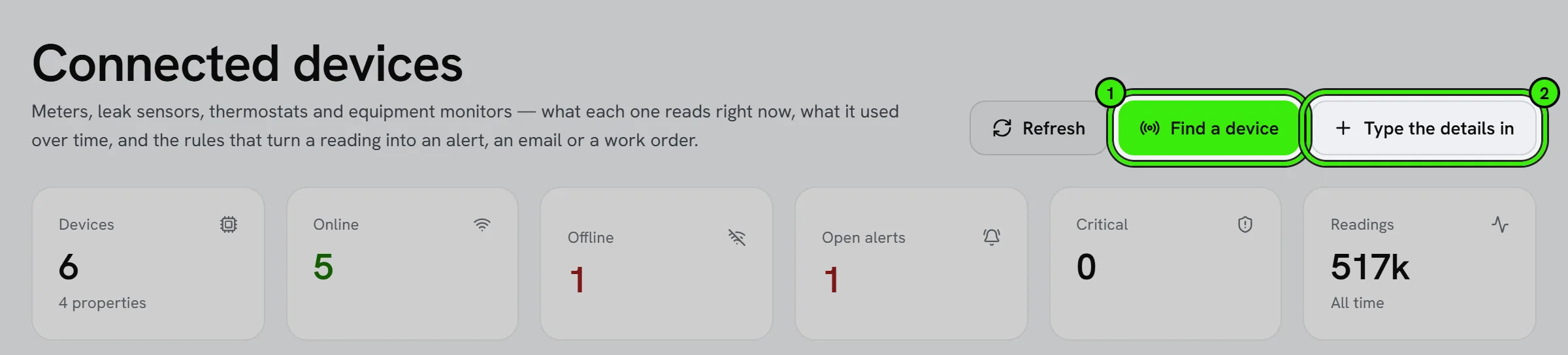
The person adding a meter is usually standing next to it in a basement, holding a phone. Open Devices in the Seayora app and tap "Find a device nearby". Seayora offers every way it can find one, and marks the ones it cannot do on that handset rather than hiding them — because a missing button reads as "Seayora cannot do this", which is rarely true.
- Over Bluetooth: Seayora looks for devices advertising nearby, then reads the standard information every Bluetooth device publishes about itself — maker, model, serial number, firmware and battery. That needs no vendor app and no account, so it works on hardware Seayora has never seen.
- Scan the code on the label: the camera reads the QR code or barcode printed on the device or its box.
- Tap the tag: hold the phone against an NFC tag on the device. A tag has to be touched, where a QR code can be photographed from across a car park — which matters when the record is proof somebody was there.
- Type it in: always available, and always enough. Seayora hands you an address and a key, and anything that can make an HTTPS request can use them.
Seayora then says what it thinks the device is, and how sure it is — "its label said so" and "something nearby is advertising that name" are different facts and the screen tells you which one you have. Nothing is created until you confirm it, and any detail the phone could not read is left blank rather than filled in with something plausible.
A device does not need a building yet
You can add a device before you have decided where it goes — choose "Not in a building yet". It is yours, and only yours, until you open it and choose a building under Edit. Putting it in a building hands it to that building's owner of record, like any other device there, and from then on its alerts can raise work orders for that building. A device with no building still alerts you by email and on its page; it just has no building to send a technician to.
What the website can do, and what needs the app
The website only offers the ways in this browser can actually run. Scanning the code on the label and typing it in work everywhere; Bluetooth works in Chrome and Edge, and tapping an NFC tag works in Chrome on Android. Anything this browser cannot do is listed underneath as available in the Seayora app on your phone, rather than drawn as a button that does nothing. Security cameras are not added here — they connect through Seayora Bridge, and the add screen links straight to the Cameras page.
How each brand actually reports
When Seayora recognizes a device it says how its readings can reach Seayora, because that depends on the maker, not on Seayora. We checked each one against the maker's own documentation on October 8, 2026:
- Reports straight to Seayora — Shelly sensors and meters (a Shelly webhook calls the address Seayora gives you, and the setup screen prints the exact address to paste), and any gateway or controller that can call a web address.
- Reports through the maker's cloud — SwitchBot meters with a SwitchBot Hub: SwitchBot's own service posts each new reading to the address you register with it.
- Needs a hub you run — Moen Flo, Phyn, Flume, YoLink, Emporia, ecobee, Nest thermostats, SensorPush, Airthings. These makers either publish no way for another service to read the device, or offer an API that has to be asked for readings and never sends them; ecobee stopped accepting new developers in March 2024. A home hub you run, such as Home Assistant, can forward their readings. For a leak alert alone, an IFTTT applet works for Phyn and YoLink.
- Read by a phone nearby — Aranet4 (with Smart Home integrations turned on) and Govee Bluetooth thermometers.
- Cannot report — Nest Protect (not part of Google's Device Access program) and X-Sense alarms (no API). Adding them still records where each alarm is and when its battery and expiry are due.
Putting a device on Wi-Fi
Seayora can put a new device on your Wi-Fi itself, from the app, in three ways — and it picks the one the device speaks:
- Improv: an open standard for handing an accessory Wi-Fi details over Bluetooth, used by a lot of ESPHome and WLED hardware.
- Espressif over Bluetooth: devices built on Espressif chips that advertise themselves as “PROV_…” or “ESP_…”. The phone opens the device's own encrypted setup session, asks it which networks it can see, and hands it the one you choose. If the device asks for a proof-of-possession code, it is printed on its label or in its manual; scanning the label's code fills it in.
- Espressif over the device's own Wi-Fi: some devices make a temporary setup network instead. The phone joins it for a minute (iOS and Android each ask you first), hands over your Wi-Fi, and comes back. On an older Android phone you join that network in Settings yourself and choose “I joined it in Settings”.
In every case your Wi-Fi password and the device's setup code go straight from your phone to the device: they are never sent to Seayora, never stored, and no part of Seayora accepts them. Most of these devices can only join a 2.4 GHz network, and the screen says so. If you have already let Seayora use your location, the network name is filled in from the Wi-Fi your phone is on (and only offered when the device can see that network); it stays on your phone, and you can change it before sending. A Matter device is different again — see the next section — and a device that only works with its maker's own app (newer Kasa and Tapo firmware, a Sonoff outside DIY mode) is set up there; Seayora says which applies to the device it found.
The last step is the one that matters: after handing over the key, Seayora waits for the device's first reading and tells you whether it arrived. If nothing comes, it says so plainly and lists what to check — it never reports a setup as finished because a form was submitted, and the device stays registered and keeps being listened for, so it turns green on its own if it starts reporting an hour later.
Smart switches, plugs, lights, shades and fans
Seayora can find the switches, plugs, dimmers, lights, shades, curtains and fans already on a building's Wi-Fi, work out what each one is, and switch it. In the app, open Devices, tap "Find a device nearby" and choose "On this Wi-Fi". The phone listens for devices announcing themselves on the network first; many devices stay quiet, so "Look around this Wi-Fi" then checks each address on the network for the handful of ports smart devices answer on. Nothing on any device is changed by looking. The phone has to be on the same Wi-Fi — not a guest network, which keeps devices apart, and not cellular — and on an iPhone, Seayora needs "Local Network" allowed in Settings.
Each device that answers is asked what it is, and Seayora shows its maker, model and what it can do — on and off, brightness, white tone, color, a shade's position, a fan's speed, power and energy readings — so the device page gets exactly the controls that device has. What Seayora recognizes today:
- Shelly relays, plugs, dimmers, bulbs, RGBW controllers, shade controllers, energy meters and sensors (Gen1 and Plus/Pro/Gen3/Gen4).
- Anything running Tasmota or ESPHome (ESPHome needs its web server switched on), WLED LED strips, and Sonoff Basic, Mini and plug models in DIY mode.
- Philips Hue lights and plugs, through the Hue Bridge: Seayora asks you to press the round button on the bridge, then lists every light on it, each as its own device.
- Nanoleaf panels: hold the controller's power button for 5–7 seconds when asked.
- TP-Link Kasa plugs, switches, strips and bulbs whose firmware still accepts local connections.
- Matter devices and Apple Home (HomeKit) accessories, described below.
If a device has a password of its own (a Shelly with login protection, a Tasmota or ESPHome web password), you type it on the setup screen. Seayora keeps it encrypted, uses it only to talk to that device, and never shows it again; you can change it from the device page. A device that answers but has nothing Seayora can switch or read is said to be so, rather than added as an empty tile, and one already on this account is marked "Already added".
When you add it, "Let Seayora switch it" decides whether the device page gets controls; off, Seayora only reads it, and you can change that later. Switching works in one of three ways, and the device page says which one this device uses:
- From a phone on the same Wi-Fi: the Seayora app on a phone in the building talks to the device directly. Nothing reaches into the building from the internet.
- Kept connected by a Seayora Bridge: if the building has a Seayora Bridge (the same one cameras use), choose it on the device page under "Keep it connected". The bridge reads the device about once a minute and carries out commands within seconds, so the website, rules and schedules can switch it too — and you can see it switched on or off from anywhere.
- Through Apple Home: an accessory imported from Apple Home is switched through Apple Home on the iPhone that has that home. The website and Android show it but cannot switch it.
Routers sometimes give a device a new address. If a device stops answering, "Find it again" on its page looks for that exact device on the Wi-Fi and moves it to where it is now — it checks the device's own identity first, so it can never be pointed at a different device by mistake.
Matter and Apple Home
Matter is the cross-maker standard behind most new plugs, lights, locks, sensors and thermostats. Choose "Matter" and scan the Matter code on the device, its box or its manual — a QR code, or 11 digits. Your phone's own Matter setup does the rest: Apple Home on an iPhone, Google Home on Android. The setup code goes to the operating system, not to Seayora. Seayora then records the device with its maker, product and type, which it looks up in the Connectivity Standards Alliance's public product registry.
- On an iPhone, the device lands in Apple Home, and Seayora reads and switches it through Apple Home on that iPhone. "Start Apple Home setup" also takes a HomeKit code, so a HomeKit-only accessory is set up the same way.
- On Android, the device lands in Google Home and is recorded here. Switching a Matter device from Android needs Google's Home APIs, which Seayora does not have yet; switch it from Google Home, or from an iPhone in Apple Home.
- A Matter device that is already set up in a home is found on the Wi-Fi and marked as such — on an iPhone, add it to Apple Home and use "Import from Apple Home".
"Import from Apple Home" on an iPhone lists the lights, plugs, shades, sensors, locks and thermostats already in Apple Home — HomeKit or Matter — and adds the ones you pick. iOS asks once for permission to use Home data; if you said no, turn it on in Settings ▸ Privacy & Security ▸ HomeKit. Only the accessories you add are kept.
For device makers: a device built on Espressif's provisioning can also be handed its Seayora address and key during setup, so there is nothing to type into it afterwards. During setup Seayora writes a small JSON object, {"seayora":{"endpoint":"…","token":"…","format":"json"}}, to a custom provisioning endpoint named "seayora-config" (or "custom-data") if the device offers one; a device that does not offer one is set up exactly the same way and is given its address and key by hand.
How a device talks to Seayora
Every device gets its own token when you register it. The token is shown once — copy it into the device, hub or vendor dashboard straight away, because Seayora keeps only a fingerprint of it and cannot show it again. If it is lost or exposed, rotate it from the device page; the old token stops working immediately.
- Push: the device or its hub sends readings to https://seayora.com/api/iot/ingest with the token in an Authorization header. The body is a list of readings, each with a metric, a value, an optional unit and an optional timestamp. Up to 500 readings per request and 120 requests per minute per device; a heartbeat endpoint lets a device say "still here" without a reading.
- Webhook: a vendor cloud that can only be told a URL posts its own JSON to https://seayora.com/api/iot/hooks/<token>. A payload mapping on the device page tells Seayora where the numbers are in that JSON (a dotted path per metric, with an optional unit, scale and offset), and a "test with a sample" button shows exactly what would be stored before anything is.
- A mapping can also flip a yes/no the vendor states the other way round ("invert": Zigbee2MQTT's door sensors send contact: true when the door is CLOSED) and translate a vendor's state words into Seayora's ("values": {"heat": "heating"}). The common spellings from Home Assistant, Zigbee2MQTT, Matter and EV chargers (OCPP) — "heat", "fan_only", "not fully locked", "SuspendedEV", "Faulted" — are understood without one.
- Timestamps may be ISO-8601 or a Unix epoch in seconds, milliseconds, microseconds or nanoseconds. A date and time with no time zone is read as UTC.
- By hand: a reading typed on the device page — a meter read off the dial, a figure off a bill — is stored like any other, marked as manual.
Settings on a device
Each device has its own settings, and every one of them is acted on — there is nothing here that only writes a note to itself.
- Quiet hours: hold back the small notifications between two times, in the building's own time zone. A critical alert always goes through, whatever you set — a flooded basement, a carbon monoxide reading and a boiler fault are not preferences.
- Escalation: if nobody acknowledges an alert within the time you set, Seayora tells a second person.
- Accuracy: correct a device that reads consistently high or low, with a multiplier and an offset per reading. It is applied to readings as they arrive and never to what is already stored, and the untouched number is kept beside the corrected one so a mistake can always be undone.
- How it reports: tell Seayora how often the device should report, and it can say whether a gap is normal rather than guessing. Separately, how long it should be called offline after, and how long individual readings are kept — daily summaries are kept for ever either way.
- What the resident sees: sharing a device with a resident is off until you turn it on, and then you choose which readings — so you can share the temperature in somebody's home without sharing the movement sensor in the hall.
- Units on screen, zone, tags, install and battery dates, and the warranty — the record of the physical thing, so the next person can find it and knows how old it is.
- Who fitted it: the installer or vendor, with a phone number and an email. It is copied onto any work order this device raises, because the technician who opens the job is the person who needs the number.
- Retire it after: a portfolio that has lost forty sensors over three years raises forty offline alerts nobody will ever act on. Set a number of silent days and Seayora retires the device on its own. Retiring keeps every reading — it only stops the device being chased, and setting it active again resumes everything.
- Show it to the building's owner: on by default. A management company can keep its own equipment off an owner's screen without hiding the building's own meters.
Testing an alert before you need it
Every monitoring system fails the same way: somebody sets a freeze alarm in October, nothing ever fires, and in February they find out the threshold was on the wrong reading, or the rule was outside its own hours, or the maintenance board it pointed at no longer exists. Normally there is no way to discover any of that except by having the emergency.
So on any device you can type a reading — "what if this said 38 degrees right now?" — and Seayora walks it through the real rules and reports every decision it would make: whether the reading would be believed, which rules watch it, whether each is inside its own hours, the exact words of the alert, who would be told by name, whether quiet hours or a snooze would hold it, which maintenance board the work order would land on with what response time, and whether an automatic action would fire. Nothing is saved and nobody is told.
Seayora also checks the device on its own, with no input from you, for the mistakes that are invisible until they matter: a rule watching a reading the device does not report, a work order with no board and therefore no response time, an automatic action nobody confirmed, or a device set to alert when it goes quiet with no window that defines quiet.
Rules that watch more than one thing
A rule can require several things to be true at once. "Temperature below 45" on a vacant unit in winter fires every night; "temperature below 45 AND the heating says it is running" is a boiler that has failed. Each extra condition is checked against what the device last reported, and you can say how fresh that reading has to be — "the heating is off" read from a four-day-old value is not a fact about now.
If the device has never reported the second reading, the rule does not fire and the screen says why. Treating "no data" as "true" would make a careful rule behave exactly like the simple one it replaced, silently.
Things that happen on a clock
Some things have no trigger to hang a rule on: setting a thermostat back at 22:00 on weekdays, switching common-area lighting, running a pump through its weekly exercise cycle. Those are schedules, and they carry the same protections as an automatic rule action — only actions Seayora considers safe to automate can be put on one, a named person has to confirm what it will do, and changing what it does or when retires that confirmation.
- A schedule fires once per day, in the building's own time zone.
- A missed window is missed, not caught up. If Seayora is unavailable at 22:00, the instruction is not sent at 23:40 — a command that arrives ninety minutes late is often worse than one that never arrives.
- If the device cannot take the instruction when the time comes — control was switched off after the schedule was armed, say — that is recorded on the device's own timeline rather than failing silently.
What normal looks like, and when it is not
For meters, Seayora learns what a device normally does on each day of the week and compares yesterday against it. That is what finds a running toilet weeks before the bill does — a threshold cannot, because the reading is never "wrong", only higher than it should be.
- It compares like with like. A building's Sunday is nothing like its Wednesday, so the comparison is same-day-of-week; a flat monthly average would flag every weekend.
- It needs at least four comparable days before it will quote a normal figure, and it says so rather than guessing from two.
- What counts as unusual depends on how much that device normally varies. A meter that swings 40% day to day is not unusual at 45%; one that never moves more than 3% is very unusual at 20%.
- Only a rise is flagged. A drop can be a holiday, a vacancy, a closed valve or a broken sensor — four different problems behind one word. A meter that has stopped is caught by the offline check instead.
The whole portfolio at once
The Fleet tab answers the questions a device page cannot: which batteries die this month and where you have to drive, what has gone quiet and whether it is the sensor or the hub it hangs off, which firmware is out there, what your meters are costing, and — the one nothing else can tell you — which buildings have no sensor at all for the things that damage a building.
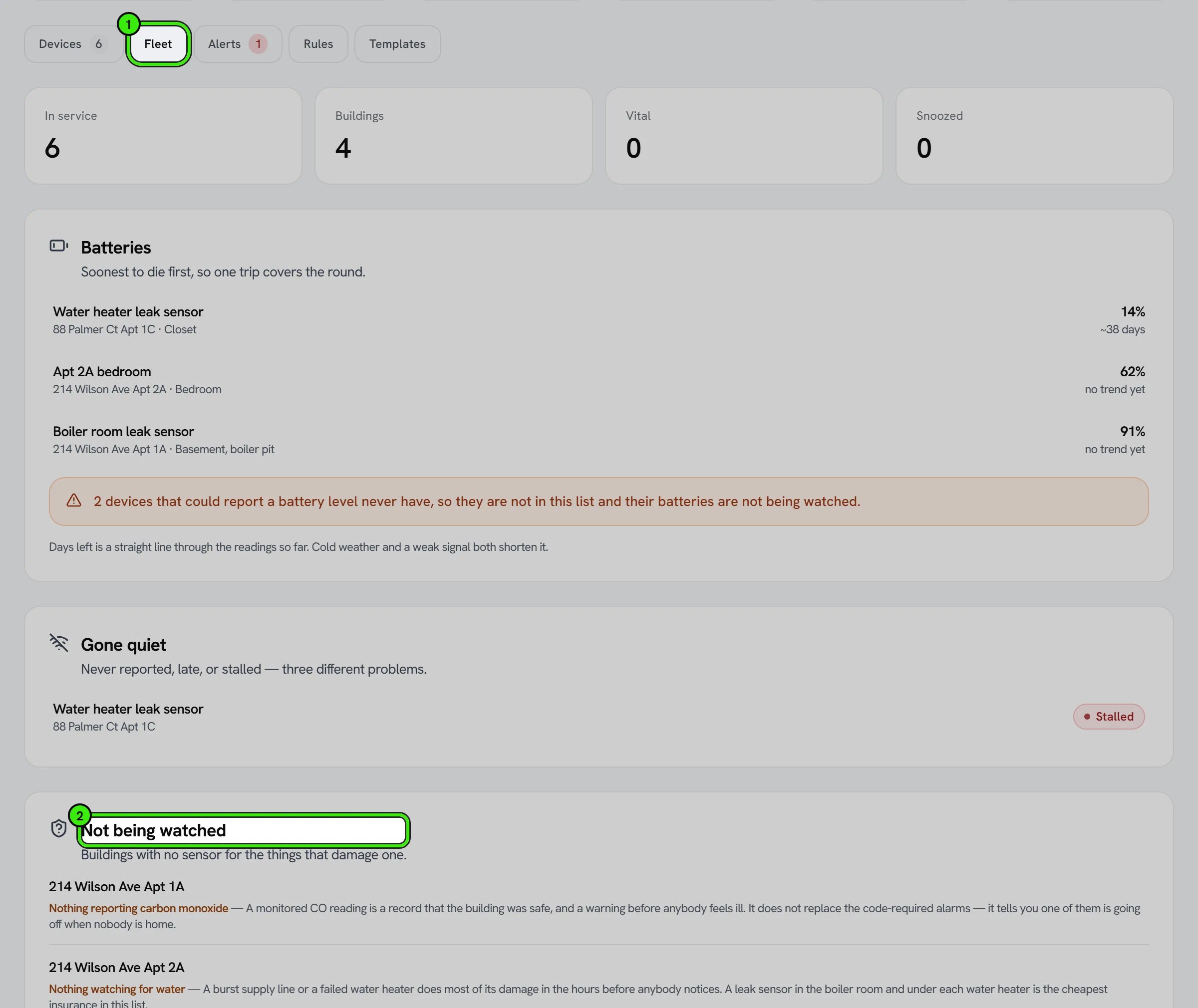
That last one matters because a monitoring product can only ever show you what it is monitoring. A building with no leak sensor in the boiler room is invisible on every other screen: it looks exactly like a building with nothing wrong. Coverage starts from your buildings instead and reports the gaps, with the argument for each. It is advice, not compliance — a code-required smoke or carbon-monoxide alarm is a separate, inspected device and Seayora is not a substitute for one.
Configuring many devices at once
Forty leak sensors in one building want the same quiet hours, the same escalation address, the same believable range. You can save any device's settings as a template and apply it to as many as two hundred others. Applying always previews first and tells you exactly what would change and what would be refused; a device that is the wrong kind for the template is named with its reason rather than quietly skipped. A template never carries anything that identifies the device it came from — not its name, its location, its serial number, or which hub it reports through.
Getting the data out
Any device's readings export as a CSV. The file carries its own provenance in the header: which device, over what window, whether a correction is applied, and how long individual readings are kept — because a spreadsheet that has left the building has lost every qualifier the screen carried. If the export hits its size limit the header says so in capitals, since a silent truncation is a number somebody bills against.
When a device has a bad night
- Snooze: hold this device's notifications for an hour, four hours or a day. It keeps recording, alerts still open on the board, and anything critical still reaches you — which is the whole difference between snoozing a device and pausing it. Pausing stops it recording; snoozing does not. A snooze expires by itself and can be at most seven days.
- A daily ceiling: a failing sensor can flap every ninety seconds and send two hundred notifications in a night, which is how somebody switches the whole feature off in the morning. Set a ceiling and Seayora stops after that many — and writes on the device's own timeline that it has, so a held alert is never silent.
- Reports through: name the hub or gateway a battery sensor talks through. When the gateway goes quiet, twenty sensors behind it all look like flat batteries — Seayora raises one alert for the gateway instead of twenty, and records on each of the others why it held.
- Believable readings: a failing sensor reports nonsense before it reports nothing. A thermistor going open-circuit reads -270°F or 3000°F, and every one of those is a critical freeze alert plus a poisoned daily average. Set the range you would believe and anything outside it is refused — recorded with the value that was refused, never quietly dropped and never rounded back to the edge.
- Also tell: up to eight more addresses beyond the owner and the managing company. They get exactly what everybody else gets, under the same quiet hours and the same snooze.
- How much depends on this: routine, standard or vital. It orders the attention list — it does not change what fires, because a rule decides that.
What a reading costs
Enter what a unit costs — a gallon of water, a kilowatt-hour — and Seayora reports a period in money as well as in units, so a running toilet is a number somebody acts on rather than a chart. Leave it blank and Seayora says it does not know the rate rather than showing $0.00, because a leak that reads as costing nothing is worse than a leak with no figure next to it.
Telling a device to do something
Some kinds of device can be told things as well as read: a thermostat can be given a target temperature, a shutoff valve can be closed, a circuit can be switched, and almost anything can be asked to flash so you can tell which of twenty identical sensors is the one on your screen. Control is off for every device until you switch it on, one device at a time.
- An instruction is queued, not sent — a device on a battery may only wake once an hour. Seayora shows it as waiting for the device, then as done once the device says so. It never reports something as done because the button was pressed.
- An instruction nobody collected in time expires rather than failing, because "the device never asked" and "the device tried and could not" are different problems.
- Closing a water valve and restarting a device ask you to type the device's own name first. They are not undone automatically and the people affected are usually asleep.
- A rule can carry out an action on its own — closing the main on a confirmed leak is the reason this exists — but only after a named person has read exactly what will happen and confirmed it. Until then the rule raises the alert and sends nothing. Re-opening a valve is deliberately never automatic: somebody goes and looks at the pipe.
- When an automatic action is armed, the building's owner is emailed, even if somebody else armed it.
Boilers, pumps and elevators over BACnet and Modbus
Equipment with a controller of its own — a boiler plant, a booster pump, a drive, a generator, an elevator monitoring interface, an energy meter — usually speaks BACnet/IP or Modbus TCP rather than sending readings anywhere. A Seayora Bridge on the building network reads it directly: choose "Add building equipment" on Connected devices, or Tools → Equipment bridges in the app. It becomes a device like any other here, with the same rules, alerts and work orders. The full guide is Building Equipment Over BACnet and Modbus.
Metrics and units
Readings are converted to one unit per metric on the way in — electricity in kWh, gas, oil and steam in kBtu (the same convention as the Local Law 97 statute), water in gallons, temperature in °F — so a chart never mixes units. A device reporting therms, liters or Celsius is accepted and converted; a unit Seayora does not recognize for that metric is refused rather than guessed. Meters report a running register; every chart and rollup shows what was used in each period, and a meter that resets is handled rather than counted as a negative day.
- Fuel volumes convert at ENERGY STAR Portfolio Manager's factors — the ones a Local Law 97 filing uses: natural gas 102.6 kBtu per ccf (1.026 per cubic foot, 36.303 per cubic meter, 100 per therm), No. 2 fuel oil 138 kBtu per US gallon, district steam 1,194 kBtu per thousand pounds. A tank burning No. 4 or No. 6 oil should report kBtu, because its heat content is higher than No. 2's.
- "Mcf" and "Mlb" are refused by name: the gas trade's Mcf is a thousand cubic feet and Portfolio Manager's is a million, and a steam bill's Mlb is a thousand pounds where Portfolio Manager's MLbs is a million. Send kcf or ccf, and klb or lb, instead.
- A reading no sensor of that kind could physically produce is refused with its value rather than stored: a room sensor reading 185 °F (85 °C is the value a DS18B20 probe reports when it failed to read), -196 °F (a probe that came off its wire), humidity above 100%, or a negative meter register. The same 185 °F is an ordinary boiler supply temperature and is accepted there. You can set a tighter range of your own per device.
- A register that dips by less than a tenth and then recovers is treated as rounding, not as a reset, so it adds no consumption. A drop larger than that is a reset: an event counter (pump runs, doorbell presses) counts on from zero, while a utility meter starts a new baseline — a replaced meter's starting number is never booked as one period's use.
Alerts and rules
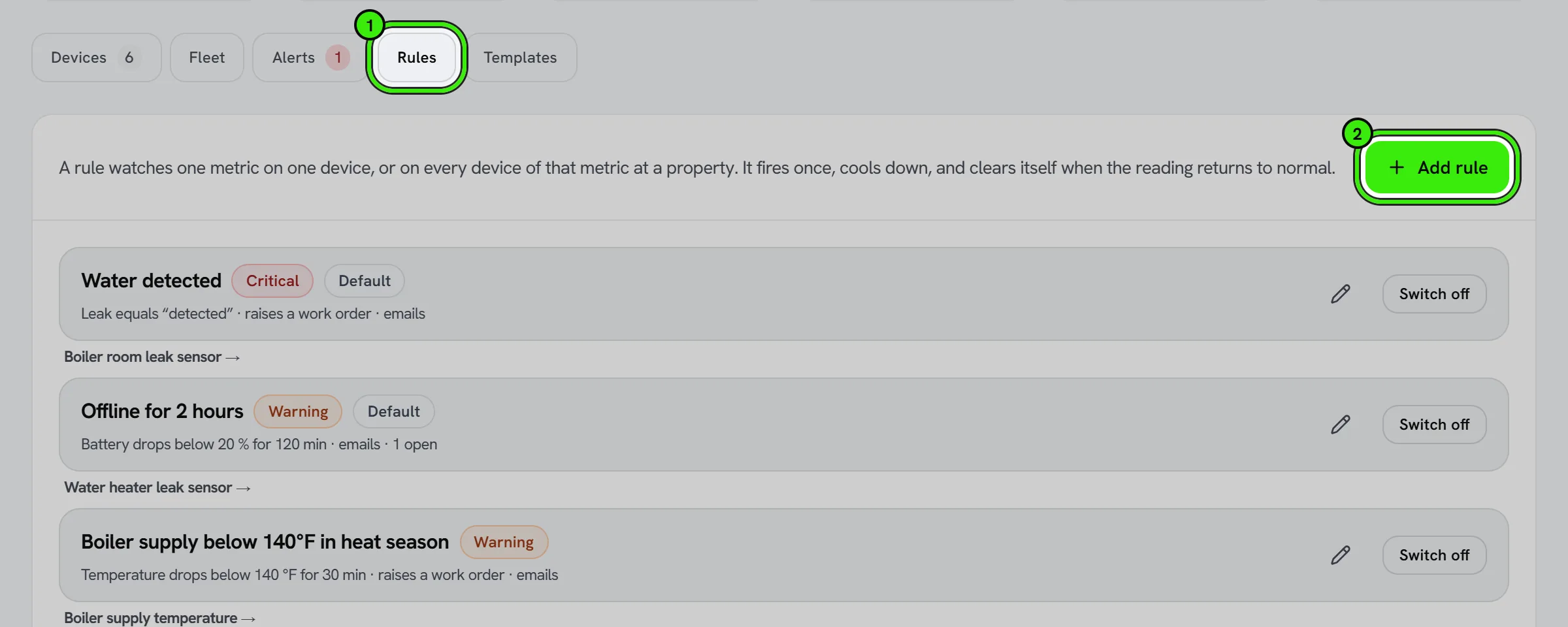
A rule watches one metric on one device, or on every device of that metric at a property: above or below a threshold, equal to a state (a leak sensor reading "wet", a boiler reporting "fault"), or a rate — gallons per hour on a water meter, which is how a running toilet or a burst pipe shows up. A rule can require the condition to hold for a number of minutes before it fires and cools down before it can fire again. Registering a device creates a few sensible defaults for its kind (water detected, freeze risk below 45 °F, carbon monoxide above 35 ppm for 15 minutes or above 100 ppm at once, a likely leak from continuous flow between midnight and 5 a.m.); everything else is opt-in.
- A rule that must hold for a number of minutes fires when that time is up even if the device sends nothing more. Door, window and lock sensors usually report only when something changes, so "left open for 10 minutes" is checked every minute against the last thing the device said — as long as the device is still reporting (it has a heartbeat set and is online, or was heard from in the last six hours).
- A rate ("climbing faster than 20 an hour") is measured over the last hour, not between two neighboring readings: two refused key cards a minute and a half apart are two refusals, not "80 an hour".
- The water-meter leak default runs overnight on purpose. A building's water use never stops in the daytime; between midnight and 5 a.m. legitimate use drops to almost nothing, and flow that continues for two hours then is the leak — the way water utilities find them.
- Hot-water (hydronic) and steam boilers are separate kinds because their pressures are not alike: a hot-water system runs at 12–25 psi and is losing water under 8, while a low-pressure steam plant runs at 0.5–2 psi and sits at zero between burner cycles. A steam boiler's defaults watch the low-water cutoff, a reported fault, and pressure above 2 psi (wasted fuel) or above 12 (approaching the relief valve).
- When two rules on one device fire about the same fault in the same maintenance category, the second joins the first one's open work order instead of dispatching somebody twice.
- Every alert is an in-app notification and a push notification to the account that owns the device, and to the management company on a managed building.
- A rule can also send an email, and can raise a real work order on the maintenance board — with the same category, urgency and response-time SLA a tenant's request would get — so a leak sensor at 3 a.m. becomes a plumber's job, not a dashboard light.
- A device that stops reporting past its heartbeat window is marked offline and, if you asked, raises an alert of its own; it clears itself when the device reports again.
- Alerts can be acknowledged and resolved from the website and both mobile apps; a rule with auto-resolve on clears its alert when the reading returns to normal.
- A rule can be limited to certain hours, days and months — which is what a heat-season obligation looks like ("at least 68 °F between 6 a.m. and 10 p.m., October to May"). Outside its window the rule simply does not apply.
- A rule can also watch for something STOPPING: a state that is anything other than "running", or a meter whose register has barely moved. A pump that has quietly died produces no wrong number at all, so nothing else would ever notice.
- A rule can copy the resident in on an alert about their own home. That is off by default: being able to see a sensor is not the same as agreeing to be woken by it.
Tenants and visibility
Devices are private to the owner and manager of the building. A device flagged "visible to tenant" — a unit's own submeter or thermostat, for instance — appears read-only on the tenant's My Home page for the unit they lease, and nowhere else. Tenants never see rules, alerts, tokens or other units' devices.
Local Law 97 and the utility ledger
A meter flagged "feeds Local Law 97" hands each month's consumption to that building's LL97 utility ledger automatically, marked as metered data from a connected device. It fills months a utility bill has not covered yet and never overrides the utility's own figure, which ranks higher; a month with fewer than 25 days of data is flagged as estimated. This applies only to NYC buildings with an LL97 profile.
AI assistants and integrations
Connected devices are readable through the public API and the MCP server under the "Connected devices" permission, so an assistant can answer "is anything wrong in the building" or "how much water did 214 Ross use last month" from the same data. Two webhook events — device alert raised and device alert resolved — are available to any software connected to the account. Registering devices and changing rules stay in the console.
Setting a temperature a unit may never leave
On a device that takes a target temperature you can set the coldest and warmest it may ever be told to go. Anything outside that window is refused, with the reason, whoever asked for it — a person on any of the three apps, a rule, or a setback on a schedule. It is refused rather than quietly moved to the nearest allowed value, because a screen that says 78 while the unit is heating to 74 is worse than an error. Leave the window blank and the platform-wide floor and ceiling still apply: never below 40°F, because that is how pipes get frozen deliberately, and never above 90°F, because that is not a number anybody means to type. Those limits are for a room. A water heater's setpoint must be between 100 °F and 160 °F — 90 °F is where Legionella grows, and storage is normally held at 140 °F with mixing valves at the taps — and a hot-water boiler's supply setpoint between 100 °F and 200 °F.
The same settings on every screen
Every setting on this page exists on the website, on iPhone and on Android, and each of them is drawn from one list the server sends — so a setting added to Seayora appears on all three at once and cannot say one thing on a laptop and another on a handset. That matters more than it sounds: the person changing a meter’s correction is usually standing next to it in a basement, holding a phone, and a setting they can only reach from a desk is a setting they cannot use.
What Seayora does not do, and is not responsible for
This is the part to read before you rely on any of it. Seayora records what your devices say and applies the rules you set. It is not a monitoring service: nobody at Seayora watches your alerts, at any hour, and Seayora will never dispatch anyone or contact emergency services on your behalf. If a person or a building is at risk, call the emergency number for your area — do not wait for an alert and do not rely on anything on these screens.
- An alert is best-effort. It reaches you only if the device took a reading, its radio and your network carried it, any vendor cloud passed it on, Seayora was up to evaluate it, and Apple, Google, your mail provider or your carrier then delivered it to a handset that was on and had signal. Seayora controls one link in that chain.
- Your own settings can delay or hold an alert: quiet hours, a snooze, a daily ceiling, an escalation delay, a hub holding a child device’s offline alert. The one thing none of them can do is hold back a critical alert.
- The numbers are the ones you entered. A correction, a believable range, a cost per unit and a temperature window all change what Seayora reports, and Seayora does not audit any of them. Figures from a sensor are operational data — not a basis for billing a tenant, sub-metering, a regulatory filing, an insurance claim or a court.
- Seayora supplies no hardware and warrants none. A device that fails, reads wrongly, cries wolf or goes silent is between you and whoever sold it to you.
- An instruction to a device is queued, not guaranteed. A valve may not close. A setback may arrive late or not at all. Nothing here is a building-management or life-safety control system.
- Seayora is not a UL-listed alarm, not a monitored or central-station alarm service, and is not a substitute for a code-required smoke, carbon-monoxide, fire or flood alarm, or for a sprinkler system. It satisfies no insurer’s requirement and earns no premium reduction unless your insurer says so in writing.
- Connecting a device transfers none of your duties to Seayora. Heat, hot water, working detectors, habitable conditions, inspections, notice before entry, and the records your jurisdiction requires all remain yours.
The full wording, including the limitation of liability, is section 18A and 18A.1 of the Terms of Service. Two limits are worth stating here as well: those terms govern what Seayora owes you, and they do not touch what you owe a resident, a neighbor or an authority — none of whom agreed to them; and nothing in them excludes liability the law does not allow to be excluded.
Data retention and accuracy
Raw readings are kept for about 13 months and daily summaries indefinitely, so a year-over-year chart keeps working after the raw rows are gone. A sensor is not a certified meter: a reading that is wrong on the device is wrong in Seayora too, and alerts are only as good as the thresholds you set. Verify on site before acting on a critical alert, and treat metered figures as operational data, not as a substitute for the utility's bill.
Frequently asked questions
Which devices work with Seayora?
Anything that can send JSON over HTTPS — directly, through a hub, or from a vendor cloud with a webhook or "send data to URL" setting — and, through a Seayora Bridge on the building network, controllers that speak BACnet/IP or Modbus TCP. Seayora does not sell or pair hardware; it gives each device a token and an address, and a payload mapping for clouds that speak their own format.
Can a tenant see my sensors?
Only a device you flag "visible to tenant", only on the unit they lease, and only its readings. Rules, alerts and tokens are never shown to a tenant.
Does an alert automatically create a work order?
Only if the rule says so. Several of the default rules do (a leak, freeze risk, carbon monoxide), because those are the cases where a person needs to be dispatched rather than informed. You can turn it off per rule.
What happens if I lose a device token?
Rotate it from the device page. Seayora stores only a fingerprint of the token, so it cannot be recovered — but a new one is minted instantly and the old one stops working the moment you rotate.
Do sensor readings replace my utility bill for Local Law 97?
No. A connected meter fills in months the bill has not covered yet and is ranked below the utility's own figure and a Green Button export. The City reconciles against the utility account, so the bill wins when both exist.
Related guides
- Building Equipment Over BACnet and Modbus (Seayora Edge)
- Maintenance & Dispatch Workflow
- Compliance
- Managing Properties & Units
- Notifications, Email & SMS
Related features and guides
- Building Equipment Over BACnet and Modbus (Seayora Edge) — Documentation. How a Seayora Bridge reads your boilers, pumps, elevator monitors and meters over BACnet/IP and Modbus TCP — finding the equipment, mapping its points to measurements, testing a read before you save, and what happens when a point stops answering.
- Maintenance & Dispatch Workflow — Documentation. How maintenance requests flow from tenant intake through routing, approval, completion, and cost.
- Compliance — Documentation. Violations, required filings, housing programs and carbon caps for each building — what is open, what is due and what to do next.
- Texas Rekeying Law: Locks and Security Devices Landlords Must Provide — Guide. Texas Property Code rules on rekeying within seven days of turnover, required locks, latches, deadbolts and door viewers, and who pays.
- Compliance Alerts & Required Filings — Feature. Seayora watches your properties for new violations and works out which recurring filings each building owes, turns both into a dated checklist, and emails you when something new appears. Live violation data for New York City; rule-based filing obligations across the NYC metro.
- Maintenance Requests & Work Orders — Feature. Tenants submit work orders with photos and video from their phone. Landlords triage, dispatch, and track every request to completion in one place.