Equipment, Preventive Maintenance & the Equipment Outlook
Register the boiler, the water heater and the roof, schedule the work each one needs, print a scan-to-report label — and see which equipment needs attention before it fails.
The asset register holds the equipment in your buildings: what each item is, where it is, when it went in, what it cost, when its warranty ends and how long it is expected to last. Each asset carries its own preventive plans, service log, work orders, the meters and sensors linked to it, and a label a tenant can scan to report a problem against it. Open it under Operations → Assets on the website, and from Assets in either phone app.
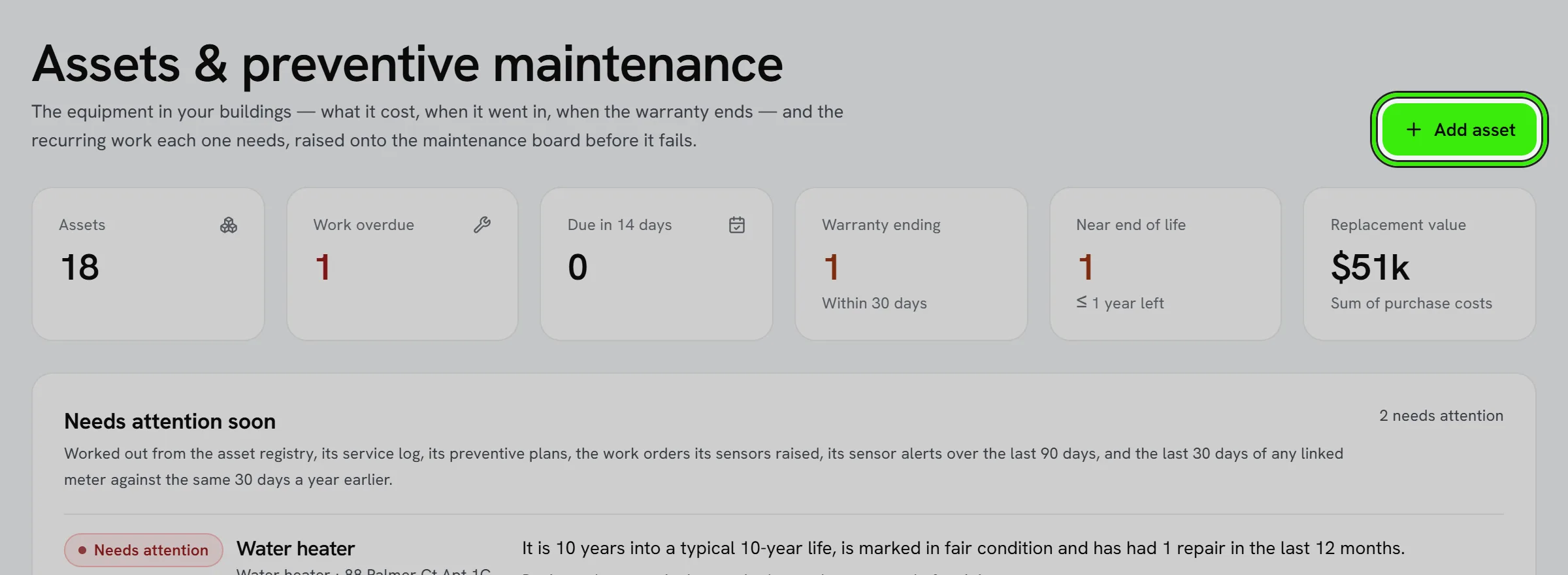
Equipment the list does not name
Pick “Other — name it” as the type and say what it is: a pool pump, a generator, a gate motor. The name is kept for your portfolio, so the next time it is in the type list beside Boiler and Roof, and the asset reads as what it is everywhere instead of “Other”. A name that is already a built-in type — typing “Roof” — simply files the asset under that type. It works the same on the website, the iPhone app and the Android app.
Preventive plans
- A plan is recurring work — an annual boiler service, a filter change every three months. Each one raises a real work order onto the maintenance board ahead of its due date, and raises it only once however many times it is triggered.
- Mark a plan done to record the visit and move its next due date forward. The visit is added to the service log.
- New equipment suggests the plans that kind of equipment usually needs; add them with one tap.
Scan-to-report labels
Every asset has a QR label. Stick it on the unit: a tenant who scans it opens a repair request already pointed at that asset, so nobody has to describe which boiler. Print or share it from the asset’s page.
The equipment outlook
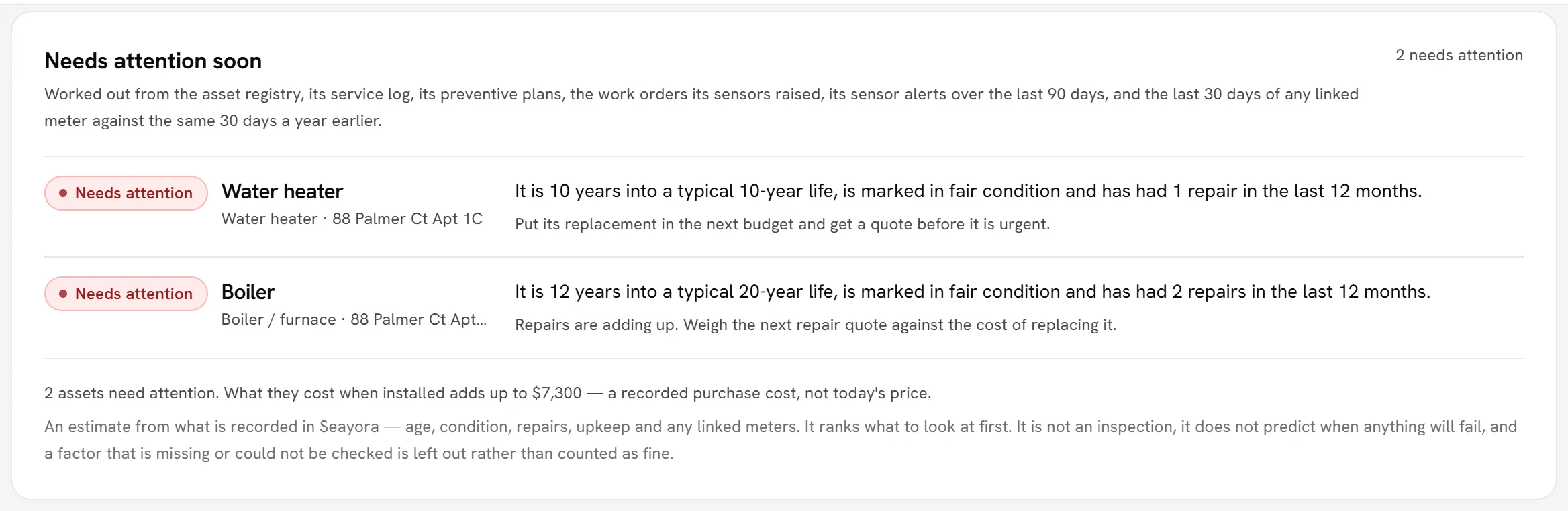
The outlook ranks every asset in service by how much attention it may need, and says why in plain words — for example, “It is 14 years into a typical 20-year life and drew 40% more gas than in the same 30 days last year.” It appears at the top of the asset register, as a line on each asset that needs attention, and on each asset’s own page with every factor and a suggested next step.
| Tier | What it means |
|---|---|
| Needs attention | Several signals, or one strong one, say this equipment should be dealt with soon — priced for replacement, serviced or repaired. |
| Keep an eye on it | Something is worth watching, but nothing is pressing yet. |
| Nothing flagged | Nothing recorded against it stands out. |
| Not enough recorded | Too little is recorded to judge it — usually the install date is missing. |
What it looks at
| Factor | How it is read |
|---|---|
| Age | Its age against the expected life you recorded for it, or a typical life for that kind of equipment when you did not. |
| Condition | The condition you recorded. Only fair, poor and failed count — every asset starts as “good”, so “good” is not treated as a finding. |
| Repairs | Repairs and warranty claims in the service log over the last 12 months, plus work orders raised by its own sensors, compared with the year before. |
| Consumption | For a meter linked to it: the last 30 days against the same 30 days last year, by daily average. Only a rise counts. |
| Sensor alerts | Alerts from its linked sensors that are still open, and how many there were in the last 90 days. A sensor going offline is about the sensor, so it does not count. |
| Preventive maintenance | Plans that are overdue, or no plan at all on equipment that normally has one. |
One strong signal is enough on its own — a boiler past its expected life needs attention whether or not anybody logged a repair — and signals that agree raise the ranking. A factor that is missing (no install date, or no readings from a year ago) or that could not be checked is left out and marked as such. It is never counted as fine.
What it does not claim
- It is an estimate from what is recorded in Seayora. It is not an inspection and it does not predict when anything will fail.
- Expected lives are planning figures, not warranties.
- Consumption is not adjusted for weather or occupancy — a colder month is the commonest innocent reason a boiler used more gas, and the sentence says so.
- The cost shown for equipment that needs attention is what it cost when it was installed, as you recorded it — not today’s replacement price.
- It never raises a work order or changes a record by itself. The suggested next step is something you choose to do.
Making it more accurate
- Add the install date to every asset — without it, age cannot be judged.
- Log repairs in the service log with their cost.
- Set the condition when somebody inspects the equipment.
- Link a meter or sensor to the equipment it measures in Connected devices; after a year of readings, its consumption is compared year on year.
Assistants connected to Seayora can read the same ranking with the equipment_outlook tool — for example, “which boilers should I budget to replace next year?” — and they are given the same qualifiers.
Frequently asked questions
Does the outlook tell me when my boiler will fail?
No. It ranks equipment by how much attention it may need from what is recorded — age, condition, repairs, upkeep and any linked meter. It does not predict a date, and it is not an inspection.
Why does an asset say “Not enough recorded”?
Usually because it has no install date, so its age cannot be judged, and nothing else recorded against it stands out. Add the install date on the asset’s page.
Does it adjust for a cold winter?
No. Consumption is compared with the same 30 days last year and is not adjusted for weather or occupancy. For heating equipment the sentence says so.
Can my tenants see the outlook?
No. It is shown only to the owner and the managers of the property.
Related guides
Related features and guides
- Building Health Score — Documentation. What the building health score is made of, what each factor means, what it deliberately does not claim, and how to show a building condition badge on a listing.
- Unit Timeline — Documentation. Everything that happened at one unit — or on your tenancy — in one list, newest first, and exactly who can see what.
- QR Codes & Scanning — Documentation. Print QR labels for equipment, units, jobs and signs, scan any code with your phone, and see everywhere a label has been read.
- Calendar & Scheduling — Feature. Schedule showings, inspections, site visits, and maintenance jobs on a shared calendar so field work and leasing activity stop colliding.
- In-App Video Calls — Feature. Start a video call from any Seayora conversation, or upgrade a voice call to video mid-conversation. Run remote showings, walk a contractor through a repair, and schedule video meetings on the shared calendar — no personal number, no third-party meeting app.
- Team Roles & Permissions (RBAC) — Feature. Role-based access control with employee accounts, so leasing agents, maintenance staff, and bookkeepers each see only their scope. Every action is audit-logged.