Recording payroll — Seayora keeps the record, you make the payment
How to record a payment you have made to your crew, why Seayora does not send wages itself, which payroll providers let you connect an API key so pay runs are recorded for you, and which ones refuse to.
Seayora records payroll. It does not pay it. You pay your crew the way you already do — your bank, your payroll provider, a check, cash — and then record it here. The hours that payment covers stop showing as outstanding, the payment reaches your books as payroll expense, and the person you paid can see it on their own screen.
This is a deliberate line, not a missing feature. Paying wages means withholding, depositing and filing tax in every state your crew works in, and moving money under a license. The firms that do that for software platforms hold those licenses themselves. Seayora keeping the record and staying out of the payment is what lets this work on day one, for every payroll provider, with nothing to sign.
Recording a payment
- On the website: Finance → Accounting → Chart of Accounts → Payroll. The form is at the top of the tab, above the payroll runs already posted to your books.
- On your phone: open Team, choose the person, then Record a payment.
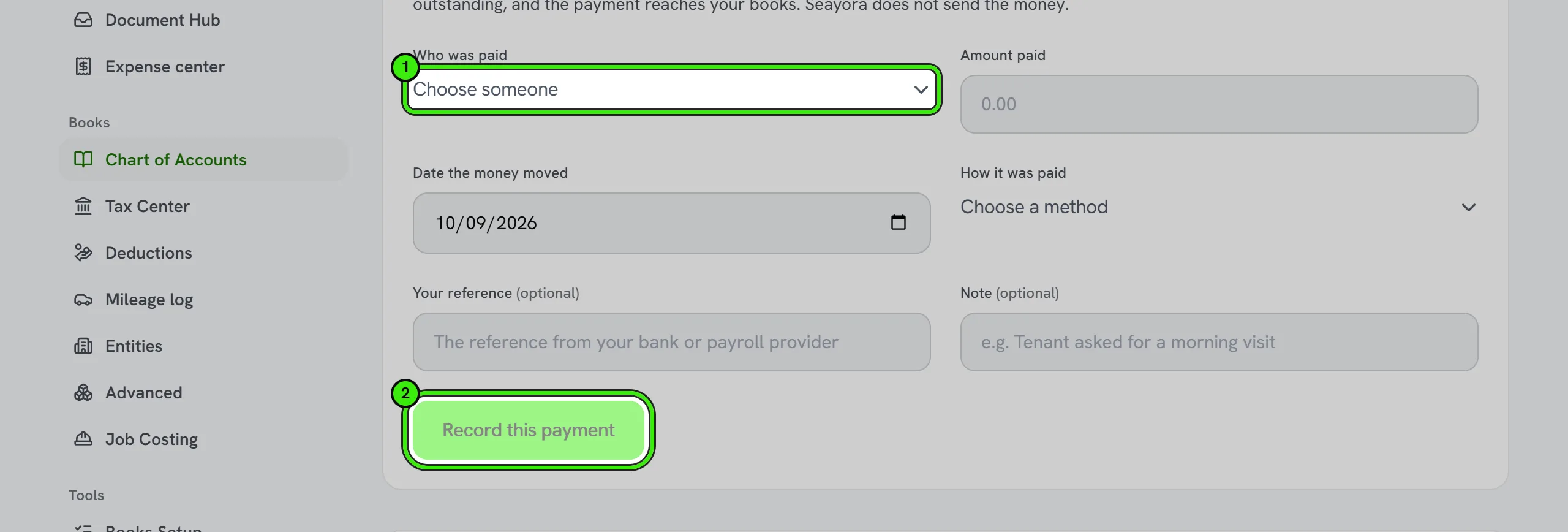
You are asked for four things: who you paid, how much, the date the money actually moved, and how you paid it. Two more are optional — your own reference from your bank or payroll provider, and a note.
| Field | What it is for |
|---|---|
| Amount paid | Bounded by what is genuinely outstanding for that person. Only approved hours count, so you cannot record a payment against time nobody has signed off. |
| Date the money moved | The day you paid, which is often not the day you record it. This is the date the person sees as when they were paid. |
| How it was paid | Bank transfer, through a payroll provider, check, cash, or another way. There is no default: an unrecorded method stays unrecorded rather than claiming one you did not choose. |
| Your reference | Yours, not ours. Seayora never invents a reference — if you leave it blank it stays blank. |
When you record a payment, the person is emailed to say their employer recorded paying them, with the amount, the date and the method. The email names you as the payer, because you are.
What your crew sees
Each person has a My pay screen showing what is still outstanding and every payment you have recorded. They can also tell you which account they want to be paid into — only the last four digits are stored, and Seayora never holds a full account number. Nothing on that screen offers them a withdrawal, because Seayora cannot send one.
Recording pay runs automatically
Seayora cannot import pay runs from any payroll provider yet, so for now every payment is recorded by hand. When an import exists it will only ever read finished pay runs — it will never run payroll, start a pay run or move money.
Even then, most payroll brands do not let their own customers hold an API key at all. That is their policy, not a limit in Seayora, so the app tells you which situation you are in rather than showing you a box that can never work.
| Provider | Can you connect it? |
|---|---|
| Rippling | Not yet. Rippling does let you create your own API key, but Seayora cannot read pay runs from it yet. |
| ADP | Not yet. ADP gives API access through ADP API Central, a paid add-on — and Seayora cannot read pay runs from ADP yet either. |
| Gusto | No. Gusto issues API access only to integration partners it has approved, not to its own customers. |
| Paychex | No. Credentials come through their partner program. |
| QuickBooks Payroll | No separate payroll key. If you already connect QuickBooks for your books, payroll entries arrive that way. |
| Square Payroll | No. Square does not expose payroll through its public API. |
Recording by hand takes about fifteen seconds per payment and produces exactly the same record an import would.
Disconnecting
Disconnecting stops Seayora reading your pay runs and deletes the stored credential. Every payment already recorded is kept — some have been posted to your books and some have settled real timesheets, so removing them would rewrite your history to undo a settings change.
One thing that changed
This screen used to be called Direct deposit and offered to transfer wages to a bank. It could not: no money ever moved. It now records what you have done instead of claiming to do something Seayora is not able to do. If you have old entries from that period, they are still in your history.
Related features and guides
- Contractor Payroll & Wages — Feature. Wage tracking, payroll records, W-2 export and geofence-verified hours — driven by the same timesheets that feed job costing. Seayora keeps the record; you pay your crew the way you already do.
- The Crew Schedule: Shifts, Time Off, Pay Periods & Labor Budgets — Documentation. How to build a crew schedule, publish it, see planned hours against what was actually worked, approve time off, freeze a pay period for payroll, and hold a job to a labor budget.
- Permissions Reference — Documentation. Every permission an assistant or API key can hold, what it unlocks, and which ones can change records — generated from the server.
- AI that runs on your phone — Documentation. Some Seayora features can run on the handset itself — free, offline, and without the text leaving the device. Which ones, which phones, and what happens on every other phone.
- Call Recording & Consent — Feature. Where enabled, calls can be recorded or transcribed for quality and dispute resolution — with recordings attached to the conversation and consent obligations made explicit.
- Field Service Management Software — Feature. The unified service-pro command center: estimates, jobs, crew, fleet, inventory, safety, payroll, invoicing, reputation, and forecasting — free to join, 4% only when you are paid.