Filtering Your Inbox
Smart filters, saved filter chips and labels — how to answer "who owes rent and has an open repair" without scrolling.
A busy inbox is a list of people, and the question you open it with is usually not "which thread is unread". Smart filters answer the real question directly: who is waiting on a reply, who owes rent, whose lease is nearly up, which threads have a voice note in them.
The quick row
Under the inbox tabs is a row of the filters people reach for most, one tap each, on the website and in both apps. If you collect rent — a landlord, a management company or an owner — they are Overdue, Open repairs, Waiting on you, Lease ends in 30 days, Payment failed, Missed call and Mentions you. Everyone else gets Waiting on you, Mentions you, Missed call, Waiting over a day, Photos and Documents. Tap one to apply it and tap it again to clear it; they work exactly like the same filters in the full panel and combine with anything else you have applied.
Filters narrow together, never widen
Pick as many as you like. They combine with AND — "Owes rent" plus "Open repairs" shows the people who owe money AND have something broken, not everyone who matches either. The bar under your chips spells out exactly what is applied, so a filter you forgot about never looks like missing conversations.
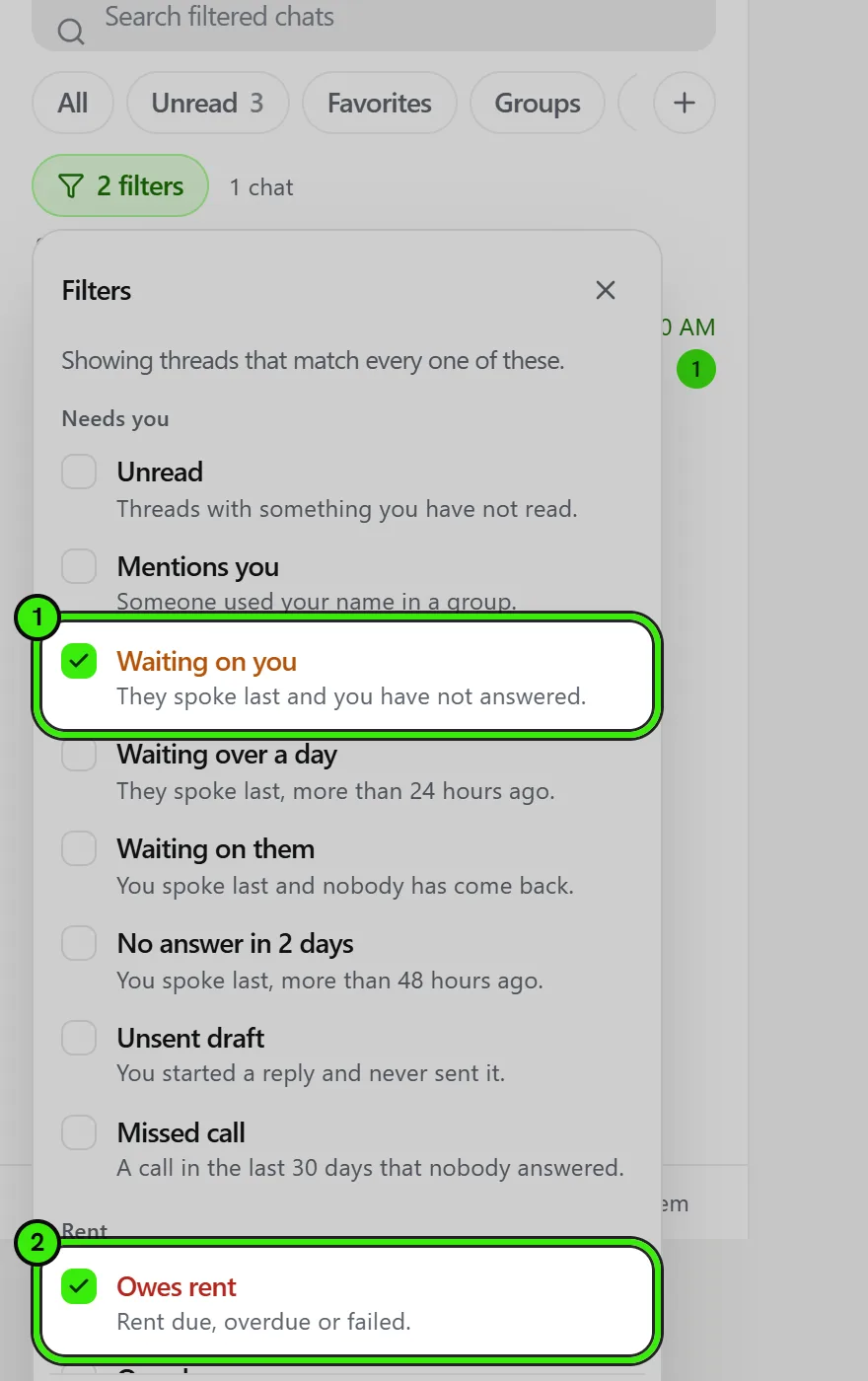
What you can filter on
| Group | Examples |
|---|---|
| Needs you | Unread · Mentions you · Waiting on you · Waiting over a day · Waiting on them · No answer in 2 days · Unsent draft · Missed call |
| Rent | Owes rent · Overdue · Payment failed · Rent due · Due this week · Paid late · Paid on time |
| Repairs | Open repairs · 3 or more repairs |
| Lease | Lease ends in 30 days · Lease ends in 60 days · Lease ended |
| In the thread | Photos · Videos · Documents · Voice notes · Links · Polls · Places |
| The thread | Favorites · Pinned · Direct messages · Groups · Support · Muted · Not filed yet · Closed · Disappearing · Archived |
| When | Active today · Active this week · Quiet a month · Never got going |
Rent, repair and lease filters only appear for the side that collects — a landlord, a management company or a property owner. A tenant is not shown them, because the platform does not compute a rent position for the person who is paying rather than collecting, and a chip that is always empty is worse than no chip.
Saving a filter as a chip
Once a set is applied, "Save as a chip" names it and puts it beside the Filters button. A saved chip appears on every device you sign in on — web, iPhone and Android — because the arrangement lives on your account, not on the machine you made it on.
A saved filter is private to you. Nobody else on the platform can see it, including the people in the threads it selects — the same rule that governs labels.
Labels compose with filters
Your own labels ("Chasing payment", "Awaiting access") sit in the same panel and narrow the list alongside the filters. Labels are private filing: a tenant never sees a label you put on their thread.
Frequently asked questions
Do filters search my whole inbox or just what is loaded?
The whole inbox — and that includes the five chips along the top (All, Unread, Favorites, Groups, Archived) as well as the smart filters behind the Filters button. Every one of them is answered by the server over every conversation you are in, not over the page currently on screen, which is the entire point for a question like "who has not paid".
Why can I not see the rent filters?
They are shown to the side that collects rent — landlord, management and owner accounts. A tenant account has no rent position of its own to filter on.
Can other people see my saved filters?
No. Saved filters and labels are private to your account, and there is no way to share one.
Does hiding a thread with a filter delete anything?
No. A filter only changes what is listed. Nothing is archived, deleted or hidden from anyone else, and clearing the filter brings the full list straight back.
Related guides
- In-Platform Messaging
- Tidying Your Inbox
- Voice Notes
- Chat Appearance & Wallpapers
- Seayora Storage: Messages Media and Camera Footage
Related features and guides
- In-Platform Messaging — Documentation. How to message tenants, landlords, managers, and service pros inside Seayora with a record of every conversation, send anything later at a time you choose, and draft a reply to an inquiry about your listing.
- Tidying Your Inbox — Documentation. Swipe actions you choose yourself, selecting several conversations at once, and the unread count on the Messages tab.
- Voice Notes — Documentation. Recording and playing voice messages on the web, iPhone and Android — including what a transcript is for.
- Contractor Job Board & Assignment — Feature. A live job board showing every open, assigned, and completed job. Create jobs, assign technicians, and move work through status without a group chat.
- Holdover Tenants: What Happens When the Lease Ends and the Tenant Stays — Guide. When accepting rent after a lease ends creates a month-to-month tenancy, and when a holdover owes double rent: New York, California and Florida rules.
- Broadcast Messaging & Notices — Feature. Broadcast SMS and email notices to an entire building or portfolio at once — water shutoffs, policy changes, and seasonal reminders, without a mail merge.