Team Permissions
How a management company or a contractor decides, per employee, which parts of the account are hidden, read-only or fully open.
If you run a management company or a contracting business on Seayora, you hire people who need part of the account and not the rest: a leasing agent who screens applicants but never sees the books, a technician who closes their own jobs but never reprices one, a bookkeeper who reads every ledger but never messages a resident. Team permissions are how you say that, once, per person.
You set them when you invite somebody, and you can change them at any time from Settings — on the website, on Android and on iPhone. Every change emails the person it happened to, with exactly what moved.
Three levels, not a switch
Each area of the account is set to one of three levels. "What can they see" and "what can they change" are two different questions, and a single on/off answers only one of them badly.
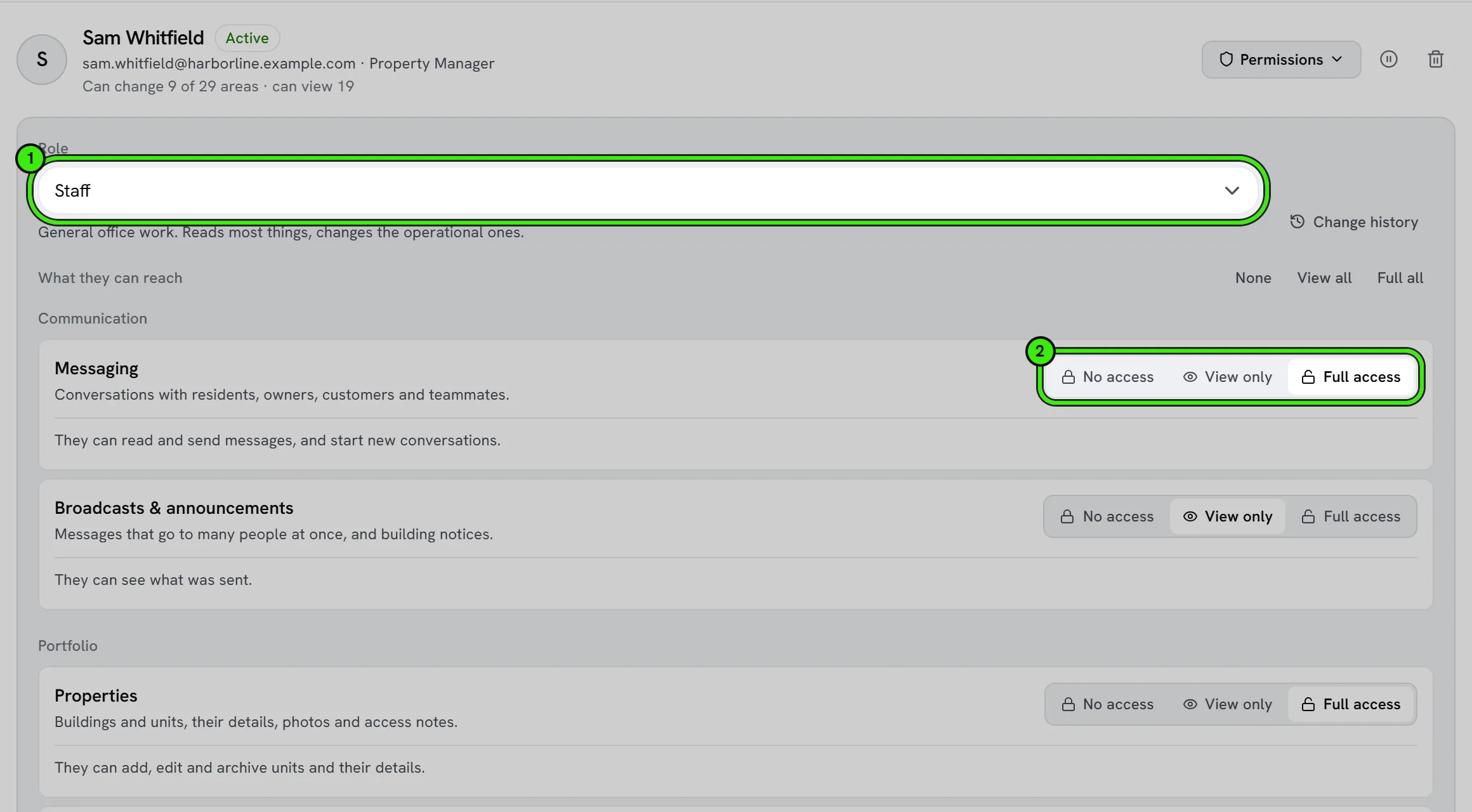
| Level | What it means |
|---|---|
| No access | Hidden from them entirely. It does not appear in their navigation, in their Tools list, or in search. |
| View only | They can open it and read it. Nothing they do changes it. |
| Full access | They can read it and change it. |
A few areas offer only No access and Full access, because there is no meaningful read-only version of them — there is no such thing as "viewing" a refund. Each area also spells out, in its own words, what View only and Full access actually let that person do, because "Full access" on Payroll and "Full access" on Tasks are not the same promise.
Roles are a starting point, not a cage
Picking a role — Manager, Leasing agent, Maintenance coordinator, Bookkeeper, Dispatcher, Estimator, Technician, Staff or Viewer — fills in every switch with a sensible set for that job. You can then move any of them. Changing the role later replaces the switches with that role’s set again, so a role always describes what the person can actually do.
One invitation adds a person
Inviting a team member is the only way to add somebody — there is no separate "add employee" form. On a management account the same invitation can also carry their job title, trade, how they are employed, their start date and the buildings they cover, all optional and all changeable later from their card. A Staff member reaches only the buildings checked there.
Their role decides what comes first
The role also orders the sections they see. A bookkeeper’s Operations opens on Accounting, Rent and Utilities; a leasing agent’s on Applications, Showings and Leases; a maintenance coordinator’s on Field work, Maintenance and Assets. It only reorders: anything they arrange themselves wins, and nothing their permissions withhold appears. The permission list in the invitation is ordered the same way, so the areas a role works in are at the top.
What they see when something is not theirs
Anything at No access is simply absent from their navigation, rather than present and broken. On the phones, the Tools screen additionally names what is on the account but not open to them, so somebody hunting for Rent learns that their manager has not given it to them instead of concluding the app is broken. If they reach a page directly — a bookmark, a link in an email, a search result — they get a plain explanation and a way to message you, never a dead end.
Who can change permissions
The account owner always can. You can also give a trusted teammate access to Team & permissions, and then they can manage the roster too — but they can never grant access they do not hold themselves. A leasing agent with team access cannot promote anybody, including themselves, to the company bank details. They also cannot change their own access at all; only the owner can.
Sending the invitation, and the link you can copy
An invitation is emailed to the address you type. After you send it you can also copy its link, to pass on by text or chat. The two open the same invitation, with one difference: the emailed link proves the invitation reached that inbox, so somebody opening it creates their account in one step. Somebody who opens the copied link and is creating a new account is asked for a 6-digit code that Seayora emails to the invited address — which is what stops an account being opened in a person’s name by anybody who is not them. Somebody who already has a Seayora account signs in to accept, whichever link they use.
Pausing and removing
Pausing somebody closes the whole account to them at once, without deleting anything or unpicking a single switch, and it is reversible. Removing them takes them off the roster entirely. Neither touches their own Seayora account, which is theirs and stays theirs.
What permissions are not
- They are not the same as which properties somebody is assigned to. A staff member assigned to three buildings sees those three; permissions decide which parts of those three they can open.
- They do not stop obligations. Rent receipts, leases awaiting signature, payment failures and security alerts reach the people who need them whichever switches are set.
- They do not apply to your own record. Anybody on the roster can always clock themselves in, see their own hours and manage their own sign-in security, whatever their payroll access says.
- They are not a hiding preference. Hiding a tile in Arrange is something a person does for themselves and can undo; a permission is your decision and they cannot.
The change history
Every change is recorded — who changed it, when, what moved, and from which level to which. Expand a teammate and open Change history to read it. Each person can also read their own history.
Frequently asked questions
Do I have to set permissions before somebody joins?
You set them on the invitation, and they see exactly what they are being given before they accept. You can change everything afterwards from Settings.
What happens if I change somebody’s access while they are using the app?
It takes effect within a few seconds. They are also emailed a summary of what changed and who changed it.
Can I stop somebody messaging residents without stopping them reading messages?
Yes — set Messaging to View only. They can read the threads they are part of and cannot send anything.
Someone on my team can see the team list but cannot change it. Why?
They hold View only on Team & permissions. Only the owner, and anyone given Full access to that area, can change what people are allowed to do.
Does a technician need permission to use the time clock?
No. Their own clock, their own hours and their own time-off requests are their own record, not a permission. Payroll access is about seeing and changing other people’s.
Related guides
- Roles & Account Types
- Account Security: SSO, 2FA & Passkeys
- Workforce & Task Management
- Arranging Your Tools & Sections
Related features and guides
- Roles & Account Types — Documentation. The difference between landlord, management, service professional, and tenant accounts — and what each role can do on Seayora.
- Account Security: SSO, 2FA & Passkeys — Documentation. How to secure your Seayora account with single sign-on, two-factor authentication, device verification, passkeys (WebAuthn), and resetting a forgotten password.
- Workforce & Task Management — Documentation. How management companies assign staff, manage tasks and check-ins, and keep an accountable record of work.
- Team Roles & Permissions (RBAC) — Feature. Role-based access control with employee accounts, so leasing agents, maintenance staff, and bookkeepers each see only their scope. Every action is audit-logged.
- Employee Tasks & Check-Ins — Feature. Assign tasks to staff, track completion, and require check-ins at site visits so field work is accountable rather than assumed.
- Inventory, Tools & Vendor Supply — Feature. Track parts inventory and tool check-out, reorder from vendors, transfer stock between locations, and get ahead of supply delays and bulk-discount thresholds.