Browsing & Searching Rentals
How renters search listings on Seayora — the map, filters, saved favorites, city and neighborhood pages, and applying online.
Renters can search Seayora without an account — on the website and in both apps — and apply online in minutes once they find the right place.
Finding a home
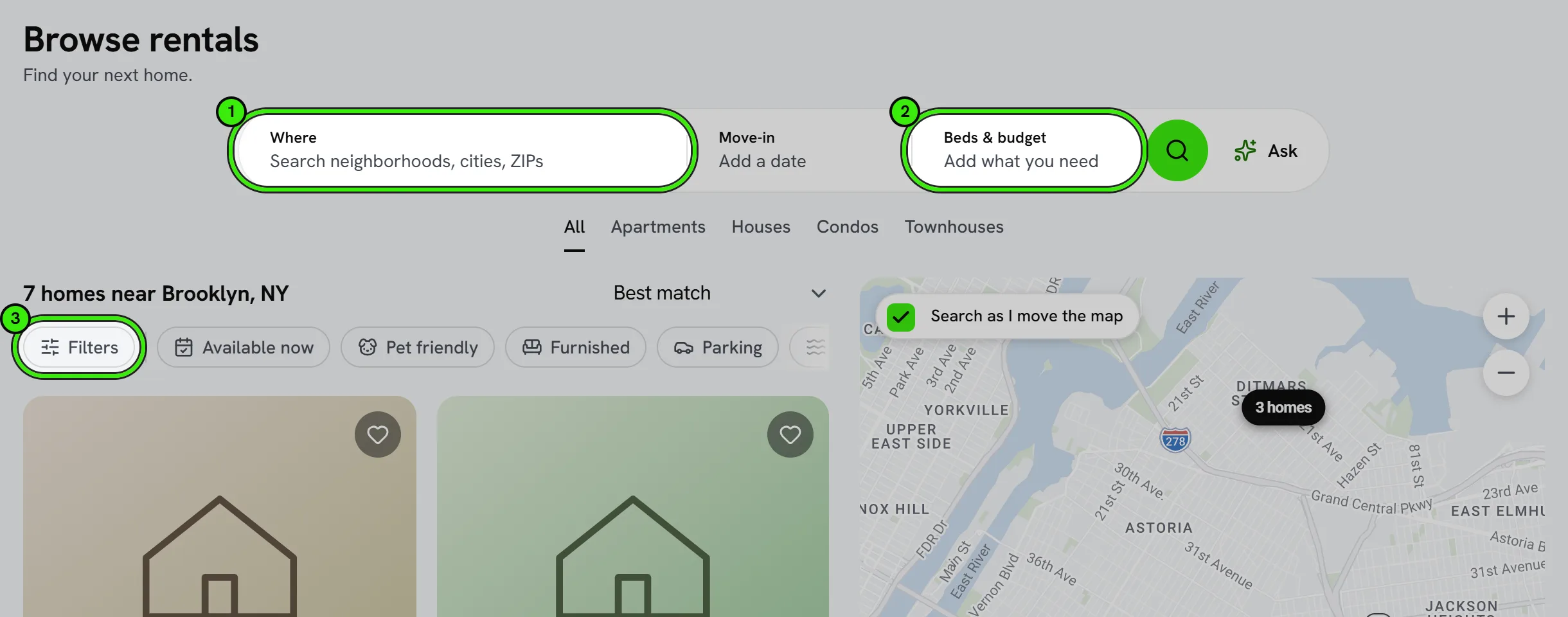
- Filter by city, neighborhood, price, bedrooms, bathrooms, and amenities — the most-used ones (pets, furnished, parking, laundry, available now) are one tap above the results.
- Drag or zoom the map to search the area you are looking at.
- Browse curated city and neighborhood pages.
- Open any listing for its photos, every amenity, the address on a map, walking times to transit and essentials, and the full rent and terms.
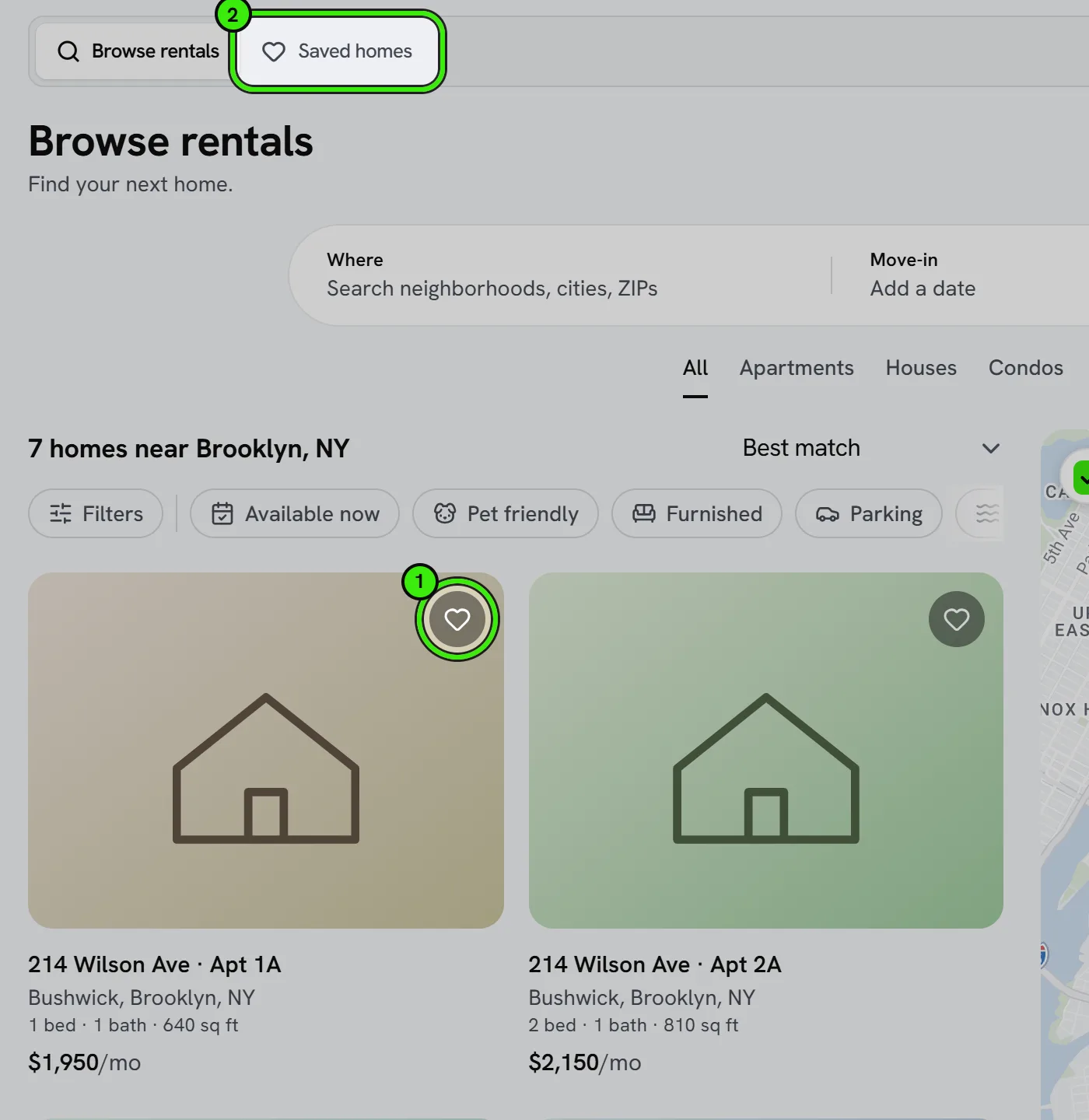
- Save favorites to compare them side by side.
Searching by map
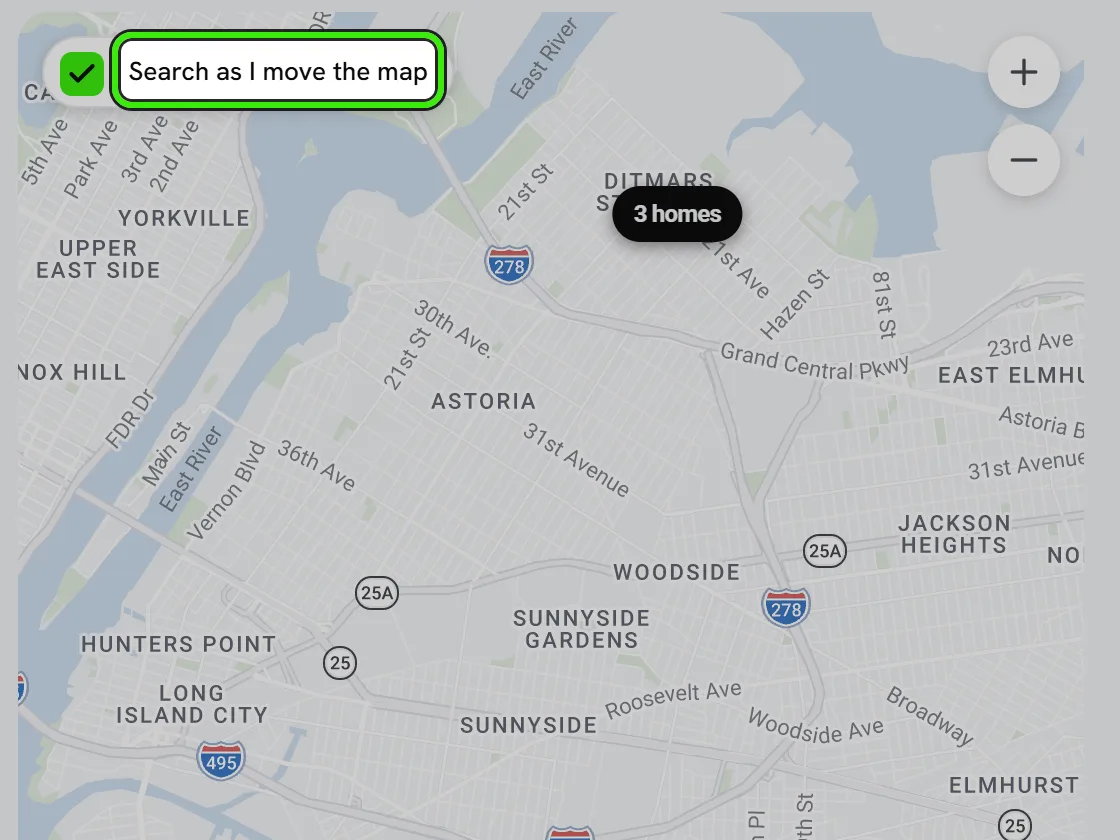
The map sits beside the results on a laptop and behind a Map button on a phone, and it is a search of its own: with “Search as I move the map” switched on, dragging or zooming it shows the homes in the area you are looking at, and the line above the results says so (“42 homes in this map area”). Switch it off and a “Search this area” button appears once you have moved the map, so you can look around without the list changing under you. Moving the map replaces whatever place you had typed — a city and a map area that no longer overlap would show nothing at all — and typing a new place puts the map back on that place. The address in your browser carries the map area, so a search you share opens on the same view.
Before you search for anywhere, the page shows homes near you, using the rough location your browser or connection provides; that location is never written into the link you share.
Browsing on your phone
The iPhone and Android apps do not make you sign up before you can look. The first screen offers “browse rentals without an account”, which opens the same marketplace the website shows a signed-out visitor: the same published listings, the same search box, the same photos, price, beds, baths, size and description.
Saving a home, messaging the lister and applying do need an account, because all three attach something to you. The apps say so at the point you reach for them and create the account there and then — nothing is hidden behind a wall you have to guess at, and nothing sends you to a laptop.
Asking the assistant
Every search carries an Ask control — on the website and in both apps. Tell it what you want in your own words, such as “a two-bedroom in Bushwick under $2,500 where dogs are OK”, and it searches every listing on Seayora, shows the homes that match and writes a short answer about them. You can keep going: “what about three bedrooms?” keeps the rest of your search, and “which of those is the cheapest?” is about the homes it just showed you.

Under your question it shows what it read it as — for example “Bushwick · 2 bedrooms · Up to $2,500 · Pets allowed”. Tap ✕ on any of them to search again without it, so nothing about your search is hidden inside the answer. It searches by budget, bedrooms, bathrooms, place, type of home, move-in date, pets, furnished, parking, laundry, a pool and an elevator. Listings do not yet record step-free access, so for that it searches for an elevator and says so. If nothing matches all of it, it says which filters to relax — it never fills the gap with homes that do not match.
You can also search with a photo — of a kitchen you like, say — and it ranks homes whose listing photos look like it. The photo is made smaller on your device, read once to describe it, and never stored.
It reads the top five homes it finds and answers only from what those listings actually say, so if a landlord has not filled in the pet policy the assistant tells you that rather than guessing. It will not estimate a commute, a distance, a school or a crime rate, and it will never describe a neighborhood by the people who live there. If part of your question asks it to — “a safe area”, “good schools”, “no kids” — it searches for everything else you asked and tells you which part it left out.
When your search names a place, it can email you new homes that match, once a day. On the website and the iPhone app you can type your email address if you are not signed in; the Android app asks you to create an account first. If you are signed in, it also remembers your last search so you can pick up where you left off.
What you ask it, what it read that as and which homes it showed you are kept for 180 days after you last use it, so that what it said can be checked if anyone asks. Signed out, a conversation carries no name, email or address. Signed in, you can delete yours at any time from Settings → Your data.
The rent, bedroom count, size and address you see beside an answer come from the listing itself, not from the assistant — they are the same figures the card shows. The assistant writes the comparison; it never re-types a number.
It is a starting point, not the record. Check the listing, and ask the lister, before you decide anything.
Messaging the lister
Every listing carries two actions: message the lister, or ask for a tour. Both open a real conversation with whoever advertises the unit, inside Seayora — you never see their personal email address and they never see yours until you choose to share it.
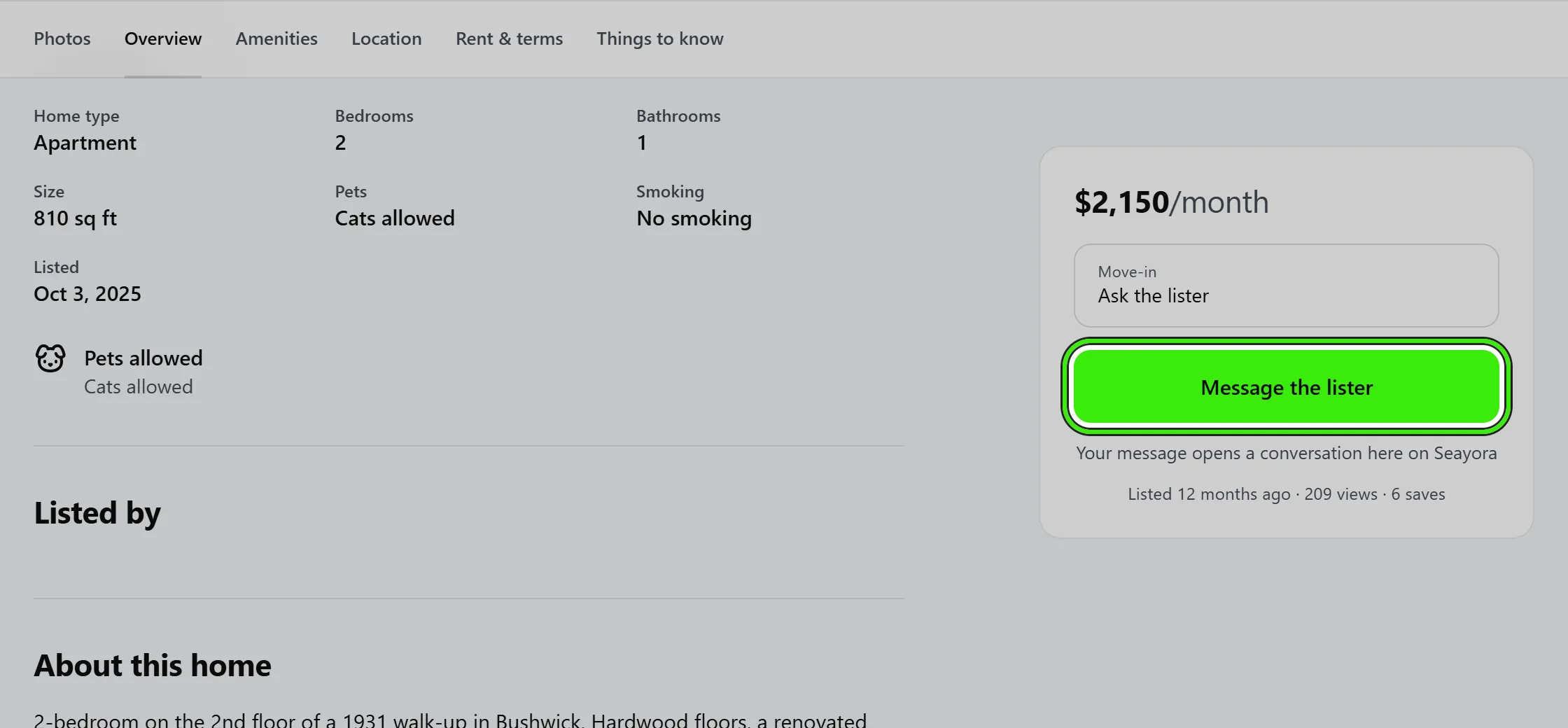
If you start one of those without an account, the message is kept for you. Sign in or create an account and it goes out on its own; you land straight in the conversation rather than having to type it a second time. It is held for 24 hours and only on the device you started it on.
From listing to application
When you’re ready, apply directly from the listing. Your application goes to the landlord or manager, who makes their own independent decision. Applying quickly with your documents ready helps you stand out.
Saving searches and getting alerts
Set up a saved search for a city, neighborhood, or price range and Seayora can notify you when a matching listing goes live — useful in competitive markets where good units go fast. See the saved searches doc for details.
Comparing favorites side by side
Favorited listings collect in one place so you can compare price, size, and amenities without reopening each one. It’s the easiest way to narrow down a shortlist before you apply.
Frequently asked questions
Do I need an account to browse rentals?
No — you can browse and search freely without an account, on seayora.com and in the iPhone and Android apps. You’ll need one to save favorites, set up saved searches, message a lister, or apply.
Can I search by moving the map?
Yes. Leave “Search as I move the map” on and every drag or zoom searches the area in view; turn it off and use “Search this area” when you are ready. Your filters stay applied either way.
Does a listing show the exact address?
Yes — the street and unit the lister entered appear under the title and on the map in the Location section, along with walking times to nearby transit, groceries, parks and schools measured from the home’s own coordinates.
Can I filter by move-in date?
Yes, availability date is one of the standard filters, alongside price, bedrooms, bathrooms, and amenities, so you only see units that actually match your timeline.
Can I contact a landlord directly from a listing before applying?
Yes — most listings support sending a message or inquiry before you commit to a full application, useful for quick questions about availability or policies.
Are prices on Seayora always up to date?
Landlords are responsible for keeping their own listings current. If a price looks stale, message the landlord to confirm before applying.
What can the Ask assistant actually see?
Every published listing on Seayora, through the same kind of search you can do yourself — and, for the answer, the top five homes that search found, and only what those listings say. It cannot see your saved homes, your applications or anything outside Seayora, and it does not estimate commutes, distances, schools or anything else a listing does not state.
Why did it leave part of my question out?
Because that part asked it to choose homes or neighborhoods by who lives there, or by schools, crime or places of worship — things fair housing law keeps out of renting, and which a machine should not guess at either. It searches for everything else you asked and says which part it left out.
Is what I ask the assistant kept?
For 180 days after you last use it, so that what it was asked and what it answered can be checked. A photo you search with is never kept. Signed out, a conversation carries no name, email or address; signed in, you can delete your conversations from Settings → Your data.
Can the assistant tell me which neighborhood is best?
No, and it will not try. It describes the home, never the people around it — no “family-friendly”, no “safe area”, no ranking of one neighborhood against another. Those are the kinds of statements fair housing law exists to keep out of rental advertising, and they would be no better coming from a machine.
Is the assistant available everywhere?
It is on the website, the iPhone app and the Android app, with the same questions and the same answers. If it is switched off on an installation, the panel says so rather than taking a question it cannot answer.
Related guides
Related features and guides
- Creating & Publishing a Listing — Documentation. How to post a rental listing on Seayora — property details, pricing, availability, amenities, and how listings appear in search.
- Rental Applications — Documentation. How online rental applications work on Seayora — what applicants submit, how landlords review, and how to keep the process fair and consistent.
- Saved Searches & Alerts — Documentation. How renters save a search and get notified the moment a new matching listing goes live on Seayora.
- Apartment & Rental Search — Feature. Search rentals by city, neighborhood, price, bedrooms, and amenities. Save homes, get alerts when something changes, and apply online in minutes with a reusable renter profile.
- Saved Searches & Rental Alerts — Feature. Save a search once and get notified when new rentals match your criteria — so you see the right unit before it is gone.
- How to Rent an Apartment: A Step-by-Step Guide — Guide. A renter’s step-by-step guide to finding and securing an apartment — budgeting, documents to prepare, applying, and what to check before you sign.