The Time Clock: Punches, Breaks, Overtime & Approval
How technicians clock in and out against a job, what the geofence and photo rules do, how overtime is calculated, how an owner reviews and approves hours, and how to read the clock-in map.
Labor is usually the biggest cost on a job, and the clock is what makes job costing and payroll reflect what actually happened. A shift is a pair of real timestamps with a location, not a number somebody types at the end of the week.
Clocking in and out
A technician punches from the Time Clock screen on the website or either mobile app. The clock is the same everywhere: one open shift per person at a time, whichever device it was started on. Starting a shift on a phone and ending it on a laptop is normal and works.
- Pick a job, or clock in without one when the rules allow it — shop time, travel and training all count.
- Take breaks during a shift. A break pauses the clock and is recorded as its own pair of timestamps, so break time is never a number anybody estimates afterwards.
- Switch straight from one job to the next. That closes the running shift and opens the next one at the same moment, so there is no gap and no second clock-in to remember.
- Elapsed time is measured against Seayora’s clock, not the device’s. A phone whose clock is wrong does not change what anybody is paid.
The rules an owner sets
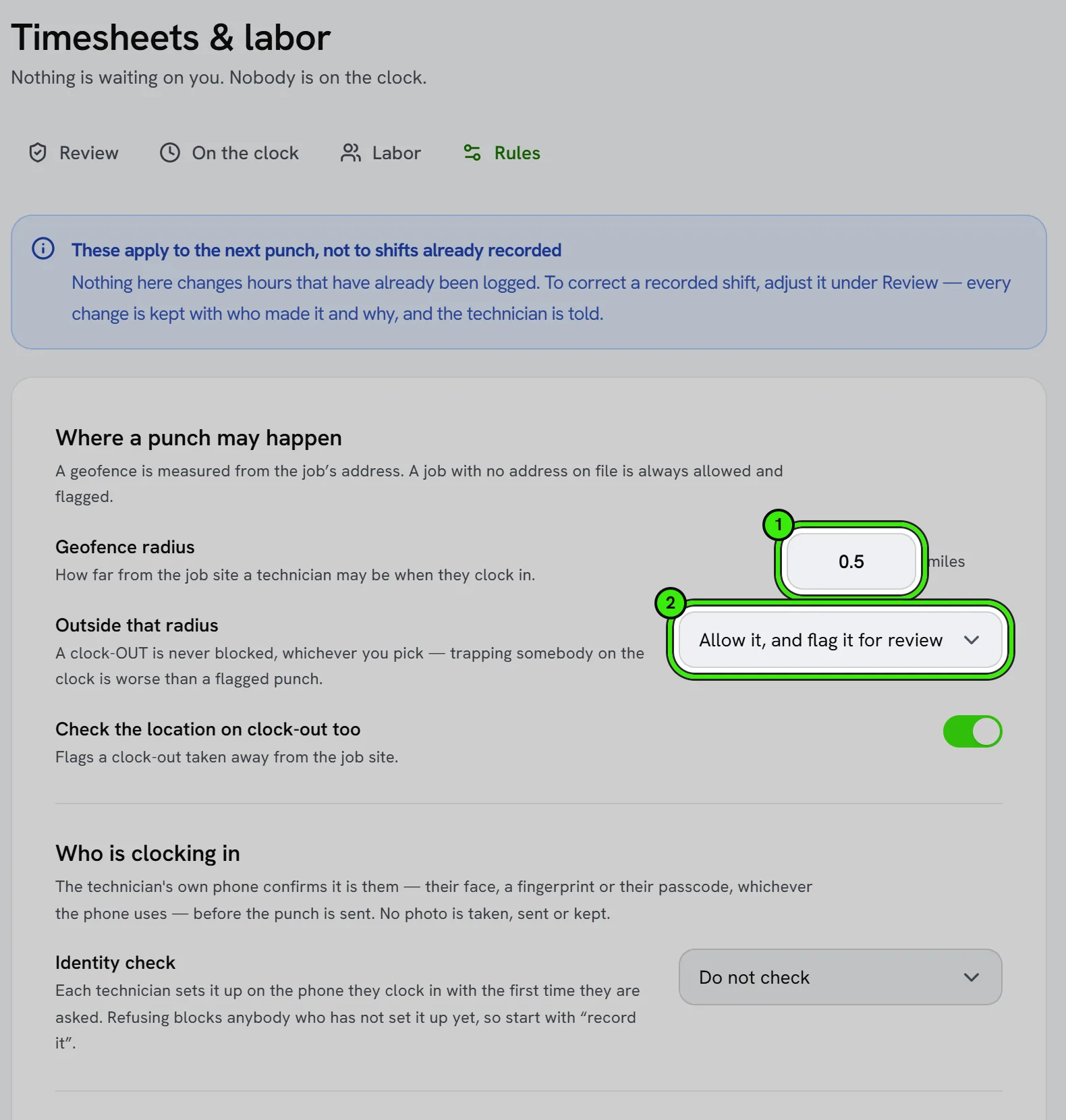
Every rule below lives under Timesheets & Labor → Rules and applies to the next punch. Nothing an owner changes here alters hours already recorded.
| Rule | What it does |
|---|---|
| Geofence radius | How far from the job site a technician may be when clocking in. Measured from the job’s address. |
| Outside the radius | Off (do not check), flag it for review, or refuse the clock-in. A clock-OUT is never refused — trapping somebody on the clock is worse than a flagged punch. |
| Identity check | Off, record, or refuse. The technician’s own phone confirms it is them — fingerprint, face or passcode — and signs the punch with a key that never leaves the device. No photo is taken, sent or kept. Each technician sets up their phone once, from the time clock in the app or under Settings → Security → Passkeys. Start on record: refuse turns away anybody who has not set up their phone yet. |
| Photo at clock-out | A photo of the finished work is required before the shift closes. |
| A job on every punch | Off allows non-job time. |
| Overtime thresholds | A weekly threshold, a daily one, or both. Whichever produces more overtime for a shift is the one that applies. |
| Time zone | Where your crew works. It decides which day a shift falls on, when the week starts for overtime, and the times shown in late alerts and timesheet exports. Left empty, Eastern time is used. |
| Round punches | Rounds both the clock-in and the clock-out to the nearest interval, from exact time up to half an hour. |
| Automatic unpaid break | Deducted from shifts past a set length. It never doubles up on a break the technician already punched — the longer of the two applies. |
| Auto clock-out | A forgotten punch is closed AT the limit, not at the moment it is noticed, then flagged and held for review rather than paid. |
| Late alerts | When a job has a scheduled start and its technician has not clocked in fifteen minutes later, both they and the owner are told. Once per job. |
| Approval before payroll | On by default. Off marks a completed shift approved the moment it is clocked out. |
Approving hours
Timesheets & Labor opens on the shifts waiting for a decision, oldest first, with any flags on the row rather than hidden behind a click. Approve one or approve the page; rejecting requires a reason, and the technician is emailed that reason. Either way they are told, because the decision changes what they are paid.
A recorded shift can still be corrected. Adjusting the punches recalculates hours, overtime and pay through the same engine the clock uses, records who changed it and why, and — if the hours moved — emails the technician what changed. A shift already included in a payroll run can no longer be edited.
What a flag means
A flag is a note for whoever reviews the shift. It is never an accusation, and it never blocks payment by itself.
| Flag | What happened |
|---|---|
| Outside the geofence | The clock-in was taken further from the job site than the radius allows. |
| Left the site before clocking out | The clock-out was taken away from the job site. |
| No location | The device did not provide a GPS fix, so the geofence could not be checked. |
| Job site has no coordinates | The job has no address on file, so there was nothing to measure against. |
| Closed at the limit | Nobody clocked out, so the shift was closed automatically at the auto clock-out limit. |
| Very short | Shorter than the minimum length shifts are flagged at. |
| Entered by hand | Added by an administrator for a missed punch rather than punched. |
| Edited | The punches were changed after the fact. The trail records by whom and why. |
The clock-in map
Work → Clock-in map draws every punch in a window on a map, one color per person. A filled pill is a clock-in, a hollow one is a clock-out, and the line between them joins the two ends of one shift. Click a pill for the shift behind it — the job, the distance from the site, the flags, the hours — and use the legend to show one person at a time. It is on the website and in both mobile apps, and the same color belongs to the same person on all three.
The distance shown on a punch is the one it was judged against when it happened, not one worked out again later. The circle drawn round a job site is your CURRENT geofence radius, which is a different thing: change the radius today and yesterday’s punches keep the verdict they were given.
Above the map, Seayora says how many punches the window held and how many it could place. Those are different numbers, and the gap is the point: a punch taken with location switched off has no place on a map, and a map showing four pins out of eleven punches would otherwise read as a quiet week. Every reason is named — no location from the device, a shift still running, or a shift an administrator typed in by hand and which therefore never had one.
This is punch location, not tracking. Two fixes per shift, taken at the moment somebody pressed a button. Seayora does not follow a phone between punches, has no background location, and there is nothing on this screen about where anyone went in between.
Export gives you the same window as a CSV, including the count of punches that carried no location — so a spreadsheet of what was placed can never be mistaken for a spreadsheet of what happened.
Where the hours go
Approved and pending time both flow into job costing as labor cost and into payroll as hours worked; a rejected shift counts toward neither. Standard and after-hours rates are applied per shift, then overtime and double-time multipliers on top, so the figure on the console is the figure on the payslip.
Keeping records defensible
Every change to a timesheet is kept permanently with who made it, when, and the values before and after. Review time regularly rather than approving weeks at once — accurate, timestamped records are the best answer to a wage-and-hour question, and they are only accurate if somebody looked at them while people still remember the day.
Frequently asked questions
Can a technician clock in from a phone in the field?
Yes, and that is the normal case — the Time Clock is a full screen in both mobile apps as well as on the website, with the same rules, the same breaks and the same live timer.
What happens if a technician forgets to clock out?
The shift is closed automatically at the auto clock-out limit your company sets, flagged, and held for your review rather than paid. Both of you are told it happened.
Does the geofence stop somebody from clocking out?
No. A clock-out is never blocked, whichever enforcement mode is set. If it was taken away from the job site it is flagged for review instead — refusing it would trap somebody on the clock.
Why does the clock-in map show fewer pins than punches?
Because a punch taken with location switched off has no place to be drawn. The strip above the map says how many were placed, how many were not, and why — a shift still running has no clock-out yet, and a shift entered by an administrator never had a location at all.
Can I see where somebody was between punches?
No, and Seayora does not collect it. Location is read at a punch and only at a punch; there is no background tracking to show.
I changed the geofence radius and old punches did not change. Why?
On purpose. Every punch keeps the verdict it was given at the time, against the rule in force then. Re-deciding history against today’s radius would show violations that never happened, or hide ones that did.
Is location tracked between shifts?
No. Location is read at the moment of a punch only, with the device’s permission, and never in the background. If permission is refused the punch still goes through and is flagged, or refused, depending on your rules.
Does the identity check take a photo of the employee?
No. The phone they clock in with checks their fingerprint, face or passcode itself and signs the punch; Seayora receives the signature, never an image or a faceprint. The old clock-in photo was retired — it proved nothing about who was holding the phone.
A technician is refused at clock-in with “not set up for identity checks yet”. What do they do?
Set up their phone once: on the time clock in the Seayora app, tap Set up this phone, or add a passkey under Settings → Security → Passkeys. It uses the same fingerprint or face they already unlock the phone with. Until the whole crew has done that, use record rather than refuse.
Can time be logged against several jobs in one day?
Yes. Clock in and out per job, or use Switch jobs to move straight from one to the next — each job’s labor cost then reflects only the time actually spent on it.
What happens to a shift that is not approved?
It is not paid as recorded, and the technician is emailed the reason you gave. It can still be corrected and approved afterwards.
Who can approve timesheets?
The company owner. Approval is deliberately separate from the person entering the time.
Related guides
- The Crew Schedule: Shifts, Time Off, Pay Periods & Labor Budgets
- Job Costing
- Payroll Posting
- HR & Team Compliance
Related features and guides
- The Crew Schedule: Shifts, Time Off, Pay Periods & Labor Budgets — Documentation. How to build a crew schedule, publish it, see planned hours against what was actually worked, approve time off, freeze a pay period for payroll, and hold a job to a labor budget.
- Job Costing — Documentation. How to tie income and costs to individual jobs so you can see true profitability by job, customer, or trade.
- Payroll Posting — Documentation. How payroll results post into your accounting so wages, taxes, and liabilities land in the right accounts.
- Timesheets & Labor Tracking — Feature. Technicians clock in and out against a job, hours flow into job costing and invoicing, and you see real labor cost per job instead of an estimate.
- Contractor Payroll & Wages — Feature. Wage tracking, payroll records, W-2 export and geofence-verified hours — driven by the same timesheets that feed job costing. Seayora keeps the record; you pay your crew the way you already do.
- Mobile Field App & Push Notifications — Feature. A mobile-first field experience with push notifications for dispatch, so technicians get assignments, capture photos, and clock in without going back to an office.