Seayora Platform Overview
What Seayora is, who it is for, and how the listings, leasing, payments, accounting, and service-pro tools fit together in one platform.
Seayora is an all-in-one property and operations platform that connects landlords, property managers, renters, and service professionals. Instead of stitching together a listing site, a payment app, a screening service, an e-sign tool, and separate accounting software, everything lives in one place with a shared record.
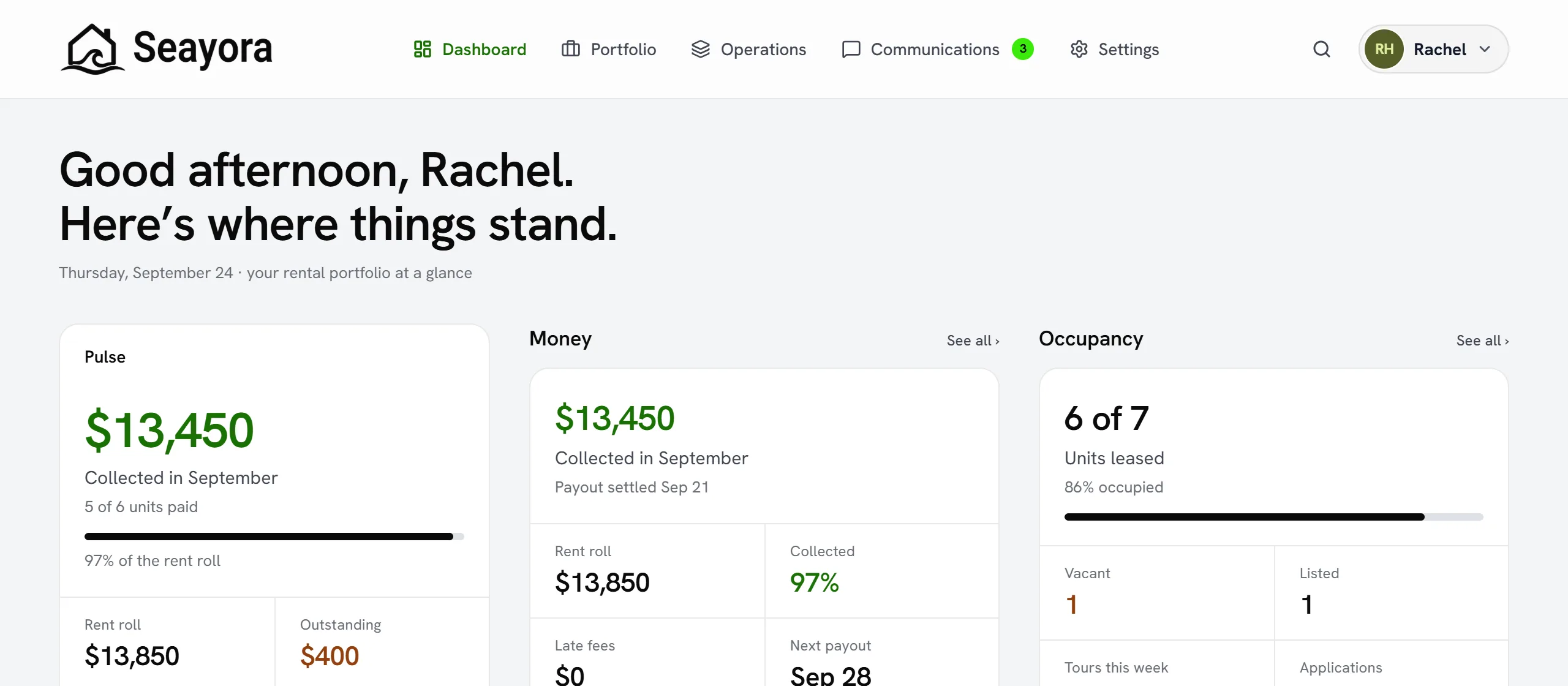
What you can do
- Advertise rentals and let renters browse, save, and apply online.
- E-sign leases with a full audit trail.
- Collect rent online with autopay, reminders, and exportable records.
- Run maintenance and dispatch work to a trusted contractor network.
- Invoice, track bills, reconcile bank feeds, and run full accounting — including a QuickBooks integration.
- Message and call other users with in-platform communication tools.
How it fits together
A listing becomes an application, an application becomes an e-signed lease, and the lease drives rent collection and credit reporting. Maintenance requests turn into work orders, and completed work flows into accounting and job-costing reports. The goal is a single source of truth from first advertisement to year-end books.
What Seayora is not
Seayora is a technology platform — not a broker, property manager, landlord, bank, consumer reporting agency, accountant, or law firm. It provides tools; you remain responsible for your own decisions and compliance. See the Terms of Service for the full scope.
Who Seayora is built for
- Independent landlords who want listings, leasing, and rent collection without juggling five apps.
- Property management companies coordinating a portfolio, a staff, and owner reporting.
- Service professionals who need jobs, invoicing, and full accounting in one place.
- Renters and applicants who want to search, apply, sign, pay, and message without printing anything.
A typical first week
Most new accounts follow a similar path: create an account and secure it, add your first property or connect your existing QuickBooks data, invite a tenant or teammate, and turn on the payment or accounting features you need. You don’t have to configure everything on day one — most settings have sensible defaults you can refine later.
Frequently asked questions
Do I need to use every part of Seayora?
No. Turn on only what your business needs — a landlord who doesn’t do contract work can ignore the service-pro tools entirely, and a service pro who doesn’t manage rental properties never has to touch listings or leasing.
Can I try Seayora before committing?
Most tools are available as soon as you create an account, and listings include a free period before a small recurring fee applies. See Pricing for current details.
Does Seayora replace my accountant or attorney?
No. Seayora provides software tools for advertising, leasing, payments, and bookkeeping, but it isn’t a law firm, accounting firm, or broker. For legal, tax, and complex financial decisions, work with a licensed professional.
Related guides
- Roles & Account Types
- Account Security: SSO, 2FA & Passkeys
- Accounting Suite Overview
- Platform Glossary: Key Terms Explained
Related features and guides
- Roles & Account Types — Documentation. The difference between landlord, management, service professional, and tenant accounts — and what each role can do on Seayora.
- Account Security: SSO, 2FA & Passkeys — Documentation. How to secure your Seayora account with single sign-on, two-factor authentication, device verification, passkeys (WebAuthn), and resetting a forgotten password.
- Accounting Suite Overview — Documentation. A tour of Seayora’s accounting and bookkeeping tools — invoicing, bills, ledger, bank feeds, reports, automations, and the AI analyst.
- Inventory, Tools & Vendor Supply — Feature. Track parts inventory and tool check-out, reorder from vendors, transfer stock between locations, and get ahead of supply delays and bulk-discount thresholds.
- Reducing Late Rent with Autopay and Automated Reminders — Guide. How autopay, scheduled reminders, and clear late-fee policies work together to cut down on late and missed rent payments.
- Payment Disputes & Chargebacks — Feature. When a tenant disputes a payment or a card is charged back, Seayora keeps the transaction trail, the lease, and the communication history together so you can respond with evidence.