Portfolio Analytics & Owner Reporting
How management companies and landlords see portfolio-wide performance — occupancy, rent roll, and maintenance — across every property.
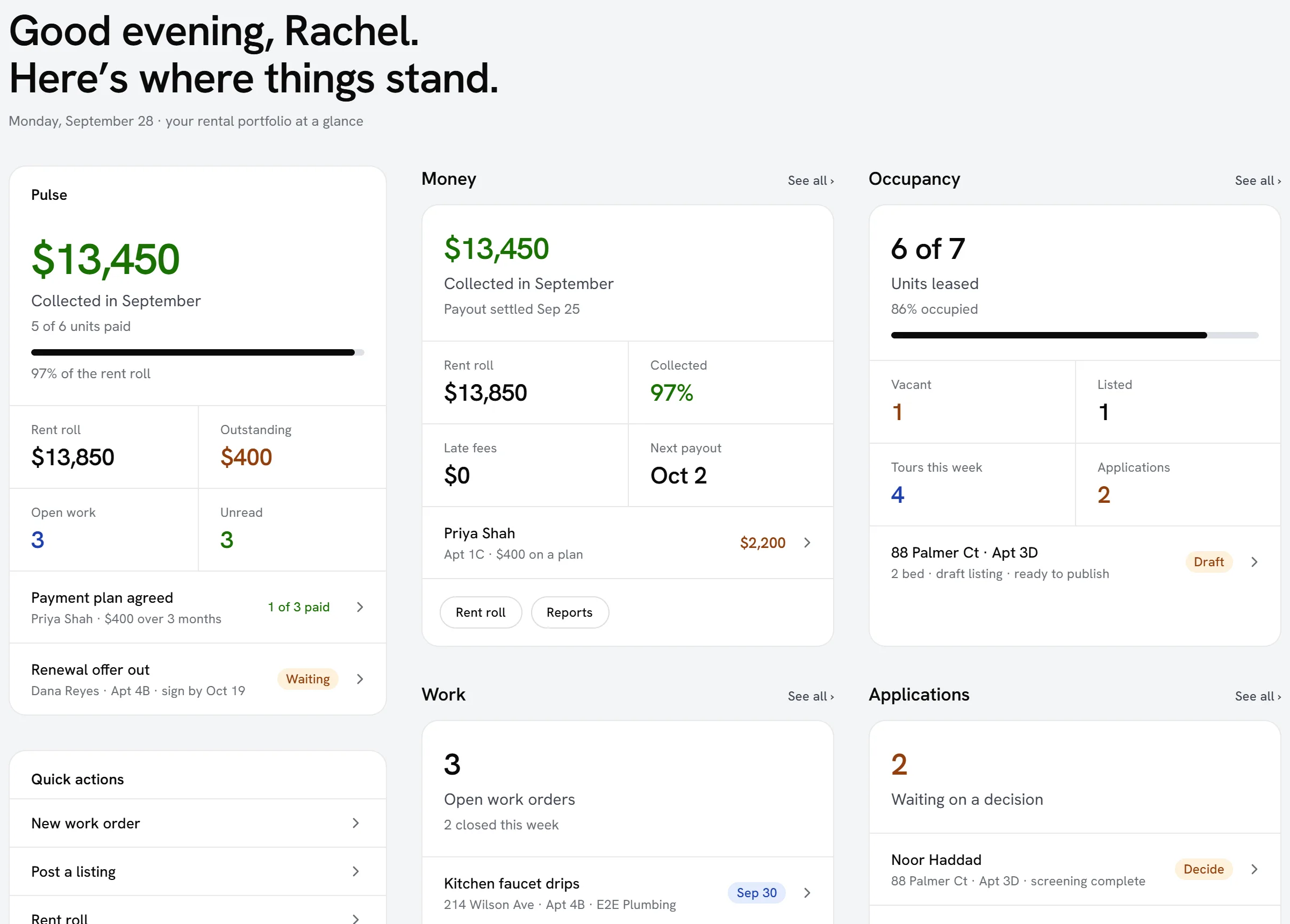
Managing five properties is different from managing fifty. Portfolio analytics let you see performance across every property at once instead of clicking into each one.
What you can see
- Occupancy and vacancy across the portfolio.
- Rent roll and collection status by property.
- Open maintenance requests and average resolution time.
- Lease expirations coming up across every unit.
Spotting problems early
A single late payment is normal; a property with rising delinquency month over month is a trend worth investigating before it becomes a bigger problem.
Reporting to owners
Filter any view down to a single owner’s properties to produce the kind of regular report owners expect from a management company, without manually compiling it each time.
Frequently asked questions
Can I export a portfolio report for an owner meeting?
Yes — most portfolio views can be filtered and exported, so you can bring a clean, current report to a meeting instead of assembling one from scratch.
How current is the data on portfolio analytics?
It reflects live data from your properties, leases, and maintenance records — there’s no separate manual refresh step needed.
Can I compare occupancy across two different time periods?
Yes — most portfolio views support period-over-period comparison so you can see whether occupancy or collection performance is improving or slipping.
Related guides
Related features and guides
- Portfolio Analytics & Dashboards — Feature. Customizable dashboards and portfolio reporting covering occupancy, vacancy, financial performance, and team metrics across every property you manage.
- Owner Portals & Reporting — Feature. Owner portals and multi-property accounting let property owners see performance and financials for their assets without a monthly email from you.
- Multi-Property Portfolio Management — Feature. Unlimited multi-property portfolios with unit-level detail, bulk operations, and portfolio-wide reporting — built for management companies operating at scale.
- Who Owns a Property: the Owner Lookup — Documentation. Look up who owns a property from public records — the deed, the tax roll and the landlord registration — free and with no account, check your portfolio against the owner on file, and ask Seayora not to show an owner.
- Find a Property Manager: Asking for One, and Receiving Owner Leads — Documentation. Owners: ask to be put in touch with management companies that serve your area, for free. Management companies: receive owners who asked, accept the ones you want, and only then see who they are.
- Classes, Locations & Multi-Dimensional Reporting — Documentation. How to tag transactions with classes and locations so you can report on performance by division, trade, or site — not just company-wide.