The Service Pro Dashboard
How service professionals manage jobs, finances, and operations from a single dashboard.
The service-pro dashboard brings your incoming work, schedule, invoicing, and finances into one view.
What you manage here
- Incoming and scheduled jobs.
- Estimates, invoices, and getting paid.
- Operations, quality, and your finances.
- Your full accounting suite and AI finance tools.
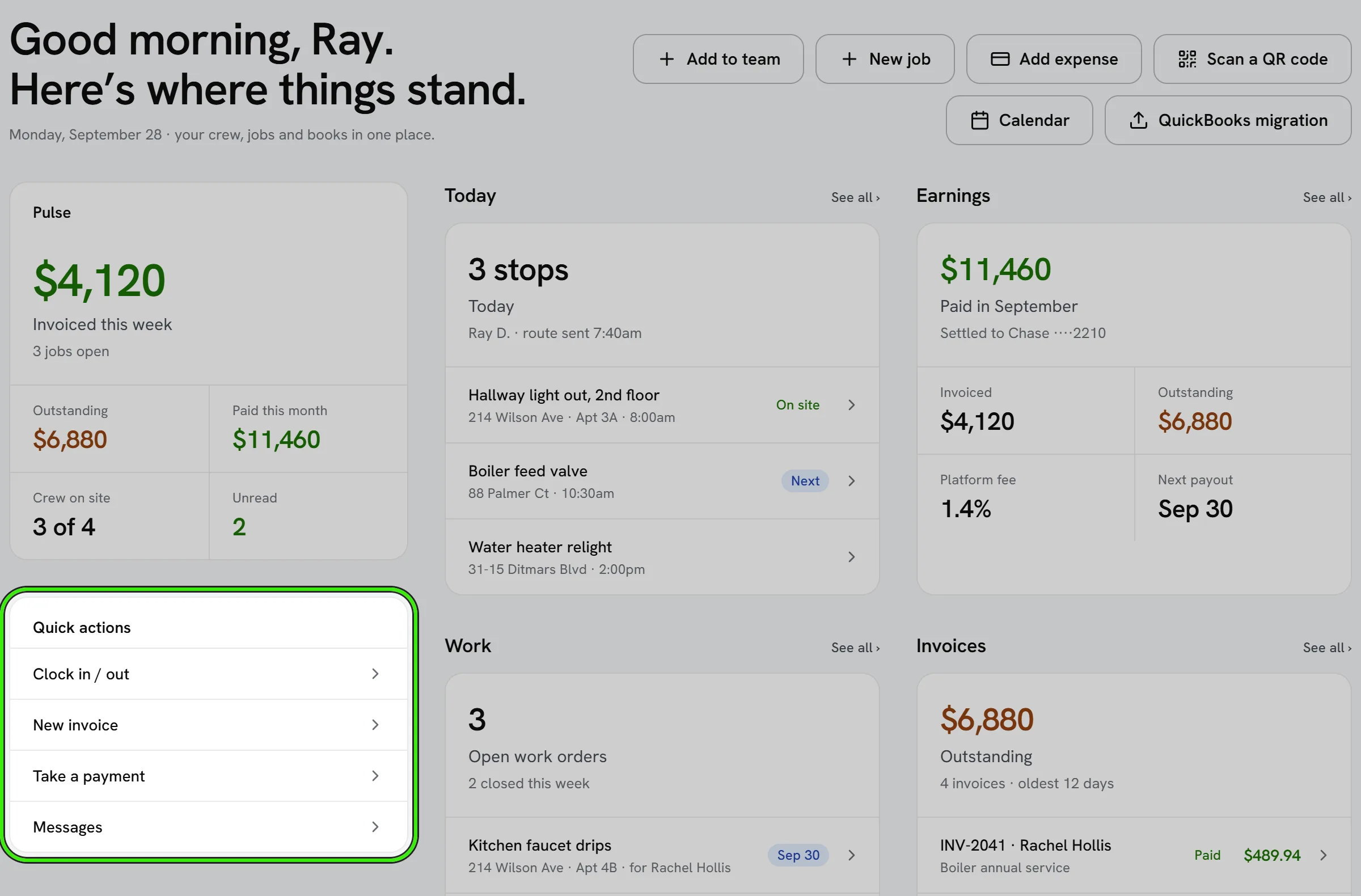
Because jobs, invoices, and books share one record, work flows straight into your accounting and job-costing reports.
Customizing your view
Like the general dashboard, the service-pro dashboard is customizable — rearrange widgets so today’s jobs, cash position, or overdue invoices are wherever you check first.
Running more than one business
If you operate multiple businesses or brands, switch between them without separate logins — each keeps its own jobs, invoices, and books, while your account stays the same.
Frequently asked questions
Do I need to be part of the contractor network to use the dashboard?
No — the dashboard and its tools work for your own direct customers whether or not you also take dispatched jobs from the contractor network.
Can office staff use the dashboard without seeing financials?
Yes, if you configure roles and permissions to limit financial visibility while still allowing access to jobs and scheduling.
Can I see cash position alongside job status on one screen?
Yes — that’s exactly the kind of mixed operational-and-financial view the dashboard is designed for, so you’re not switching between separate apps to get the full picture.
Related guides
- Dispatch & Work Orders
- Invoices, Estimates & Statements
- Accounting Suite Overview
- Customizing Your Dashboard
Related features and guides
- Dispatch & Work Orders — Documentation. How jobs are routed to service pros, how work orders track status, and how approval limits keep spending in check.
- Invoices, Estimates & Statements — Documentation. How to create, brand, and send invoices, estimates, and statements — with a price book, good / better / best options and acceptance on the spot — turn estimates into invoices, and get paid online.
- Accounting Suite Overview — Documentation. A tour of Seayora’s accounting and bookkeeping tools — invoicing, bills, ledger, bank feeds, reports, automations, and the AI analyst.
- Vendor & Subcontractor Management — Feature. Manage subcontractors and vendors, track their compliance, and keep customer and vendor portals connected to the jobs they are working on.
- Portfolio Analytics & Dashboards — Feature. Customizable dashboards and portfolio reporting covering occupancy, vacancy, financial performance, and team metrics across every property you manage.
- Contractor Job Board & Assignment — Feature. A live job board showing every open, assigned, and completed job. Create jobs, assign technicians, and move work through status without a group chat.