Calendar & Scheduling
One calendar over everything Seayora already knows is happening — what it draws, what you can add to it, how reminders and repeats work, and how to read it in the calendar app you already use.
Almost everything on this calendar is already in Seayora — a lease ending, rent falling due, a tour somebody booked, a work order scheduled, an inspection, a compliance deadline. The calendar is one place to read all of it, plus whatever you add yourself.
What it draws, and where each thing comes from
Fourteen sources feed the calendar, and each one can be switched off on its own in Calendar → Preferences. Turning one off changes what YOU see; it never changes the underlying record.
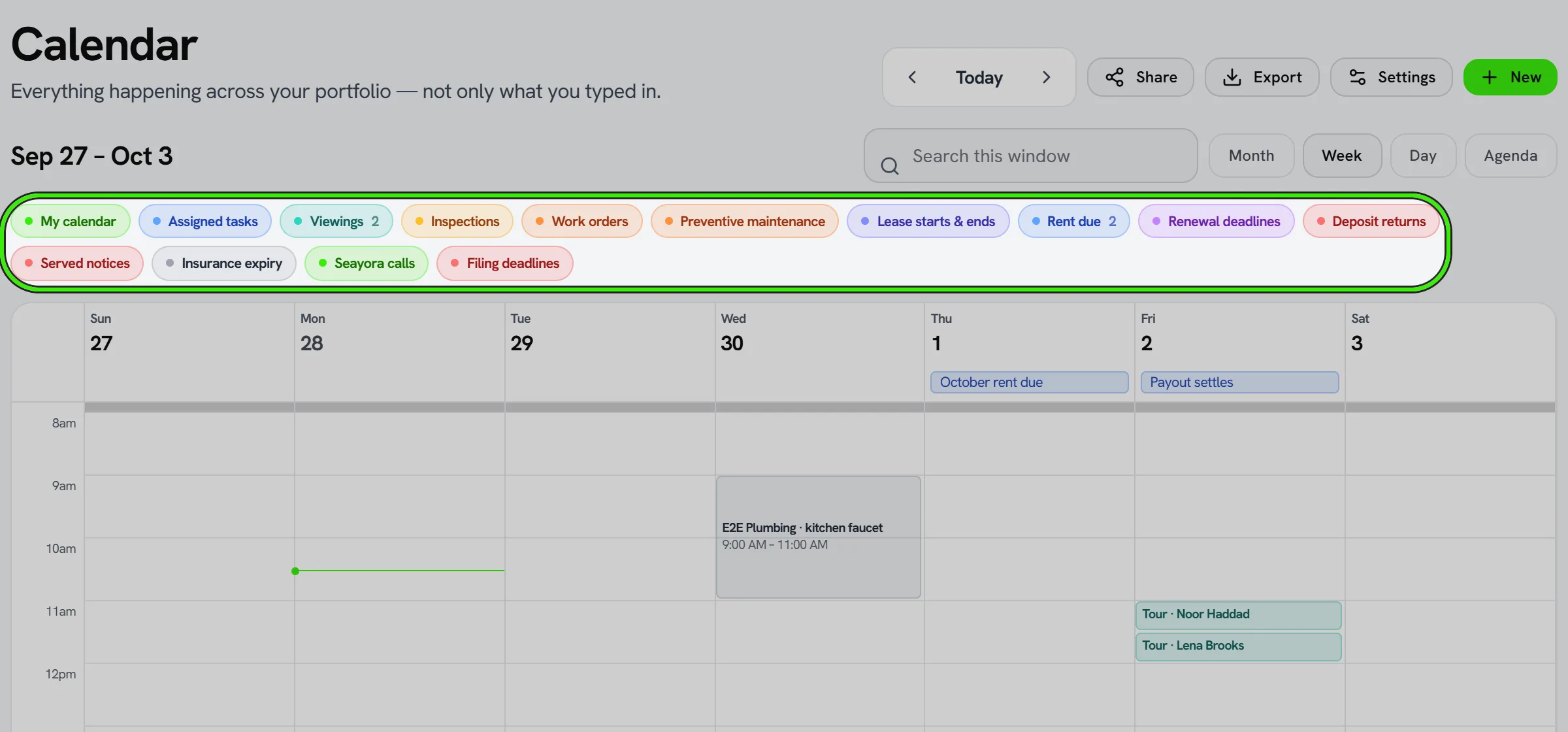
- Your own events — the ones you create here.
- Tasks with a due date.
- Tours and showings somebody booked.
- Work orders and maintenance visits with a scheduled date.
- Inspections — move-in, move-out, periodic.
- Leases starting and ending.
- Rent due dates, and rent that has gone unpaid.
- Renewal decision deadlines and the last day to serve notice.
- Deposit return deadlines.
- Insurance policies expiring.
- Compliance and housing-program filing dates.
- Amenity reservations.
- Calls booked with Seayora.
- Team time off.
If a source cannot be read — a slow query, a service having a bad minute — the calendar says so by name. It never draws an empty day and lets you conclude nothing is happening.
Adding something yourself
An event has a type (an appointment, a viewing, a reminder, a deadline, a visit, time off, and so on), a title, a time or a whole day, an optional place, and an optional link to a property or a lease. Anything you create is yours; the calendar draws it alongside everything the rest of Seayora already knew about.

Repeating events
An event can repeat daily, weekly, monthly or yearly, with an end date or a number of occurrences. Editing one is three different decisions and Seayora asks which you mean: this occurrence only, this one and everything after it, or the whole series.
A monthly event set for the 31st is SKIPPED in a month that has no 31st, not moved to the 30th. Moving it would silently change the day you chose, and a rent reminder that quietly slides is worse than one that visibly does not fire.
Reminders
Every event can carry up to two reminders — say a day before and an hour before. They are sent once each, and they are sent from the server, so they arrive whether or not anybody has the app open. An event you create with no reminder gets none; there is no silent default.
Times and time zones
Every event carries the time zone it was created in and is stored as a real instant, so a 9am visit in New York is 9am in New York whoever opens it and wherever they are. Whole-day events have no time at all and do not shift across a date line.
Sharing your calendar
You can share your calendar with a teammate at one of three levels, and the difference matters: busy shows only that you are occupied, with no titles and no details; view shows the events; edit lets them change them. Sharing is per person and can be withdrawn at any time.
Reading it in Apple Calendar, Google Calendar or Outlook
Calendar → Preferences can mint a subscription link. Paste it into any calendar app and Seayora’s events appear alongside your own, refreshing on that app’s own schedule.
A subscription link is a credential: anybody who has it can read that calendar without signing in. Seayora stores only a fingerprint of the link, so it can be revoked but never shown again — mint a new one and the old one stops working immediately.
Conflicts, and finding a time
When you set a time, Seayora tells you what it overlaps. If a source could not be checked it says which one rather than reporting a clear diary it did not actually read. “Find me a time” proposes open slots inside your working hours, and proposing one changes nothing until you pick it.
Downloading a single event
Any event can be downloaded as a calendar file and opened in whatever you already use. Rescheduling one you have already added updates the existing entry rather than adding a second copy of it.
Frequently asked questions
Do I have to add rent dates and lease ends myself?
No. They are already in Seayora and the calendar reads them. The only things you add by hand are the ones Seayora could not know about.
I turned off a source and the events vanished. Did I delete anything?
No. A source switch changes what your calendar draws. The leases, work orders and deadlines behind it are untouched, and switching it back on brings them straight back.
Can I share my calendar with somebody outside my company?
Sharing is between Seayora accounts. For anybody else, a subscription link is the way — but treat it as a password, because anybody holding it can read that calendar.
Why did my monthly reminder skip February?
Because you set it for a day that month does not have. Seayora skips rather than moving it, so the day you chose is the day it fires — every time it fires.
Does a reminder reach my phone if the app is closed?
Yes. Reminders are sent by the server, not by the app.
Can two people edit the same event?
Only if you shared it at the edit level. Busy and view are read-only, and busy does not even show the title.
Related guides
- Dispatch & Work Orders
- Booking Tours & Showings
- Lease Renewals & Amendments
- Workforce & Task Management
Related features and guides
- Dispatch & Work Orders — Documentation. How jobs are routed to service pros, how work orders track status, and how approval limits keep spending in check.
- Booking Tours & Showings — Documentation. How prospective renters book a tour from your listing, what you control (hours, slot length, in-person, self-guided or video), and what the visitor receives.
- Lease Renewals & Amendments — Documentation. Renewing an expiring lease, the last day you can lawfully serve notice, what the local market is asking, and what a served notice freezes.
- Calendar & Scheduling — Feature. Schedule showings, inspections, site visits, and maintenance jobs on a shared calendar so field work and leasing activity stop colliding.
- Technician Scheduling, Shifts & Skills — Feature. Shift scheduling, PTO tracking, and per-technician skill profiles, so dispatch routes work to someone qualified and on the clock.
- Reducing Late Rent with Autopay and Automated Reminders — Guide. How autopay, scheduled reminders, and clear late-fee policies work together to cut down on late and missed rent payments.